Which cloud flow configurations fix retry and timeout failures?
Short answer
For intermittent failures from temporary service issues, select enable a retry policy. For action failures caused by execution time limits, select increase the timeout setting.
Question
HOTSPOT
A company uses a cloud flow to synchronize systems.
The company reports the following cloud flow issues:
• Intermittent failures caused by temporary service issues
• Action failures caused by execution time limits
You need to troubleshoot the cloud flows.
Which configurations should you use? To answer, select the appropriate options in the answer area.
NOTE: Each correct selection is worth one point.
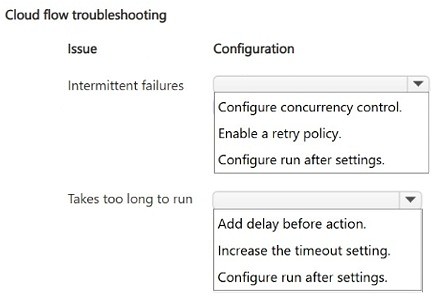
Key Takeaways
The item tests whether you can map each reported failure symptom to its matching flow configuration — retry policy for temporary service issues and an increased timeout for execution-limit failures, rather than swapping the two.
This AB-410 hotspot asks how to troubleshoot two distinct cloud flow failure patterns in Power Automate: intermittent failures caused by temporary downstream service issues, and action failures caused by execution time limits. The correct configuration pairs enabling a retry policy for transient errors with increasing the timeout setting for actions that exceed their run-time allowance.
Common mistake: The most common error is reversing the fixes: learners set a retry policy expecting it to solve timeout-based action failures, or increase the timeout hoping it will mask transient connectivity blips. Retries address short-lived service unavailability, while the timeout setting addresses how long a single action call is allowed to run before it is terminated.
Expert Analysis
Why the Answer Is Correct
For intermittent failures caused by temporary service issues, the correct configuration is to enable a retry policy on the affected connector action, because Power Automate's built-in retry (default of four retries with exponential interval) automatically re-attempts a request that fails due to transient service conditions. For action failures caused by execution time limits, the correct configuration is to increase the timeout setting on the action, since the timeout controls how long Power Automate waits for the called service to respond before the run is aborted. The two symptoms map one-to-one to two separate action-level settings, which is exactly what a hotspot item is designed to test.Why Other Candidate Answers Are Wrong
Any pairing that applies a retry policy to the execution-time-limit problem misdiagnoses the cause: retrying a call that legitimately runs too long will simply repeat the same timeout, consuming retries and prolonging the failure. Likewise, increasing the timeout does not repair a flow that fails intermittently because a service briefly returns errors; the request has already failed and a longer wait window does not re-send it. Concurrency and trigger-configuration settings are irrelevant here because the reported issues concern individual action behavior, not parallel-run contention or firing logic.Community Comment Notes
The single community response independently reaches the same conclusion, stating "1. Enable a retry policy 2. Increase the timeout setting," which aligns symptom-to-setting exactly as the platform documentation describes. Because the vote pool is thin — only one posted answer and no votes recorded — this page's verdict rests on Power Automate's error-handling model rather than on community consensus. Treat the comment as corroboration, not as evidence.Official Reference
Exam Strategy
When a hotspot presents a list of symptoms, match each one to the narrowest setting that governs it: transient service errors point to retry policy, and run-time limits point to timeout. Read each answer-area row independently rather than looking for a single global setting that fixes both.
Frequently Asked Questions
Why does a retry policy fix intermittent cloud flow failures in Power Automate?
A retry policy automatically re-attempts a failed connector action after a delay, so brief downstream service outages recover without manual intervention instead of failing the whole run.
Does increasing the timeout setting help with temporary service errors?
No. Increasing the timeout only extends how long Power Automate waits for one response; it does not re-send a request that already failed, so retries are required for transient errors.
Discussion 1 contributions
Compiled from public community threads and reader submissions, lightly edited for clarity. Handles and vote tallies are shown as recorded.
From public community threads 1
-
exam_upskill 👍 11. Enable a retry policy 2. Increase the timeout setting
Reader comments & corrections
No reader corrections yet — spotted an error or have a note? Share it below.