Which business rule components fit each form requirement?
Short answer
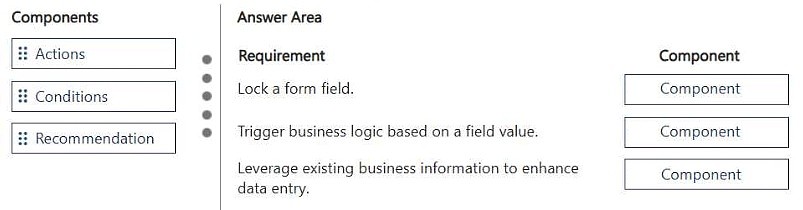
Lock a field on a form: Lock/Unlock (Action). Trigger business logic based on a field value: Condition. Use existing business information to enhance data entry: Recommendation.
Question
DRAG DROP
You must create a form for team members to use. The form must provide the ability to:
• Lock a field on a form.
• Trigger business logic based on a field value.
• Use existing business information to enhance data entry.
You need to implement business rule components to create the form.
Which components should you use? To answer, move the appropriate components to the correct requirements. Each component may be used once, more than once, or not at all. You may need to move the split bar between panes or scroll to view content.
NOTE: Each correct selection is worth one point.
Key Takeaways
You must map each form requirement to the correct business rule component, and the trap is placing Condition where an Action such as Lock/Unlock belongs, since Condition is the trigger of a rule while Lock/Unlock is the action it executes.
This AB-410 drag-and-drop item tests the three business rule components available in the Power Apps visual business rule designer for model-driven forms: Lock/Unlock, Condition, and Recommendation. The correct matching is Lock a field to Lock/Unlock, trigger business logic on a field value to Condition, and enhance data entry with existing business information to Recommendation.
Common mistake: The most common wrong approach is treating Condition as the component that locks a field. Condition only evaluates a field value and branches the rule; the actual field-locking behavior comes from the Lock/Unlock action, which lives under the Actions group in the designer.
Expert Analysis
Why the Answer Is Correct
Locking a field on a form is done with the Lock/Unlock action, one of the Actions available in the business rule visual designer, which sets a column to read-only when the rule's conditions are met. Triggering business logic based on a field value is exactly what a Condition component does: it evaluates a column (for example Status equals Escalated) and activates the rule's actions. Using existing business information to enhance data entry is the purpose of a Recommendation, which analyzes column values and suggests the next best actions with supporting reasons to the user.Why Other Candidate Answers Are Wrong
Swapping Condition and Lock/Unlock fails because Condition cannot directly lock a field — it is only the trigger that gates actions such as Lock/Unlock, Set Business Required, Set Visibility, and Show Error Message. Recommendation cannot lock fields or act as a generic condition; it is scoped to advisory guidance surfaced in the form. Lock/Unlock likewise cannot fulfill the recommendation requirement, since it only controls read-only state, and no action component besides Condition evaluates a field value to branch logic.Community Comment Notes
A learner posted the sequence "1. Action 2. Conditions 3. Recommendation," which aligns with the standard designer wording: Lock/Unlock is an Action, the field-value trigger is a Condition, and the data-entry enhancer is a Recommendation. Because the item is anonymous and votes are unavailable, the mapping above was verified against Microsoft's business rule documentation rather than relying on that single comment.Official Reference
Exam Strategy
Remember the designer's three building blocks — Condition (the trigger), Actions (Lock/Unlock, Set Business Required, Set Visibility, Set Default Value, Show Error Message), and Recommendation — and match requirement wording to them. Words like "lock," "hide," or "require" point to Actions; "based on a field value" points to Condition; "suggest" or "enhance data entry" points to Recommendation.
Frequently Asked Questions
What business rule component locks a field on a model-driven form?
The Lock/Unlock action, available in the Actions group of the business rule visual designer, makes a column read-only when the rule's conditions are satisfied.
Which business rule component enhances data entry with existing business information?
A Recommendation analyzes column values and suggests next best actions with supporting reasons to help users complete the form accurately.
Discussion 1 contributions
Compiled from public community threads and reader submissions, lightly edited for clarity. Handles and vote tallies are shown as recorded.
From public community threads 1
-
exam_upskill 👍 11. Action 2. Conditions 3. Recommendation
Reader comments & corrections
No reader corrections yet — spotted an error or have a note? Share it below.