Which actions send qualification results email in Power Automate?
Short answer
Use the Dataverse List rows action with Table name set to Qualification, filtered to the service request's related rows, loop to build Valid/Not Valid, then send with Outlook Send an email (V2).
Question
HOTSPOT
This is a case study. Case studies are not timed separately from other exam sections. You can use as much exam time as you would like to complete each case study. However, there might be additional case studies or other exam sections. Manage your time to ensure that you can complete all the exam sections in the time provided. Pay attention to the Exam Progress at the top of the screen so you have sufficient time to complete any exam sections that follow this case study.
To answer the case study questions, you will need to reference information that is provided in the case. Case studies and associated questions might contain exhibits or other resources that provide more information about the scenario described in the case. Information provided in an individual question does not apply to the other questions in the case study.
A Review Screen will appear at the end of this case study. From the Review Screen, you can review and change your answers before you move to the next exam section. After you leave this case study, you will NOT be able to return to it.
To start the case study
To display the first question in this case study, select the “Next” button. To the left of the question, a menu provides links to information such as business requirements, the existing environment, and problem statements. Please read through all this information before answering any questions. When you are ready to answer a question, select the “Question” button to return to the question.
Background
ADatum Corporation provides verification and investigation services that are used by insurance companies, law firms, and other organizations in the public sector. Services include verifying an individual’s background, qualifications, and specific scenarios that require onsite visits.
The thorough work ADatum Corporation performs results in highly accurate cases with minimal critical information missing. Because of these high-quality results, ADatum Corporation is quickly proving itself as one of the best in the industry. In recent months, business has significantly increased, with most new business coming from high-profile companies and individuals.
Management has decided to create a new qualification verification (QV) role to help ensure that clients get the most accurate results. This role examines completed work to ensure that nothing is missed.
Current environment
Data storage and retention
• All information sent by clients for services is stored in Microsoft Dataverse with a model-driven app as the interface.
• Clients enter their data in a website, which then uses a service account to create the records in the Dataverse database.
• Team members currently have full access to all Service Request records.
Service requests
• The Service Request table includes header information about the individual or organization that is the subject of verification.
• New Service Request records are assigned to a queue. All potential users who will be performing the verifications have access to these records.
• A service request is assigned to a single user who will ensure that all qualifications are verified. This single user is the only one able to process Qualification records related to their own service requests.
• Many required tasks when performing verification services are currently done by using manual processes.
• To keep up with demand, ADatum Corporation identifies several processes that can be replaced by using Power flows to hire fewer new staff and keep costs down.
Qualification verification
• The qualification table contains details about an individual school degree, professional qualifications, and other qualifications that must be verified.
• A service request can have one or more Qualification records associated with it.
• Record status is pending verification until the initial team member finishes, at which point the member changes the status to Complete.
• When all qualification records related to a service request are verified either by manual or automated processes, the results are made available to ADatum Corporation’s client.
• In the rare event that results are questioned, a new service request is created and verified independently of the previous work that took place.
• To complete a service request, users perform the following actions:
o Send a templated email by using Microsoft Outlook to the client after all qualifications for a service request are checked.
o Change the service request status to Completed. Currently, service requests do not indicate when all Qualification records are addressed.
Microsoft Power Platform environment
• The following environments exist: development, testing, user acceptance testing (UAT), and production.
• Managed solutions are used to move customizations from the development environment to other higher-level environments. These solutions are created and maintained by the power users and provided to internal IT for deployment when they are ready.
• Two managed solutions, Verification Process Automation and Onsite Visit, share several components.
• All customizations to Power Platform components are performed by several power users who have received training and are certified as subject matter experts.
• Power users have been granted the System Administrator security role in the development environment.
• Corporate policy prohibits power users from writing code due to lack of a formal code review process.
• Internal IT will not be able to supply any development resources for this project due to a lack of staff. This means that any customizations and automation created for this project must be low-code/no-code for the power users to implement them.
• Customizations created by power users are deployed by internal IT.
Requirements
Process automation
ADatum Corporation plans to establish a new QV department to verify completed work so that the quality of work is maintained. The new process for verifying professional qualifications must automate the following:
• Enter data and navigate the authority’s website. The authority website UI changes frequently because the company constantly improves the user experience.
• Search page contents for a specified value to determine validity.
• Update the corresponding Qualification record in Dataverse.
The new process for completing a service request must automate the following:
• Set the Service Request record status to Complete when work on all Qualification records is finished.
• Send an email to the client with the results when the service request is completed. The email must list each qualification as either Valid or Not Valid, depending on the verification.
Qualification verification
• Service request results will not be released to clients until all related Qualification records are set to a Complete status.
• To check work done by a wide array of users, 10 percent of Qualification records must be double checked.
• Qualification records must be automatically assigned to a queue.
• Qualification records must be flagged with a new status field named Assigned to ensure that records are rechecked.
• Ensure that only QV team members can change the status from Assigned to In Progress to Complete.
• Record the name of the QV team member who performed the work and the date completed.
Governance and security
• All components required for the verification process must be included in a new solution.
• Corporate security requires that deployments to non-development environments must be automated using service accounts.
• User security and data access must also be consistent across environments, except for the elevated access of the power users in the development environment.
• The Onsite Visit managed solution has a table that is not in the Verification Process Automation managed solution. This table must be upgraded prior to the go-live date without the other shared components.
• A VP of sales requires a test environment to demonstrate to potential clients the security policies that are included in their initial offering.
Issues
• More employees than are required can access individual client information and continue to have access after a service request is completed.
• When users go on vacation, all their outstanding Service Request records are assigned to a substitute employee. The substitute employees are unable to see all the qualifications related to their service requests.
• Currently, testing the new QV functionality outside the development environment is not possible due to corporate security policies requiring the same security role across all environments.
• Internal IT reports that the solution import to the test environment failed because of missing dependencies related to the flow for completing service requests.
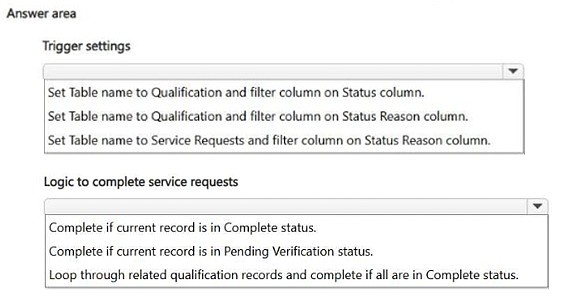
You need to configure a Power Automate flow to send the email with the results to the client.
What should you use? To answer, select the appropriate options in the answer area.
NOTE: Each correct selection is worth one point.
Key Takeaways
It tests whether you retrieve ALL related Qualification records (Dataverse List rows filtered to the Service Request) before composing the email; the trap is sending from a single row or a static template so most qualifications never appear.
This AB-410 case-study hotspot asks how to build the Power Automate step that emails ADatum's client a results summary listing every Qualification as Valid or Not Valid. The page establishes that you must retrieve the related Qualification rows from Dataverse and then send the message with the Outlook email action.
Common mistake: Learners pick a single-row retrieval such as Get row by ID on the Service Request, or paste a fixed templated body, because the case mentions Outlook templates — this omits the per-qualification Valid/Not Valid detail the requirement demands.
Expert Analysis
Why the Answer Is Correct
The requirement states the email must list each qualification as either Valid or Not Valid, so the flow first has to enumerate the child records: the Dataverse List rows action pointed at the Qualification table, filtered to the rows related to the current Service Request (the community note echoes this: "Set Table name to Qualification and filter column on Status column"). Inside a Apply-to-each loop the results are appended as Valid or Not Valid, and the Outlook Send an email (V2) action delivers that composed body to the client contact on the Service Request. This sequence satisfies both stated automation goals — status change and per-qualification reporting — while staying low-code/no-code, which corporate policy requires of ADatum's power users.Why Other Candidate Answers Are Wrong
Choosing Get row by ID on Service Request returns header data only and yields no Qualification detail, so the message could never list each qualification. Selecting a single Qualification action or an email action that sends a fixed Outlook template omits the loop, meaning only one row (or none) would be reported. Using the Dataverse Create/Update row action for the email step confuses record manipulation with messaging; the email must be produced by an Outlook connector action, and the table enumeration must come before it. Relying on a manual Outlook send contradicts the case, which explicitly says the templated email must be automated by the flow.Community Comment Notes
One commenter, exam_upskill, describes the pattern as "Set Table name to Qualification and filter column on Status column" and then looping "through related qualification records and complete if all are in Complete status." That matches the retrieval half of the answer, but the same comment stops short of naming the Outlook send action, so treat it as partial guidance. Another useful cue in the thread is the reminder that all related qualification rows must be checked before results are released, which is exactly why a list/loop is required rather than a single-row lookup.Official Reference
Exam Strategy
For hotspot items, anchor on the concrete requirement sentence in the case ("must list each qualification as either Valid or Not Valid") and pick the actions that satisfy it literally: enumerate the child rows, then send mail. On AB-410 case studies, always re-read the exhibit's dropdown labels before committing, and remember you can revisit answers from the Review Screen.
Frequently Asked Questions
Which Dataverse action retrieves the Qualification rows for the results email?
Use List rows on the Qualification table, filtered to the rows related to the current Service Request, so every qualification can be listed in the message.
Why can't the flow use the existing Outlook template for the results email?
The template must still be populated per qualification as Valid or Not Valid, so the flow has to loop over retrieved rows and compose the body before sending.
Discussion 1 contributions
Compiled from public community threads and reader submissions, lightly edited for clarity. Handles and vote tallies are shown as recorded.
From public community threads 1
-
exam_upskill 👍 11. Set Table name to Qualification and filter column on Status column 2. Loop through related qualification records and complete if all are in Complete status.
Reader comments & corrections
No reader corrections yet — spotted an error or have a note? Share it below.