Which actions configure prompt execution in a cloud flow?
Short answer
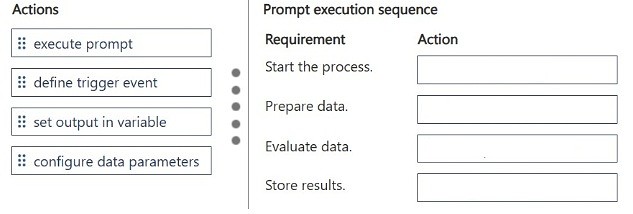
Order the actions as: Define trigger event, Configure data parameters, Execute prompt, Set output in variable. That sequence starts the flow, prepares the customer message data, runs the custom prompt, and stores the analysis results.
Question
DRAG DROP
A company builds a cloud flow that analyzes customer messages by using a custom prompt.
You must build the following functionality into the prompt:
• Start the workflow process.
• Prepare message data for the prompt.
• Evaluate the data by using the prompt.
• Store the analysis results.
You need to configure the prompt execution.
Which actions should you perform? To answer, move the appropriate actions to the correct requirements. You may use each action once, more than once, or not at all. You may need to move the split bar between panes or scroll to view content.
NOTE: Each correct selection is worth one point.
Key Takeaways
You are tested on the end-to-end lifecycle of prompt execution inside a cloud flow; the trap is starting with the prompt itself instead of first defining the trigger and preparing the message data as input parameters.
This AB-410 drag-and-drop item tests how a custom prompt is wired into a Power Platform cloud flow, from trigger through to storing results. The correct execution order is: define trigger event, configure data parameters, execute prompt, and set output in variable.
Common mistake: The most common error is dragging 'Execute prompt' into the first slot or placing 'Set output in variable' before the prompt runs. Because the prompt can only evaluate data that has already been prepared and passed to it, any action placed ahead of trigger definition and parameter configuration is out of order and scores zero for that row.
Expert Analysis
Why the Answer Is Correct
In a cloud flow that uses a custom prompt, execution always begins with an event, so 'Define trigger event' maps to "Start the workflow process." The next requirement, "Prepare message data for the prompt," corresponds to 'Configure data parameters,' where customer message content is surfaced as prompt inputs. The third requirement, "Evaluate the data by using the prompt," is satisfied by 'Execute prompt,' the action that invokes the AI Hub prompt against those parameters. Finally, "Store the analysis results" is done by 'Set output in variable,' which captures the prompt response so downstream actions can use it.Why Other Candidate Answers Are Wrong
No other plausible mapping exists because each requirement has a distinct, non-overlapping purpose: nothing evaluates data before the prompt executes, and nothing stores results until the prompt has returned output. Placing 'Execute prompt' before 'Configure data parameters' would mean the prompt has no customer message data to analyze, contradicting the stated requirement to prepare the data. Placing 'Set output in variable' earlier would capture an empty or undefined value, since no prompt run has produced a result yet.Community Comment Notes
Both community contributors converged on the same sequence. One listed it as "1. Define trigger event 2. Configure data parameters 3. Execute prompt 4. Set output in variable," and FabiolaRT independently posted the identical order, noting a minor typo in "set ouput in variable." This two-person consensus matches Microsoft's documented prompt-in-a-flow pattern, so it corroborates rather than contradicts the vendor body of knowledge.Official Reference
Exam Strategy
Treat drag-and-drop prompt items as a lifecycle sequence: trigger, inputs, execution, output. Map each bullet to the earliest stage it could possibly occur at, and remember that any 'execute' action always requires its parameters to exist beforehand.
Frequently Asked Questions
Why must Configure data parameters come before Execute prompt in a cloud flow?
Prompt inputs such as the customer message must be defined and passed to the prompt before it runs; otherwise the prompt has no data to evaluate and returns no meaningful analysis.
How are prompt results stored for later use in a Power Automate cloud flow?
Use 'Set output in variable' immediately after 'Execute prompt' so the prompt's response is captured in a flow variable that subsequent actions can reference.
Discussion 2 contributions
Compiled from public community threads and reader submissions, lightly edited for clarity. Handles and vote tallies are shown as recorded.
From public community threads 2
-
exam_upskill 👍 11. Define trigger event 2. Configure data parameters 3. Execute prompt 4. Set output in variable
-
FabiolaRT 👍 1-Define trigger event -Configure data parameters -Execute prompt -Set ouput in variable
Reader comments & corrections
No reader corrections yet — spotted an error or have a note? Share it below.