Using AI Prompts in Canvas Apps with Power Fx
Short answer
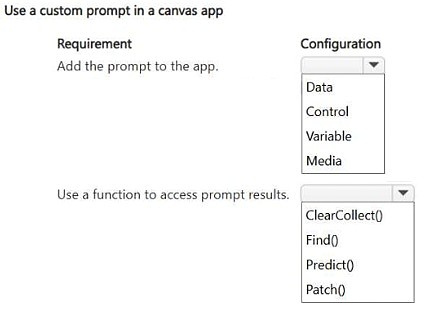
Add the Data connection to access the AI prompt, then use the Predict() function in Power Fx to retrieve and display the summary result.
Question
HOTSPOT
A company builds a canvas app that users use to enter customer feedback. The company plans to use a preexisting custom prompt to summarize the feedback within the app.
The company must be able to:
• Use the prompt in the app.
• Access the result of the prompt by using Power Fx.
You need to add the prompt to the app and retrieve the results.
Which configurations should you use? To answer, select the appropriate options in the answer area.
NOTE: Each correct selection is worth one point.
Key Takeaways
The question tests the integration of AI capabilities in canvas apps, specifically focusing on the Data source selection and the specific Power Fx function required to invoke the prompt.
This guide explains how to integrate preexisting custom prompts into Microsoft Power Apps canvas apps and retrieve their results using the Predict() function. It clarifies the correct configuration steps for accessing AI Hub models within a canvas app environment.
Common mistake: Learners often confuse the 'AI Builder' connector with standard data sources or attempt to use incorrect functions like 'Evaluate()' or 'Run()', failing to recognize that 'Predict()' is the dedicated function for prompt results.
Expert Analysis
Why the Answer Is Correct
To use a preexisting custom prompt in a canvas app, you must first add the Data connection (specifically the AI Builder service) to the app. This makes the prompt available as a callable resource. Once connected, you retrieve the result by using the Predict function in Power Fx, which executes the prompt against the provided input.Why Other Candidate Answers Are Wrong
Common incorrect selections include trying to use generic connectors like SharePoint or Dataverse directly without the AI layer, or attempting to use functions designed for other purposes like 'Refresh' or 'SubmitForm'. These do not execute the AI logic defined in the prompt.Community Comment Notes
As noted by user exam_upskill, the correct configuration involves selecting 'Data' as the source and utilizing the 'Predict' function. This aligns with official documentation stating that Predict is used to run a prompt model from a canvas app.Official Reference
Exam Strategy
Always verify the specific Power Fx function associated with the AI feature you are implementing. For prompts and AI Builder models in canvas apps, 'Predict()' is the key keyword to remember for execution.
Frequently Asked Questions
What function is used to execute an AI prompt in Power Apps?
The Predict() function is used to execute a prompt model and return its result within a canvas app.
How do I make a custom prompt available in my canvas app?
You must add the AI Builder data connection to your app so that the custom prompt appears in the list of available data sources.
Discussion 1 contributions
Compiled from public community threads and reader submissions, lightly edited for clarity. Handles and vote tallies are shown as recorded.
From public community threads 1
-
exam_upskill 👍 11. Data 2. Predict()
Reader comments & corrections
No reader corrections yet — spotted an error or have a note? Share it below.