Set Dataverse Account Category Default on Form Load
Short answer
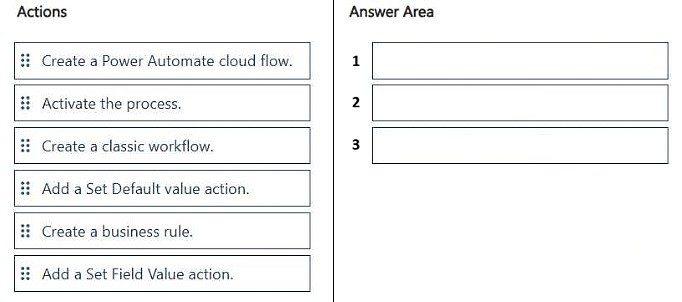
First create a business rule on the Accounts table, then add a Set Default value action that sets category to Standard, and finally activate the process.
Question
DRAG DROP
You are configuring the Accounts table in Microsoft Dataverse for a company.
When users create a new account, the category must automatically be set to Standard when the form loads.
You need to implement the configuration.
Which three actions should you perform in sequence? To answer, move the appropriate actions from the list of actions to the answer area and arrange them in the correct order.
Key Takeaways
This item tests whether you know the end-to-end business rule workflow in Dataverse—create, configure with Set Default value, then activate—and the trap is skipping activation, which leaves the rule dormant and the category blank.
To make the Accounts table's category default to Standard whenever a new account form loads in Microsoft Dataverse, you build a business rule and turn it on. The required sequence is: create the business rule, add a Set Default value action targeting the category column, then activate the process so it runs on the form.
Common mistake: The most common wrong approach is creating the rule and adding the Set Default value action but never activating the process, so the rule never fires on form load and the category stays empty. Learners also wrongly reach for a cloud flow when the requirement is a form-load default.
Expert Analysis
Why the Answer Is Correct
The stated sequence—create a business rule on the Accounts table, add a Set Default value action that assigns Standard to the category column, and then activate the process—matches how Dataverse business rules are authored: definition first, logic second, activation last. A business rule scoped to the form evaluates as the form loads and applies defaults to a new record, which is exactly the stated requirement. Activation is a mandatory final step; without it the rule remains in an inactive state and never executes. This ordering also mirrors the designer's flow, where the Set value element is added to the condition-less default branch before you save and activate. The logic is entity-scoped or form-scoped so it applies consistently whenever users create a new account.Why Other Candidate Answers Are Wrong
Any sequence that omits activation fails, because an inactive business rule does nothing on form load and the category will remain unset. Ordering the Set Default value action before the business rule exists is impossible in the designer—you cannot add an action to a rule that has not been created. Choosing a cloud flow or a Power Fx formula instead introduces latency and does not reliably run at form-load time for a default on a new record, so those approaches miss the in-form behavior being tested. Selecting only two of the three steps leaves the configuration incomplete even if the individual actions are correct.Community Comment Notes
A single community post laid out the answer directly as "1. Create a business rule 2. Add a Set Default value action 3. Activate the Process", which matches the correct ordering derived from the Dataverse business rule authoring model. Because only one comment was posted and it carries no vote-backed selection, it should be treated as a helpful confirmation rather than as authority; the sequence is validated by the official business rule workflow instead.Official Reference
Exam Strategy
When a drag-drop asks for a sequence ending in a behavior taking effect, look for the activation or publish step as the final action—Dataverse business rules, flows, and plug-ins all require it. Read each action for its verb (create, add, activate) and order them so nothing references something that does not exist yet.
Frequently Asked Questions
Why does the category not default to Standard even after I set the value in the business rule?
The rule is most likely still inactive. You must activate the process after adding the Set Default value action for it to run when the form loads.
Should I use a cloud flow to set the default category instead of a business rule?
No. A form-load default belongs in a business rule evaluated on the form; a cloud flow runs asynchronously and will not reliably set the value as the form opens.
Discussion 1 contributions
Compiled from public community threads and reader submissions, lightly edited for clarity. Handles and vote tallies are shown as recorded.
From public community threads 1
-
exam_upskill 👍 21. Create a business rule 2. Add a Set Default value action 3. Activate the Process
Reader comments & corrections
No reader corrections yet — spotted an error or have a note? Share it below.