Rollup vs Calculated Columns on the Invoice Table
Short answer
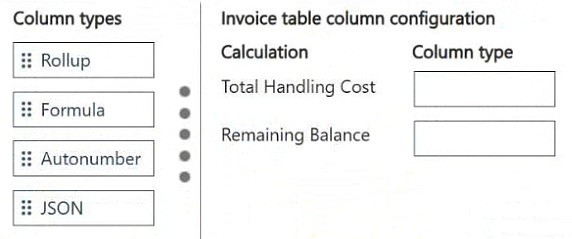
Total Handling Cost uses a Rollup column (SUM of Handling Cost on related invoice line records); Remaining Balance uses a Calculated/Formula column (Total Amount minus Payment Received on the same Invoice row).
Question
You are configuring the Invoice table in Dataverse for a billing application. Each invoice has multiple associated invoice line records.
You need to display columns with the following values:
• Total Handling Cost that is the sum of the Handling Cost column on all related invoice lines
• Remaining Balance that subtracts the Payment Received column from the Total Amount column
You need to implement the Total Handling Cost and Remaining Balance columns on the Invoice table.
Which column types should you use? To answer, move the appropriate column types to the correct calculations. You may use each column type once, more than once, or not at all. You may need to move the split bar between panes or scroll to view content.
NOTE: Each correct selection is worth one point.
Key Takeaways
It tests whether you can distinguish cross-table aggregation (rollup) from same-row arithmetic (calculated/formula column) in Dataverse.
This AB-410 drag-and-drop maps two Dataverse derived columns: Total Handling Cost is a rollup column summing Handling Cost across related invoice lines, while Remaining Balance is a calculated formula column subtracting Payment Received from Total Amount.
Common mistake: Assigning both values to calculated formula columns, or building a cloud flow for them, because both appear to be simple arithmetic — this fails since a calculated column cannot aggregate values across the Invoice-to-Invoice Line relationship.
Expert Analysis
The boundary being tested
Both requirements ask for a value stored on the Invoice table that is derived from other columns, so neither is a plain text, currency or choice column. The deciding factor is where the inputs live: whether they come only from columns on the same row, or from rows on the other side of a relationship.
Remaining Balance → calculated (formula) column
Remaining Balance = Total Amount − Payment Received. Both Total Amount and Payment Received are columns on the same Invoice record. A Dataverse calculated column, written in the column's formula expression, evaluates row-local arithmetic like this at save time. Nothing crosses a relationship, so a rollup is unnecessary and would not even accept this logic.
Total Handling Cost → rollup column
Total Handling Cost is the SUM of Handling Cost on all related invoice line records. The input values live on child rows in a one-to-many relationship, which is exactly the definition of a Dataverse rollup column: aggregate (SUM, COUNT, MIN, MAX, AVG) over a related table, refreshed by the system's asynchronous rollup job, optionally on a schedule. Learner notes on this question give the matching pairing — Total Handling Cost → Rollup, Remaining Balance → Formula — and that matches exam doctrine.
Common trap
Because both look like "computed" values, the temptation is to assign both to the formula/calculated type, or to reach for a business rule or cloud flow. Cross-table aggregation is the rollup's signature; same-row arithmetic is the calculated column's. Use a flow or business rule only when the calculation must trigger other side effects, which this scenario never asks for.
Exam Strategy
Read each derived value and ask where its inputs come from. If the formula references columns across a parent-child relationship (SUM/COUNT/MIN/MAX/AVG over related rows), choose Rollup; if every input is a column on the same record, choose the calculated/Formula column. On drag-and-drop items, match the keyword in the description — 'sum of all related' signals rollup, 'subtract one column from another' signals formula — and apply each type to only the calculation it can actually express.
Frequently Asked Questions
Why can't I use a calculated column for Total Handling Cost?
How does Remaining Balance stay updated in Dataverse?
When should I use a cloud flow instead of these column types?
Discussion 1 contributions
Compiled from public community threads and reader submissions, lightly edited for clarity. Handles and vote tallies are shown as recorded, and comments reflect the views of individual contributors.
From public community threads 1
-
ah2006 👍 1Total Handling Cost → Rollup Remaining Balance → Formula
Reader comments & corrections
No reader corrections yet — spotted an error or have a note? Share it below.