Role-Based Form Access and Default Forms in Model-Driven Apps
Short answer
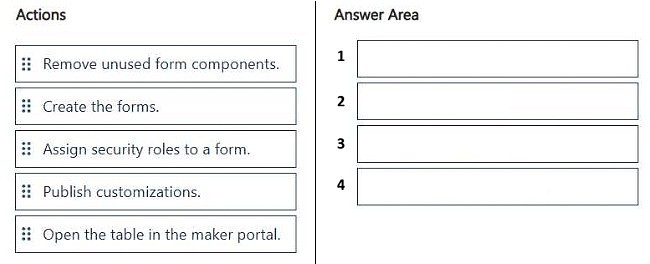
Open the table in the maker portal, create the required forms, assign security roles to each form and order them so the role's form is on top, then publish the customizations.
Question
DRAG DROP
You are creating multiple forms for a table in a model-driven app. The app will be used by different user roles.
The app must provide the following functionality:
• Ensure different roles have access to different forms.
• Ensure the correct form displays by default for each role.
You need to configure the forms.
Which four actions should you perform in sequence? To answer, move the appropriate actions from the list of actions to the answer area and arrange them in the correct order.
Key Takeaways
The exam tests the end-to-end configuration sequence for role-based form availability, and the trap is forgetting that publishing customizations is required for the role assignments and form order to take effect for app users.
In a model-driven app, multiple forms for one Dataverse table are controlled by form-level security roles and form order, so each user role sees only the forms available to it and the topmost available form becomes the default. The correct workflow is to open the table in the maker portal, create the forms, assign security roles (and set the order) for each form, and finally publish the customizations.
Common mistake: Learners commonly stop after assigning security roles to the forms, or they try to set the default form through app settings instead of realizing that the default form per role is determined by the form order within the roles the user has — and they skip publishing, so nothing changes at runtime.
Expert Analysis
Why the Answer Is Correct
Form-level access in model-driven apps is configured on the table itself, so the first step is to open the table in the maker portal (solutions > table > Forms). From there you create the individual forms, one per audience, because the forms must exist before their security can be scoped. Each form's "Assign security roles" (Manage roles) dialog restricts which Dataverse security roles can see that form, which satisfies the requirement that different roles have access to different forms. The default form for a role is then determined by the form order: the highest form in the order that the user's role has access to is what loads, so ordering the role's preferred form at the top makes it the default. Finally, publishing the customizations pushes the form metadata, role assignments, and order to the running app, which is why it must be last.Why Other Candidate Answers Are Wrong
Any sequence that publishes before assigning roles or ordering forms is wrong because publishing is a commit step — changes made afterwards would again require publishing, and users would see stale form configuration. Any sequence that starts in the app designer or tries to configure forms directly inside the app's page/form options is wrong because role-based form availability and form order are properties of the table's forms in Dataverse, not app-level settings. Omitting the creation step is impossible since the roles and order cannot be applied to forms that do not yet exist, and omitting the role-assignment step leaves every form visible to every user, breaking the segregation requirement. A sequence that ends with editing security roles in the Dataverse admin center instead of publishing the solution also fails to activate the form-level changes in the app.Community Comment Notes
A learner outlined a matching four-step flow: "1. Open the table in the maker portal 2. Create the forms 3. Assign security roles to a form 4. Publish customizations". That ordering matches the documented configuration path, since form security roles and form order are set on the table's forms and only become active after the customizations are published. The comment does not explicitly call out form order, but ordering is the mechanism that makes the correct form display by default for each role.Official Reference
Exam Strategy
For drag-and-drop ordering items, anchor the sequence on the Dataverse table as the configuration surface and always place publishing last, since unpublished changes never reach end users. Then check that any prerequisite step (creating the artifacts) precedes any step that configures them (assigning roles, setting order).
Frequently Asked Questions
How does a model-driven app decide which form to open by default for a user's role?
The app picks the highest form in the form order that the user's security role has access to. Roles with no access to higher forms fall back to the next available one.
Do security role assignments on forms take effect without publishing?
No. Form availability, form order, and role assignments are solution customizations, so you must publish the customizations before app users see the change.
Discussion 1 contributions
Compiled from public community threads and reader submissions, lightly edited for clarity. Handles and vote tallies are shown as recorded.
From public community threads 1
-
exam_upskill 👍 11. Open the table in the maker portal 2. Create the forms 3. Assign security roles to a form 4. Publish customizations
Reader comments & corrections
No reader corrections yet — spotted an error or have a note? Share it below.