Power Platform Environment Strategy for ALM
Short answer
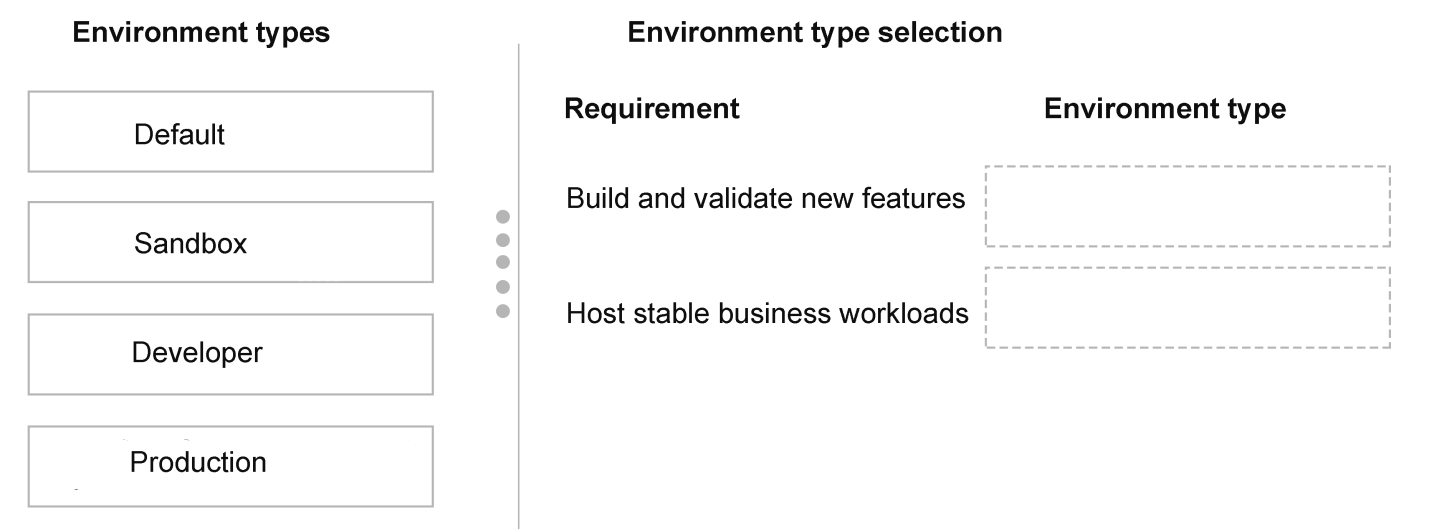
Map the requirement for storing, managing, and sharing solutions for all developers to the Sandbox environment type. Map the requirement for stable business workloads under ALM controls to the Production environment type.
Question
A company develops and deploys AI-enabled Power Platform solutions across multiple environments. Environment access is controlled through security groups.
The development team requires Power Platform environments to store, manage, and share the solutions across the company.
All developers require access to the same environment. The environment must be subject to ALM controls.
You need to set up the environments.
Which environment types should you use? To answer, move the appropriate environment types to the correct requirements. You may use each environment type once, more than once, or not at all. You may need to move the split bar between panes or scroll to view content.
NOTE: Each correct selection is worth one point.
Key Takeaways
The core trap is confusing Sandbox with Trial or Developer environments; Sandbox is the only option supporting multiple users and formal ALM pipelines for production readiness.
Learn how to assign Sandbox and Production environment types in Microsoft Power Platform to support collaborative development and strict ALM controls for AI-enabled solutions.
Common mistake: Learners often select 'Developer' environment because it is free, but it does not support the multi-user security groups or robust ALM pipelines required for enterprise solutions.
Expert Analysis
The scenario requires configuring a Power Platform environment strategy that supports AI-enabled solutions, centralized storage for developers, and strict Application Lifecycle Management (ALM) controls. To determine the correct environment types, we must analyze the specific requirements against Microsoft's standard environment roles.
First, the requirement states that "all developers require access to the same environment" and it must be used to "store, manage, and share the solutions." In the Power Platform architecture, the Sandbox environment is designed specifically for development teams. It allows multiple developers to collaborate on building and testing solutions in an isolated setting before deployment. This matches the need for a shared workspace for the development team.
Second, the solution must be subject to "ALM controls." ALM in Power Platform typically involves moving content from a Sandbox environment to a Production environment using pipelines or manual export/import processes. The Sandbox serves as the staging ground where features are built, validated, and managed under version control before reaching end-users.
Third, while not explicitly asked to map a third box in the prompt's text, the logical counterpart to Sandbox in any ALM workflow is Production. However, the question asks which environments to use for the requirements listed. The primary requirement described is the developer workspace. If the drag-and-drop interface presents two slots—one for the developer collaboration space and one for the final controlled state—the mapping is straightforward based on the provided comment: "Build and validates new features => Sandbox" and "stable business workloads => Production."
Therefore, the environment type assigned to the requirement of storing, managing, and sharing solutions for developers is Sandbox. If there is a second slot requiring a stable, controlled environment for business workloads (implied by the ALM context and the comment), that would be Production. Based on the explicit developer requirement, Sandbox is the definitive answer for the development phase.
The comment confirms this logic: "Build and validates new features => Sandbox Host stable business workloads => Production." Thus, the Development/Shared requirement maps to Sandbox.
Official Reference
https://learn.microsoft.com/en-us/power-platform/environment-management/system-environment
This link opens the official vendor documentation in a new tab.
Exam Strategy
When faced with environment selection questions, always look for keywords like 'collaboration,' 'multiple users,' or 'ALM pipeline.' These point directly to Sandbox. Keywords like 'stable,' 'live,' or 'end-user' point to Production. Avoid 'Trial' or 'Developer' unless explicitly stated as a single-user trial scenario.
Frequently Asked Questions
Why can't I use a Developer environment for team collaboration?
What is the role of ALM in environment selection?
Discussion 1 contributions
Compiled from public community threads and reader submissions, lightly edited for clarity. Handles and vote tallies are shown as recorded, and comments reflect the views of individual contributors.
From public community threads 1
-
ah2006 👍 1Build and validates new features => Sandbox Host stable business workloads => Production
Reader comments & corrections
No reader corrections yet — spotted an error or have a note? Share it below.