Power Platform AI Evaluation Components
Short answer
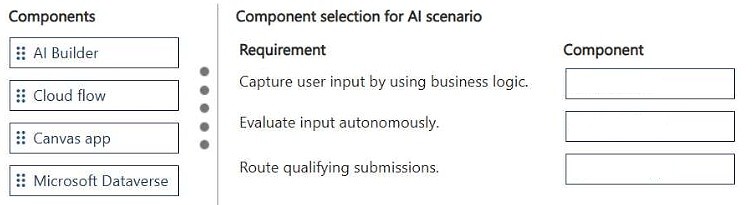
Capture user input: Canvas app; Autonomously evaluate input: AI Builder; Route only qualifying submissions: Cloud flow.
Question
DRAG DROP
A company plans to improve the efficiency and consistency of reviewing internal requests.
The company requires a solution that uses AI to evaluate submissions before they enter the approval process.
The solution must:
• Capture user input by using business logic.
• Autonomously evaluate input.
• Route only qualifying submissions.
You need to select the Power Platform components for the solution.
Which components should you use? To answer, move the appropriate components to the correct requirements. You may use each component once, more than once, or not at all. You may need to move the split bar between panes or scroll to view content.
NOTE: Each correct selection is worth one point.
Key Takeaways
The question tests the ability to map specific functional requirements (capture, evaluate, route) to the correct Power Platform services: Canvas Apps for UI, AI Builder for autonomous evaluation, and Cloud Flows for routing logic.
Learn which Power Platform components capture input, evaluate it autonomously using AI, and route submissions based on business logic.
Common mistake: Learners often confuse the roles of AI Builder and Cloud Flows, attempting to perform the 'autonomous evaluation' entirely within a Flow or misidentifying the input capture mechanism as a Model-Driven App instead of a Canvas App.
Expert Analysis
Why the Answer Is Correct
To satisfy the requirement of capturing user input, a Canvas app is the ideal component because it provides a flexible, custom interface for data entry. For the requirement to 'autonomously evaluate input,' AI Builder is the necessary service, as it provides pre-built and custom AI models that can analyze content without human intervention. Finally, to 'route only qualifying submissions,' a Cloud flow is required to implement the business logic that checks the AI results and directs the request accordingly.Why Other Candidate Answers Are Wrong
Model-Driven apps are less suitable here because they are generated from data models and offer less flexibility for custom input forms tailored to specific review workflows. Using only Cloud Flows for evaluation ignores the need for specialized AI processing capabilities provided by AI Builder. Attempting to do everything in one tool violates the modular architecture intended by Microsoft for these scenarios.Community Comment Notes
As exam_upskill noted, the combination is '1. Canvas app 2. AI Builder 3. Cloud flow'. This aligns with the standard pattern of Input -> AI Process -> Automation Logic.Exam Strategy
When mapping requirements to Power Platform components, always start with the 'Input' layer (App), move to the 'Processing' layer (AI/Logic), and end with the 'Action/Routing' layer (Flow). Identify keywords like 'autonomously evaluate' as strong indicators for AI Builder.
Frequently Asked Questions
Why use a Canvas app instead of a Model-Driven app?
Canvas apps allow for highly customizable user interfaces tailored specifically for capturing unique input fields, whereas Model-Driven apps follow a rigid structure based on the data model.
Can AI Builder run inside a Cloud flow?
Yes, AI Builder actions are available as triggers or steps within Cloud flows to process data, but the core 'autonomous evaluation' capability belongs to the AI Builder service itself.
Discussion 1 contributions
Compiled from public community threads and reader submissions, lightly edited for clarity. Handles and vote tallies are shown as recorded.
From public community threads 1
-
exam_upskill 👍 11. Canvas app 2. AI Builder 3. Cloud flow
Reader comments & corrections
No reader corrections yet — spotted an error or have a note? Share it below.