Power Platform AI Components for Model-Driven Apps
Short answer
For contextual assistance aware of the current record, use App Assistant Agent. For automatically executing business processes on triggers, use Agent Flow.
Question
DRAG DROP
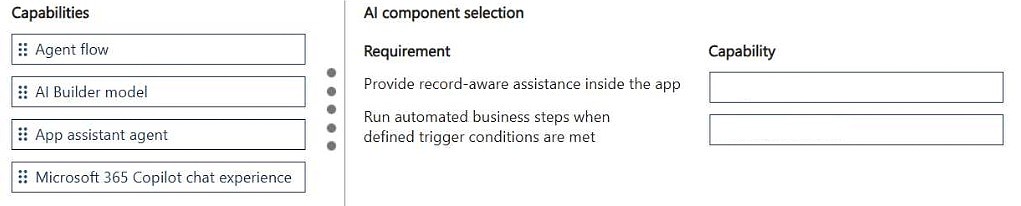
An organization wants to enhance a model-driven app with Copilot capabilities to improve user productivity, provide contextual guidance, and automate selected business processes.
The solution must meet the following requirements:
• Provide contextual assistance to users that is aware of the current record and page they are working with.
• Automatically execute business processes when predefined trigger conditions are met.
You need to select the appropriate AI component for each requirement.
Which component should you use for each requirement? To answer, move the appropriate capabilities to the correct requirements. You may use each capability once, more than once, or not at all. You may need to move the split bar between panes or scroll to view content.
NOTE: Each correct selection is worth one point.
Key Takeaways
The core trap is confusing App Assistant Agents (which provide contextual guidance) with Agent Flows (which execute backend logic). The correct mapping pairs contextual awareness with App Assistant Agents and trigger-based automation with Agent Flows.
This question tests the selection of appropriate AI components in Microsoft Power Platform to enhance model-driven apps with Copilot capabilities. It distinguishes between contextual user assistance and automated business process execution.
Common mistake: Learners often swap these components, assuming that because both are 'AI,' they can handle both tasks interchangeably. However, App Assistants are UI-centric for guidance, while Agent Flows are logic-centric for execution.
Expert Analysis
Why the Answer Is Correct
The requirement for contextual assistance aware of the current record and page is best met by an App Assistant Agent. This component leverages Copilot to provide real-time, context-aware help directly within the app interface. For the second requirement, automatically executing business processes when predefined triggers occur, the correct component is an Agent Flow. These flows run in the background and utilize AI to perform actions based on specific conditions or events, distinct from the user-facing guidance of an App Assistant.Why Other Candidate Answers Are Wrong
Other potential candidates like standard Power Automate flows or generic Chatbots do not offer the same level of integrated Copilot experience required here. Standard flows lack the native 'Copilot' branding and contextual UI integration that App Assistants provide. Similarly, using a simple flow for contextual advice would be architecturally incorrect as it doesn't render in the app canvas for user interaction.Community Comment Notes
Community consensus strongly supports this distinction. As one user noted, '1. App assistant agent 2. Agent flow' correctly maps the requirements. The comments reflect a clear understanding that contextual UI help requires the Agent, while backend automation requires the Flow.Exam Strategy
Focus on the user experience vs. backend execution dichotomy. If the requirement involves helping the user while they look at a screen, think 'App Assistant'. If it involves doing work after or because of an event, think 'Agent Flow'.
Frequently Asked Questions
What is the difference between App Assistant Agent and Agent Flow?
App Assistant Agents provide contextual, in-app guidance to users using Copilot. Agent Flows are background processes that automate business logic triggered by specific events.
Can Agent Flows provide contextual help to users?
No, Agent Flows are designed for backend execution and automation. Contextual user guidance is the specific role of App Assistant Agents.
Discussion 1 contributions
Compiled from public community threads and reader submissions, lightly edited for clarity. Handles and vote tallies are shown as recorded.
From public community threads 1
-
exam_upskill 👍 11. App assistant agent 2. Agent flow
Reader comments & corrections
No reader corrections yet — spotted an error or have a note? Share it below.