One-to-Many Dataverse Relationship with Cascade Delete
Short answer
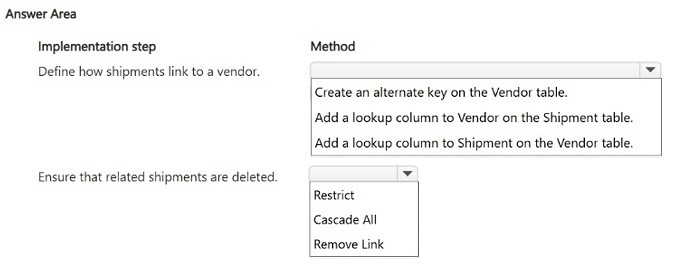
Add the Vendor lookup column on the Shipment (child/many) table to create the Vendor-to-Shipment one-to-many relationship, and set the delete behavior to Cascade All so all related Shipment records are deleted with the parent Vendor.
Question
HOTSPOT
You are creating a relationship between two Dataverse tables.
You need to configure a one-to-many relationship between the Vendor and Shipment tables and ensure that all child records are deleted when the parent record is deleted.
Which configuration methods should you use? To answer, select the appropriate options in the answer area.
NOTE: Each correct selection is worth one point.
Key Takeaways
The exam tests which table receives the lookup column in a 1:N relationship and which cascade option guarantees full child deletion; the trap is placing the lookup on the parent (Vendor) table or choosing Cascade Active, which only removes active children.
This AB-410 hotspot scenario tests how to create a one-to-many relationship between the Vendor and Shipment Dataverse tables and configure cascading so child Shipment records are removed with their parent Vendor. The correct configuration is to add a Vendor lookup column on the Shipment (child/many) table and set the delete behavior to Cascade All.
Common mistake: Learners add the lookup column to the Vendor table or pick Cascade Active/Cascade RemoveAccess-style options. In Dataverse the lookup always belongs to the 'many' side (Shipment), and only Cascade All deletes every related child record on parent deletion—Cascade Active leaves inactive children orphaned.
Expert Analysis
Why the Answer Is Correct
In Dataverse, a one-to-many (1:N) relationship from Vendor to Shipment is defined by placing a lookup column on the child table, so you must add a lookup column named Vendor on the Shipment table, making Vendor the parent (1) side and Shipment the many side. Because the child side holds the lookup, deleting a Vendor record can traverse that lookup to reach related Shipments. To satisfy the requirement that all child records are deleted when the parent is deleted, the delete cascade behavior must be set to Cascade All (shown in the relationship designer as "Delete all related records" under Type of Delete Behavior). Cascade All propagates delete to every related record regardless of its state or ownership, which is exactly what "all child records" demands.Why Other Candidate Answers Are Wrong
Creating the relationship from the Shipment side by adding a lookup to Vendor reverses the cardinality: it would model Shipment as the parent and let Shipments own Vendors, breaking the stated one-to-many direction. A Cascade Active configuration deletes only related records whose state is active, so inactive or draft Shipment rows would survive and orphan, violating "all child records." Options such as Cascade RemoveAllAccess or no-cascade behaviors only strip privileges or leave children untouched—they never delete child rows. Finally, self-referential or two separate many-to-many relationships would not give the required single parent-child lookup structure at all.Community Comment Notes
A single community answer agreed with the verdict, stating the steps as "Add a lookup column to Vendor on the Shipment table" followed by "Cascade All." No dissenting comments were posted, so the vote history gives little cross-checking, but the comment matches Dataverse's documented relationship behavior, where the lookup sits on the many side and Cascade All performs full related-record deletion.Official Reference
Exam Strategy
For relationship hotspots, first identify which table is the '1' side—that table never receives the lookup. Then match the cascade requirement's wording: 'all records' means Cascade All, 'active records' means Cascade Active, and 'my records' means Cascade User-owned.
Frequently Asked Questions
In a Dataverse 1:N relationship, which table gets the lookup column?
The table on the 'many' side. For Vendor to Shipment, the Shipment table receives the Vendor lookup column, making Vendor the parent (1) side.
What does Cascade All do when a parent Dataverse record is deleted?
Cascade All deletes every related child record regardless of state or ownership. Cascade Active would delete only related records that are active.
Discussion 1 contributions
Compiled from public community threads and reader submissions, lightly edited for clarity. Handles and vote tallies are shown as recorded.
From public community threads 1
-
exam_upskill 👍 11. Add a lookup column to Vendor on the Shipment table 2. Cascade All
Reader comments & corrections
No reader corrections yet — spotted an error or have a note? Share it below.