Moving Dataverse Table, Data, and Sitemap Changes Between Environments
Short answer
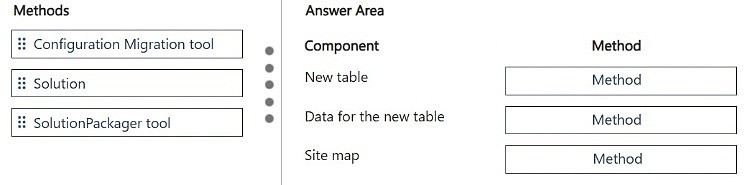
New table: Solution. Delete unused site map area: Solution. Added data in the new table: Configuration Migration tool.
Question
DRAG DROP
You make the following customizations to a Microsoft Dataverse environment:
• Create a new table.
• Add data to the new table.
• Delete an unused area from the site map.
The components must be transported to a different environment.
You need to determine the method required to transport each component.
Which method should you use? To answer, move the appropriate methods to the correct components. Each method may be used once, more than once, or not at all. You may need to move the split bar between panes or scroll to view content.
NOTE: Each correct selection is worth one point.
Key Takeaways
The exam tests the split between schema/customization components (Solution) and data records (Configuration Migration tool); the trap is assuming the Solution Packager tool is used directly to move components between environments.
This AB-410 drag-and-drop item tests Microsoft Dataverse application lifecycle management (ALM): schema customizations such as a new table and sitemap deletions are moved with a Solution, while actual rows are moved with the Configuration Migration tool.
Common mistake: Candidates map every item to the Solution Packager tool because its name sounds like a mover. The Solution Packager only unpacks a solution .zip into XML files and repacks it for source control — it is not the transport method; the Solution import/export is.
Expert Analysis
Why the Answer Is Correct
Creating a new table creates Dataverse schema (table definition, columns, relationships), which is exactly what a Solution carries, so it moves via Solution export/import. Deleting an unused area from the site map is also a customization stored in the app's site map XML, which is part of the model-driven app component inside a solution, so it also travels by Solution. Adding data to the new table creates rows — records are not stored inside a solution — so that content moves with the Configuration Migration tool, which exports and imports configuration data for a specified set of tables. The Solution Packager tool mentioned by FabiolaRT is only a supporting utility for decompressing a solution into XML for source control, not a transport mechanism between environments.Why Other Candidate Answers Are Wrong
Mapping the new table or the site map change to the Configuration Migration tool fails because that tool explicitly does not carry schema, only data rows, so an empty table definition would never arrive in the target environment. Mapping the added data to a Solution fails because solution export/import captures customizations, not records — importing a solution would deliver the table but no rows. Using the Solution Packager tool as the direct transport is a category error; it reversibly decompresses a Dataverse solution file into multiple XML files for source-control workflows, and the file it produces is still moved by Solution import.Community Comment Notes
The single community reply from FabiolaRT matches this verdict, listing the sequence "-Solution -Configuration Migration tool -Solution" and linking the official Solution Packager documentation to explain why that tool is not the third answer. Her note that the Solution Packager "is a tool that can reversibly decompress a Microsoft Dataverse compressed solution file into multiple XML files" reinforces that it serves source control, not environment-to-environment transport. No dissenting comments were posted, so the community consensus and the Microsoft ALM guidance align here.Official Reference
Exam Strategy
Read each component and ask: is it schema/customization or is it rows of data? Anything defined in Dataverse or in the app (tables, columns, site map areas) moves with a Solution; only actual record data moves with the Configuration Migration tool, and remember the Solution Packager is never the transport method.
Frequently Asked Questions
Why doesn't the Solution move the data added to the new Dataverse table in AB-410?
Solution export and import carries schema and customizations such as tables, columns and site map changes, but it never carries records. Data rows require the Configuration Migration tool.
What does the Solution Packager tool actually do in Dataverse ALM?
It reversibly decompresses a Dataverse solution file into multiple XML files for source-control and re-compresses them, so it supports ALM workflows rather than transporting components between environments.
Discussion 1 contributions
Compiled from public community threads and reader submissions, lightly edited for clarity. Handles and vote tallies are shown as recorded.
From public community threads 1
-
FabiolaRT 👍 1-Solution -Configuration Migration tool -Solution (SolutionPackager tool is a tool that can reversibly decompose a Microsoft Dataverse compressed solution file into multiple XML files) https://learn.microsoft.com/en-us/power-platform/alm/solution-packager-tool
Reader comments & corrections
No reader corrections yet — spotted an error or have a note? Share it below.