Model-driven app navigation: site map and table selection
Short answer
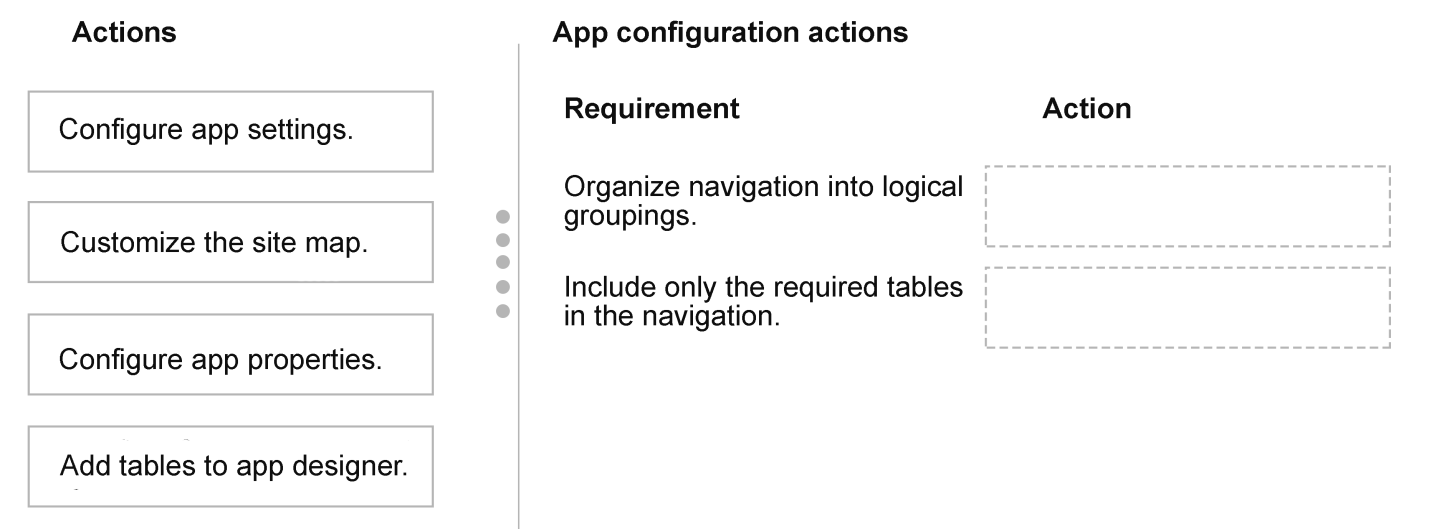
Organize navigation into business-process groupings by customizing the site map, and ensure only required data appears by adding only the necessary tables in app designer.
Question
A company is designing a model-driven app for customer service representatives.
The app must:
Organize navigation into logical groupings based on business processes.
Ensure only required data is included in the app navigation.
You need to configure navigation and table availability.
Which actions should you perform? To answer, move the appropriate actions to the correct requirements. You may use each action once, more than once, or not at all. You may need to move the split bar between panes or scroll to view content.
NOTE: Each correct selection is worth one point.
Key Takeaways
The item tests the boundary between navigation structure and app data scope, and the trap is assuming the table list itself creates business-process groupings.
This AB-410 scenario tests model-driven app navigation and table availability. The answer is to customize the site map for logical groupings and add only the required tables in app designer.
Common mistake: A common wrong approach is to expect table selection to create menu groups or to customize forms and views to control app navigation. Those choices do not define the site map hierarchy, and they leave extra tables visible or business groupings missing.
Expert Analysis
Governing principle The decisive idea is separation of concerns in model-driven app metadata. Power Apps documentation treats the site map as the navigation definition: areas, groups, and subareas that shape what users see in the app menu. The app designer is the composition surface where you choose the tables and other components the app contains. This scenario maps each requirement to one of those surfaces rather than treating navigation and data scope as the same setting.
Logical groupings
For the requirement to organize navigation around business processes, the action is Customize the site map. A site map lets you create named groups and place table subareas beneath them so the menu reflects how representatives work, not a raw table list. Merely adding tables does not create business-process groupings, and a form or view change would not alter app-level navigation.
Only required data
For the requirement to keep only required data in app navigation, the action is Add tables to app designer. The app designer controls which tables are included in the app; if a table is not added, it is not exposed as part of that app's navigation and pages. This is narrower than editing every table's permissions or relationships. It is app scoping, not security: table inclusion limits what the app surfaces, while security roles still control record access.
Answer mapping The correct mapping is: organize navigation into logical groupings → customize the site map; ensure only required data is included in app navigation → add tables to app designer. The supplied learner commentary points to the same division, listing customize the site map first and add tables to app designer second. No option letters are needed; the actions themselves form the answer.
Official Reference
- https://learn.microsoft.com/en-us/power-apps/maker/model-driven-apps/create-site-map-app
- https://learn.microsoft.com/en-us/power-apps/maker/model-driven-apps/design-custom-business-apps-using-app-designer
These links open the official vendor documentation in a new tab.
Exam Strategy
For drag-drop model-driven app questions, separate navigation metadata from app composition before matching actions. Ask whether the requirement describes menu hierarchy—site map areas, groups and subareas—or the set of tables the app contains. That prevents choosing a form, view or security option when the stem is really about app scope. Also check whether the requirement says only required data: that usually points to app designer table selection, not site map labels.
Frequently Asked Questions
Why does adding a table in app designer not create navigation groups?
Should I edit the default site map or the app-specific site map?
Does table inclusion replace security roles?
Discussion 1 contributions
Compiled from public community threads and reader submissions, lightly edited for clarity. Handles and vote tallies are shown as recorded, and comments reflect the views of individual contributors.
From public community threads 1
-
exam_upskill 👍 11. Customize the site map 2. Add tables to app designer
Reader comments & corrections
No reader corrections yet — spotted an error or have a note? Share it below.