Model-Driven App Business Rules for Country and Passport Fields
Short answer
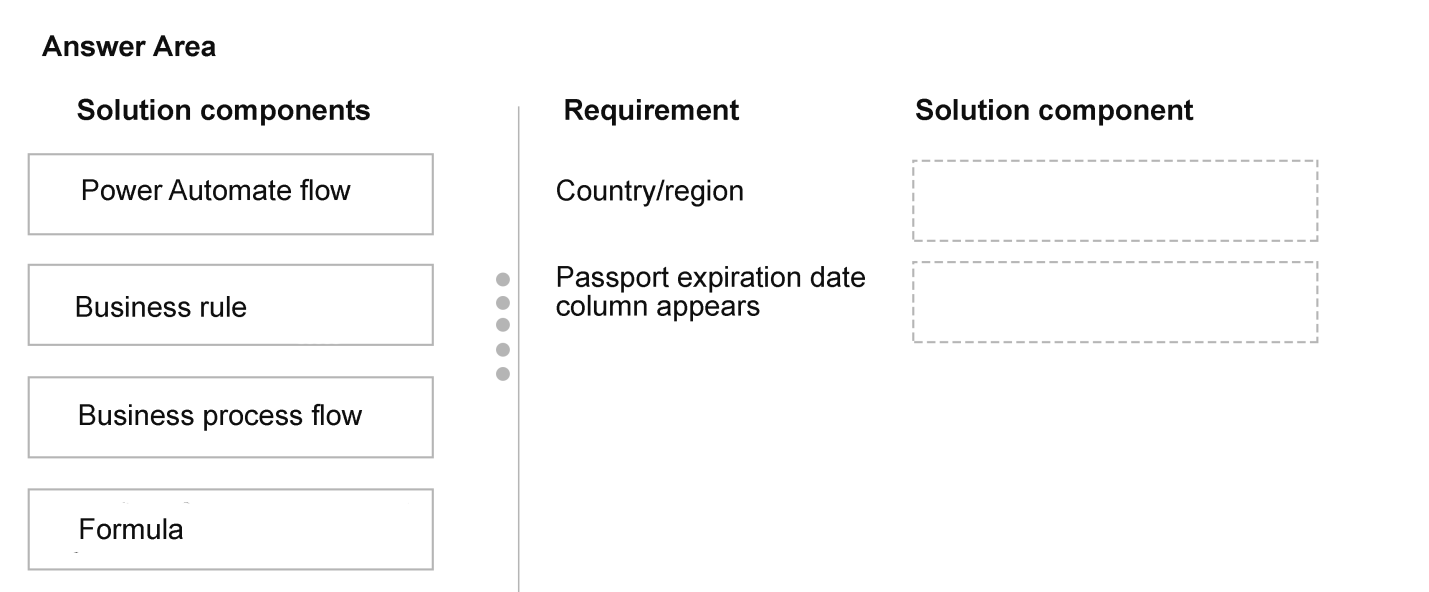
Map Business rule to both requirements: one sets Country/region to US when Language is English and clears it when Other is chosen; the other shows Passport expiration date only when Passport ownership is Yes.
Question
DRAG DROP
You are modifying a model-driven app. You set up a customer table in Microsoft Power Platform to retrieve user data.
You set up a form with the following columns for users to enter their data. The form includes the following columns:
 The form must do the following:
The Country/region column must automatically populate with US when English is chosen as a language. If the user selects Other for this column, the column must remain blank so that user can enter a value.
The Passport expiration date column must appear only if the user selects Yes in the Passport ownership column.
You need to configure the app with the least amount of effort.
What should you configure? To answer, drag the appropriate solution component to the correct requirements. Each solution component may be used once, more than once, or not at all. You may need to drag the split bar between panes or scroll to view content.
NOTE: Each correct selection is worth one point.
The form must do the following:
The Country/region column must automatically populate with US when English is chosen as a language. If the user selects Other for this column, the column must remain blank so that user can enter a value.
The Passport expiration date column must appear only if the user selects Yes in the Passport ownership column.
You need to configure the app with the least amount of effort.
What should you configure? To answer, drag the appropriate solution component to the correct requirements. Each solution component may be used once, more than once, or not at all. You may need to drag the split bar between panes or scroll to view content.
NOTE: Each correct selection is worth one point.
Key Takeaways
The item tests which Power Platform component gives the least-effort, real-time form logic, and the trap is assuming a cloud flow is required to set a choice column when a Business rule can do it client-side.
In a model-driven app, both conditional value population and conditional field visibility on a form can be handled with a Business rule on the customer table. The correct mapping for this AB-410 drag-and-drop is Business rule for the Country/region auto-fill requirement and Business rule for the Passport expiration date visibility requirement.
Common mistake: The most common wrong move is dragging a Power Automate cloud flow to the Country/region requirement because a Business rule supposedly 'cannot set multi-choice columns.' A single-select Choice column such as Country/region can absolutely be set by a Business rule, and a flow would add effort, run only after save, and would not update the form live for the user.
Expert Analysis
Why the Answer Is Correct
A Business rule scoped to the form (type: Entity) with two condition branches satisfies the Country/region requirement: if Language equals English, set Country/region to US; otherwise clear Country/region so the user can type their own value. Setting a single-select Choice column and clearing a column are both supported actions in the Business rule designer, so no server-side component is needed. For the second requirement, a separate Business rule using a Show/Hide action makes Passport expiration date visible only when Passport ownership equals Yes, and hidden otherwise. Business rules evaluate client-side as the user interacts with the form, which is exactly the real-time behavior these requirements demand, and this is by far the least amount of effort compared with flows, plug-ins, or JavaScript web resources.Why Other Candidate Answers Are Wrong
A cloud flow (Power Automate) triggered on the customer table would fire only after a record is saved or updated, so the Country/region value would not appear until the user saved, and the user would still see a stale form — far more effort than a Business rule for the same result. Plug-ins and JavaScript web resources also work but require deployment, debugging, and a developer, which directly contradicts the 'least amount of effort' constraint in the stem. Duplicate detection rules and Power Fx formulas in canvas-app context are not applicable to hiding columns on a model-driven form. The visibility requirement in particular has no server-side alternative that is simpler than a Business rule's Show/Hide action.Community Comment Notes
One learner argued that 'Country/region can't be Business rule as business rules can't set multi-choice columns' and therefore pushed a Power Automate flow, but the scenario never states Country/region is a multi-select Choices column — it is a single-select choice that Business rules can set. Another learner, FabiolaRT, pointed out that 'the "Language" column never mentions that it is multi-choice' and concluded Business rule is the answer, which aligns with the official Business rule capability list. Both comments converge on Business rule for the Passport expiration visibility requirement, and that agreement is consistent with the least-effort wording in the question.Official Reference
Exam Strategy
On drag-and-drop items that say 'least amount of effort,' default to the lowest-code component that can perform the action — for form-level set-value and show/hide logic in a model-driven app, that is always the Business rule. Only escalate to a cloud flow if the requirement mentions server-side, cross-table, or after-save behavior that a Business rule cannot express.
Frequently Asked Questions
Can a Power Platform business rule set a choice column like Country/region in a model-driven app?
Yes. A business rule can set a single-select Choice (option set) column to a specific value or clear it. Only multi-select Choices columns and a few specialized column types are unsupported.
Discussion 2 contributions
Compiled from public community threads and reader submissions, lightly edited for clarity. Handles and vote tallies are shown as recorded.
From public community threads 2
-
Daeon 👍 4Country/region can't be Business rule as business rules can't set multi-choice columns. Only component that is able to do this is Power Automate flow.
-
FabiolaRT 👍 1However, the "Language" column never mentions that it is multi-choice. So "Business rule" is the answer. If the "Language" column is anything other than "English" set blank. Otherwise it is "English" set "US"
Reader comments & corrections
No reader corrections yet — spotted an error or have a note? Share it below.