Managing Canvas App State with Variables and Collections
Short answer
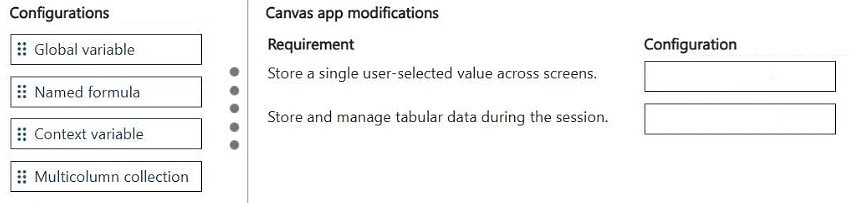
To store a single value, use a global variable (Set). To store tabular data, use a multicollection collection — that is, a multicolumn collection created with Collect or ClearCollect.
Question
DRAG DROP
You are modifying a canvas app for a company.
The app must store both a single value and tabular data.
You need to manage application state.
Which configurations should you use? To answer, move the appropriate configurations to the correct requirements. You may use each configuration once, more than once, or not at all. You may need to move the split bar between panes or scroll to view content.
NOTE: Each correct selection is worth one point.
Key Takeaways
The question tests the mapping between state requirements and Power Fx state objects — the trap is assigning a collection to a single value or a variable to tabular data, since only collections can hold multiple rows with multiple columns.
This AB-410 drag-and-drop item tests how a Microsoft Power Platform canvas app manages application state, matching each storage need to the right configuration. To hold a single value, use a global variable (created with Set); to hold tabular data, use a multicolumn collection (created with Collect or ClearCollect).
Common mistake: Learners often drag a context variable or a single-column collection to the tabular requirement. Context variables (Navigate with context) are scoped to a single screen navigation, and single-column collections cannot store multiple fields per record — a multicolumn collection is required for tabular data.
Expert Analysis
Why the Answer Is Correct
A global variable, created with the Set function (e.g., Set(varCustomer, "Contoso")), stores a single scalar value and is available app-wide, which satisfies the requirement to store a single value as part of application state. A multicolumn collection, created with Collect or ClearCollect against a data source or a table of records, holds rows with multiple columns and is the correct construct for tabular data. Together, Set-based global variables and multicolumn collections are the standard canvas app state-management configurations, and this pairing is exactly what the drag-and-drop slots require.Why Other Candidate Answers Are Wrong
A context variable passed through Navigate is screen-scoped and is torn down on navigation, so it is unreliable for app-level state and does not fit a general "store a value" requirement. A single-column collection (a collection of plain values rather than records) cannot represent tabular data with multiple fields per row, so it fails the tabular requirement. Global variables also cannot store rows and columns natively — putting a table into a variable via Set gives one record or table value but no true tabular store you can browse, filter, and update row by row like a collection.Community Comment Notes
The single community contribution on this item gives the same pairing this analysis reaches independently: "1. Global Variable 2. Multicolumn Collection". That comment aligns with Microsoft's documented canvas app state guidance, so it supports rather than conflicts with the verdict. Because only one anonymous learner weighed in, the mapping is best validated against the Power Apps documentation on variables and collections rather than against vote counts.Official Reference
Exam Strategy
Read each requirement as a shape of data: "a single value" always means a variable (Set for global, or a context variable via Navigate), while "tabular data" always means a collection. Drag and then double-check that no slot mixes the two shapes, since each correct selection earns a point.
Frequently Asked Questions
Why use a global variable instead of a context variable for a single value in a canvas app?
A global variable created with Set is available on every screen for the life of the app session, while a context variable passed via Navigate exists only on the destination screen until another navigation occurs.
What is the difference between a multicolumn collection and a single-column collection?
A multicolumn collection stores full records with multiple fields per row (e.g., customer ID, name, and amount), which is needed for tabular data. A single-column collection stores only a list of individual values.
Discussion 1 contributions
Compiled from public community threads and reader submissions, lightly edited for clarity. Handles and vote tallies are shown as recorded.
From public community threads 1
-
exam_upskill 👍 11. Global Variable 2. Multicolumn Collection
Reader comments & corrections
No reader corrections yet — spotted an error or have a note? Share it below.