How Do You Validate the Dog Pickup Date in the Model-Driven App?
Short answer
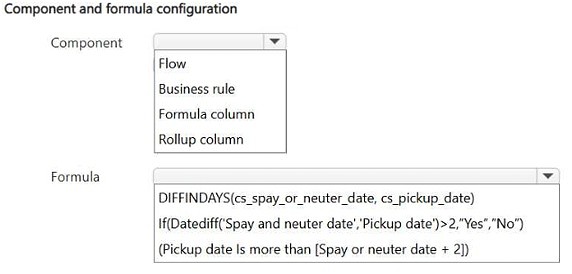
Configure a business rule on the Resident form using DateDiff('Spay and neuter date','Pickup date') >= 2, showing an error when the pickup date is sooner.
Question
HOTSPOT This is a case study. Case studies are not timed separately from other exam sections. You can use as much exam time as you would like to complete each case study. However, there might be additional case studies or other exam sections. Manage your time to ensure that you can complete all the exam sections in the time provided. Pay attention to the Exam Progress at the top of the screen so you have sufficient time to complete any exam sections that follow this case study. To answer the case study questions, you will need to reference information that is provided in the case. Case studies and associated questions might contain exhibits or other resources that provide more information about the scenario described in the case. Information provided in an individual question does not apply to the other questions in the case study. A Review Screen will appear at the end of this case study. From the Review Screen, you can review and change your answers before you move to the next exam section. After you leave this case study, you will NOT be able to return to it. To start the case study To display the first question in this case study, select the “Next” button. To the left of the question, a menu provides links to information such as business requirements, the existing environment, and problem statements. Please read through all this information before answering any questions. When you are ready to answer a question, select the “Question” button to return to the question. Background Contoso Suites is an animal shelter that specializes in finding homes for dogs that have been given up by their owners. The shelter can house up to 20 dogs. The shelter is implementing one model-driven Power Apps app to track the dogs and schedule meetings with potential adopters. No other apps will be created. The model-driven app uses Dataverse with out-of-the-box functionality when possible. Dataverse is set up with the following configuration: • The solution prefix “cs” is used for all new components. • Only the root business unit is used. • All tables are stored in Dataverse and do not require rapid scaling. • Exchange server-side sync is not configured. Adopters • Adopter information is stored in a Contact table. • Contacts are considered to be duplicates if they have the same email address and last name. • Adopters are often late to meetings, so a reminder email is sent to them two hours before their meeting. • The email reminders must not be tracked in the system. Dogs • Dog information is stored in a Dog table, which is organization owned. • Breed, size, and weight are fields in the table. Dog residency • A Resident table tracks the stay of each dog. • Each resident record has a lookup for the dog and its food. • The food type and amount are logged on each resident record. Auto-posting is not configured for changes to food type and amount. • A fee of $120 is in a currency column named Adoption Fee. This fee can be changed depending on the adoption circumstances. • A formula column named Deposit is automatically populated with 20% of the adoption fee. • A resident record is generated automatically when a dog record is created. This is the only way a resident record can be created. Exercise and feedings • Exercise for the dogs is tracked in an Exercise table. • Feedings are tracked in a Feeding table. • Exercise and feeding records appear in a resident record timeline. Care staff • The care staff must be able to view who changed the food type and the amount that was given, for up to three months ago. • The staff must be able to update the weight of a dog on the resident record. • The staff report that the buttons are too small on the touch screen they use to log exercise and feeding. • The staff must be able to view who the adopters are for upcoming meetings. The staff must not be able to update adopter information. Administrative staff • Administrative staff must receive a weekly list of duplicate contacts. Duplicate alerts must not appear when a staff member saves a new contact. • When an adopter wants to adopt a dog, the staff must perform a series of adoption duties in order. The following duty list must be displayed on the screen: o Commitment:
- Obtain adopter signature in a commitment document.
- Collect deposit.
- Document spay or neutering date.
- Perform spay or neutering.
- Document pickup date.
- Collect full payment.
- Verify dog is picked up.
Key Takeaways
The item tests client-side date-window validation on a model-driven form, and the trap is choosing a server-side flow or a formula that rejects a pickup exactly two days after the procedure.
This Contoso Suites hotspot asks which mechanism and which expression guarantee a dog is not picked up sooner than two days after spaying or neutering. The page establishes that a form-time business rule combined with a DateDiff comparison between Spay and neuter date and Pickup date is the correct configuration.
Common mistake: Candidates pick a Power Automate flow or a formula column because the scenario mentions an error message, but neither can raise a blocking pop-up while the staff member is still entering the Pickup date; others use DateDiff with the arguments reversed or with a strict > 2 test that wrongly fails a pickup that is exactly two days later.
Expert Analysis
Why the Answer Is Correct
The requirement is a hard business rule evaluated while the pickup date is being entered: no pickup sooner than two days after spaying or neutering, with an error shown if the date is too early. A business rule attached to the Resident form runs on the client, can reference the Spay and neuter date and Pickup date columns, and can display an error message on the field, which satisfies the pop-up/error requirement at the moment of entry. The correct expression compares the two dates with DateDiff('Spay and neuter date','Pickup date'), which returns the number of days from the spay date to the pickup date, so the value must be at least 2 for the date to be acceptable. Anything less than 2 days returns the error branch, blocking an invalid pickup while still permitting a pickup two days after the procedure.Why Other Candidate Answers Are Wrong
A Power Automate cloud flow cannot stop the user mid-entry, so an asynchronous or save-triggered flow would let an invalid date be saved before the error appears, breaking the required immediate pop-up behavior. A formula column such as a calculated Deposit-style column only derives a value and cannot raise a validation error, so it is unsuitable even though the scenario already uses one for Deposit. Choosing DateDiff with the arguments swapped produces a negative or meaningless number, and a strict > 2 test rejects a pickup that is exactly two days after spaying or neutering, which the requirement explicitly allows because it says no sooner than two days. Restricting the logic to the Adopter or Contact tables is also irrelevant, since pickup timing is a property of the Resident and dog workflow.Community Comment Notes
The lone comment, from exam_upskill, selects a business rule paired with If(Datediff('Spay and neuter date','Pickup date')>2,"Yes","No"), which confirms that the intended control is a business rule rather than a flow. The comment's strict > 2 comparison is the classic off-by-one trap: it would reject a pickup exactly two days after the procedure, so the comparison must allow a difference of two days. The argument order in the comment's Datediff call is correct and should be preserved, since reversing the dates yields a negative result and would invalidate every pickup date.Official Reference
Exam Strategy
When a hotspot shows a feature choice plus an expression, match the feature to the timing the requirement demands: anything that must block or warn the user while typing is a business rule or client-side validation, not a flow. Then check the date arithmetic against the boundary value stated in the case, such as exactly two days, before committing.
Frequently Asked Questions
Why use a business rule instead of a Power Automate flow for the pickup date check?
A business rule runs on the client while the date is entered, so it can display the error immediately and block an invalid Pickup date. A flow runs asynchronously and would allow the bad date to be saved first.
Which DateDiff argument order validates the pickup date correctly?
Use DateDiff('Spay and neuter date','Pickup date'), which counts days from the spay date to the pickup date, and require the result to be at least 2 days so a two-day pickup is accepted.
Discussion 1 contributions
Compiled from public community threads and reader submissions, lightly edited for clarity. Handles and vote tallies are shown as recorded.
From public community threads 1
-
exam_upskill 👍 11. Business rule 2. If(Datediff('Spay and neuter date','Pickup date')>2,"Yes","No")
Reader comments & corrections
No reader corrections yet — spotted an error or have a note? Share it below.