How do you restrict access to a form and system view?
Short answer
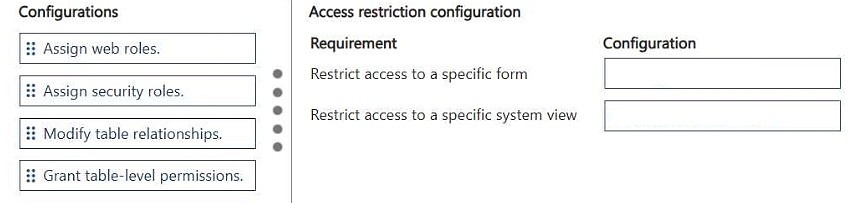
Move Assign security roles to both requirements: assign security roles on the specific form, and apply security roles to the specific system view.
Question
DRAG DROP
A company uses a model-driven app that has multiple forms and system views for the same table.
You must restrict specific users from accessing:
• A specific form
• A specific system view
You need to configure the access restrictions.
How should you complete the configurations? To answer, move the appropriate configurations to the correct requirements. You may use each configuration once, more than once, or not at all. You may need to move the split bar between panes or scroll to view content.
NOTE: Each correct selection is worth one point.
Key Takeaways
The question tests object-level security in model-driven apps; the trap is assuming forms and views need different mechanisms (sharing, app-level permissions, or field security) when both use role assignment.
In a model-driven app, access to an individual form and an individual system view is controlled with Dataverse security roles applied at the object level. This page confirms that both drag slots — the specific form and the specific system view — are completed with the Assign security roles configuration.
Common mistake: The most common wrong approach is to use Share, to disable or hide the form/view, or to apply field-level security — none of which restrict a specific form or system view for specific users; only security roles assigned to that form and that view do.
Expert Analysis
Why the Answer Is Correct
Dataverse lets a maker scope a single form by opening the form's properties and assigning security roles, so only users holding one of those roles see the form when the table is opened. The identical control exists for system views: in the view designer you apply security roles, which removes the view from the Views list for users lacking the role. Because the requirement lists exactly two restrictions — one specific form and one specific system view — and the configurations may be used more than once, Assign security roles is the correct drop for both slots. No other configuration can produce per-form or per-view restriction, since app-level sharing governs the whole app and field security governs columns, not containers.Why Other Candidate Answers Are Wrong
Sharing the app or the table grants broader access rather than narrowing it, so it cannot remove a form or a view from a particular user's navigation. Disabling or hiding the form is a global change that affects every user, not just the targeted group, and would break legitimate users of that form. Field-level security profiles and column permissions restrict data in columns, which is irrelevant to which form or view loads. Personal views or 'My Views' only affect views a user creates for themselves and cannot govern access to a system view owned by the organization.Community Comment Notes
exam_upskill answered the scenario by identifying Assign security roles twice, matching the two requirements listed in the prompt. That reading aligns with Dataverse behavior, where both form-level and view-level access are governed by security roles rather than sharing or app-level settings. Treat the comment as corroboration rather than authority, but the technical rationale holds up against Microsoft's model-driven app security documentation.Official Reference
Exam Strategy
For drag-drop security items, read the requirement wording first: phrases like 'specific form' or 'specific system view' point to object-level security roles, while 'specific users' at app level points to sharing. Since configurations may be reused, do not assume each slot needs a different tile.
Frequently Asked Questions
How do I restrict users to a specific form in a model-driven app?
Open the form, use Assign security roles, and select only the roles that should see it; users without an assigned role cannot open that form for the table.
Can I restrict a system view the same way as a form?
Yes. In the view designer you apply security roles to a system view, and it disappears from the Views list for users who hold none of those roles.
Discussion 1 contributions
Compiled from public community threads and reader submissions, lightly edited for clarity. Handles and vote tallies are shown as recorded.
From public community threads 1
-
exam_upskill 👍 11. Assign security roles. 2. Assign security roles.
Reader comments & corrections
No reader corrections yet — spotted an error or have a note? Share it below.