How do you configure conditional form behavior in a model-driven app?
Short answer
Set the enforced columns to Business required, and configure a business rule that shows the additional columns only when the specified condition is met.
Question
HOTSPOT
A company is configuring a main form for customer data entry in a model-driven app.
The company requires the following form functionality:
• Ensure that user completion is enforced for specific columns before saving a record.
• Display additional columns only when a specified condition is met.
You need to configure conditional form behavior.
Which configuration should you use? To answer, select the appropriate options in the answer area.
NOTE: Each correct selection is worth one point.
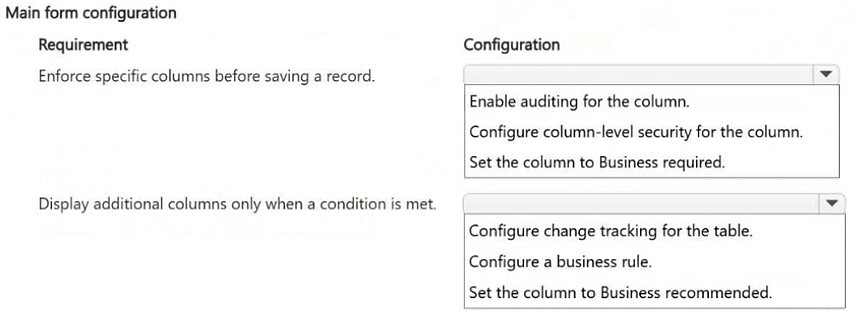
Key Takeaways
The item tests choosing the correct mechanism per requirement — requirement level for mandatory fields versus a business rule for conditional visibility — and the trap is picking a form-level validation option for enforcement or a plug-in/workflow for showing columns.
In a model-driven app main form, mandatory data entry is enforced by setting the column requirement level to Business required, while conditional display of extra columns is handled with a business rule. This page confirms both hotspot selections and explains why each configuration mechanism fits its requirement.
Common mistake: Learners commonly try to enforce saving through a form script or a required-field notification on the form itself, and try to reveal columns by adding them to the form layout with a note. Dataverse requirement levels are what actually block the save, and only a business rule (or script) evaluates a condition to show or hide a column.
Expert Analysis
Why the Answer Is Correct
Requirement level is a Dataverse column property, and setting it to Business required makes the column mandatory so the record cannot be saved until it contains a value — this is exactly the 'enforce completion before saving' requirement. For the second requirement, conditional display of additional columns on a main form is implemented with a business rule whose condition evaluates to true and then performs a Show/hide column action scoped to the form or entity. Together, Business required plus a business rule cover mandatory completion and condition-based visibility without custom code.Why Other Candidate Answers Are Wrong
Choosing 'Optional' or 'Recommended' for the first hotspot leaves the field optional, so the record saves with blanks and the enforcement requirement is not met. Selecting JavaScript, a synchronous workflow, a plug-in, or a Power Automate cloud flow for the second hotspot is incorrect because those run outside the form's interactive round trip or require development effort when the platform's built-in business rule already performs show/hide on the form. Picking 'Business required' for the visibility hotspot confuses two different features: requirement level controls data entry enforcement, not conditional display.Community Comment Notes
The lone community reply lays out the same two-step answer, stating "1. Set the column to Business required 2. Configure a business rule". That aligns with the platform's documented behavior, and no competing comment argues for a script- or workflow-based approach, so the consensus here matches the official model-driven app design guidance.Official Reference
Exam Strategy
Read each hotspot as a separate requirement and match it to the platform feature: anything about enforcing a value before save maps to column requirement level, while anything about showing or hiding columns based on a condition maps to a business rule. For hotspot items, answer each selection independently since each is scored separately.
Frequently Asked Questions
How do you force users to complete a column before saving a model-driven app record?
Set the column's requirement level to Business required on the form or column, so Dataverse blocks the save until the column is populated.
What feature shows or hides columns on a form based on a condition?
Use a business rule with a Show/hide column action, evaluating your condition so the extra columns appear only when it is true.
Discussion 1 contributions
Compiled from public community threads and reader submissions, lightly edited for clarity. Handles and vote tallies are shown as recorded.
From public community threads 1
-
exam_upskill 👍 11. Set the column to Business required 2. Configure a business rule
Reader comments & corrections
No reader corrections yet — spotted an error or have a note? Share it below.