Which Power Automate control handles Do Until vs Apply to Each?
Short answer
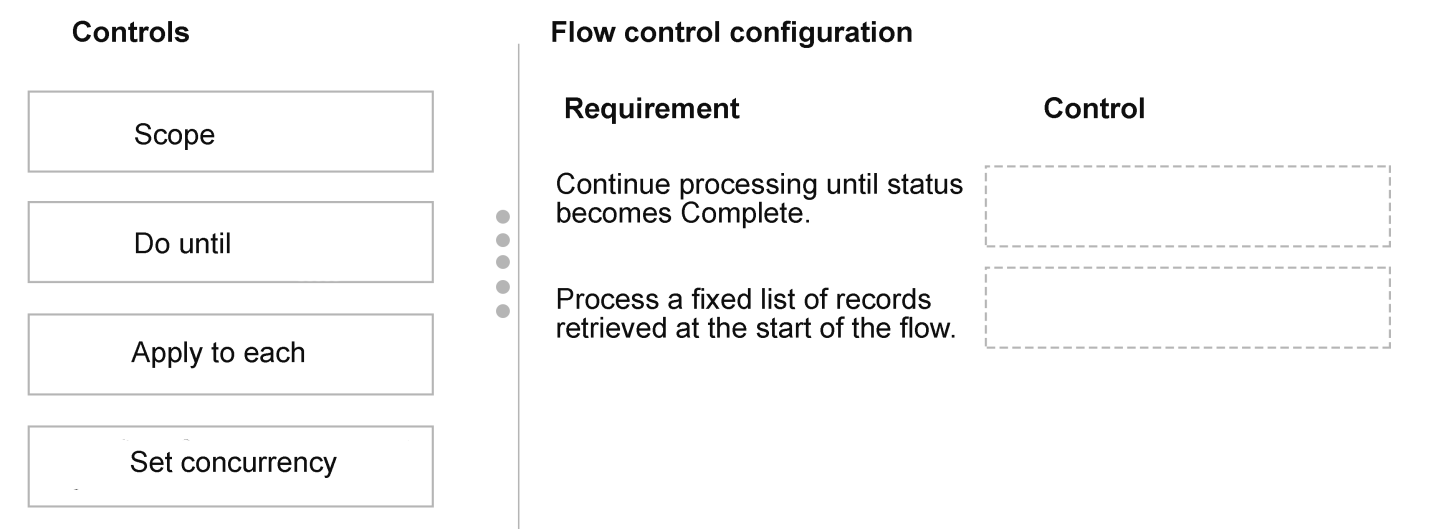
Use Do until for the status-change requirement and Apply to each for the fixed list retrieved at flow start, so each initial record is processed exactly once.
Question
A company processes transaction records by using a Power Automate cloud flow.
The company has the following requirements:
Continue processing records until a status field changes to Complete, even if new records are added during execution.
Process a fixed list of records retrieved at the start of the flow, ensuring each record is processed exactly once.
You need to configure the flow control logic.
Which controls should you use? To answer, move the appropriate controls to the correct requirements. You may use each control once, more than once, or not at all. You may need to move the split bar between panes or scroll to view content.
NOTE: Each correct selection is worth one point.
Key Takeaways
The item tests matching loop semantics to business intent; the trap is assuming Apply to each can poll for a changing status or that Do until can guarantee exactly-once over a pre-retrieved list.
This AB-410 drag-and-drop item tests Power Automate loop controls: Do until for condition-driven repeated processing and Apply to each for a fixed record array. The page confirms Do until maps to the status-change requirement and Apply to each maps to the exactly-once fixed-list requirement.
Common mistake: A common error is assigning Apply to each to the status-change requirement because it iterates records, but Apply to each only walks a fixed collection and cannot wait for or re-evaluate a status field as new records arrive.
Expert Analysis
Why the Answer Is Correct
The first requirement is explicitly condition-driven: keep going until a status field becomes Complete, even if new records appear. A Do until loop re-evaluates its condition after each iteration, so it can keep processing and checking until that dynamic condition is true. The second requirement is collection-driven: take the list that existed at flow start and process every item once. Apply to each iterates over that pre-retrieved array and does not re-query later additions, which matches the exactly-once intent. Assigning Do until to the first slot and Apply to each to the second is therefore the only pairing that preserves both behaviors.
Why Other Candidate Answers Are Wrong
A Condition or Switch action evaluates a value and branches once; it does not repeat work until a status changes. A Delay or Wait action can pause execution but does not iterate records, so it cannot satisfy either requirement alone. Putting Apply to each against the status-change requirement is tempting because it handles multiple records, but it walks the array it is given and does not poll for new records or re-check a status field between iterations. Conversely, Do until over a fixed list may stop early based on its condition, so it cannot guarantee every initial record is processed exactly once.
Community Comment Notes
As aed747e noted, the intended split is a Do until loop that runs until a dynamic condition "(status = Complete)" evaluates true, plus an Apply to each loop over a "fixed, pre-retrieved array" of records. That matches the two requirements exactly and reflects standard Power Automate control semantics. seoyeon_01 asked why this pairing is correct; the explanation above answers that by tying each control to the unit of repetition—condition versus collection.
Official Reference
https://learn.microsoft.com/en-us/power-automate/apply-to-each
This link opens the official vendor documentation in a new tab.
Exam Strategy
Read the verb first: 'until a status changes' signals Do until, while 'fixed list retrieved at the start' and 'exactly once' signal Apply to each. The phrase 'even if new records are added' reinforces condition-driven repetition, not a fixed array, so don't let it push you to a third control.
Frequently Asked Questions
Why does Do until fit the status-change requirement better than Apply to each?
Can Apply to each guarantee each record in the initial list is processed exactly once?
Discussion 3 contributions
Compiled from public community threads and reader submissions, lightly edited for clarity. Handles and vote tallies are shown as recorded, and comments reflect the views of individual contributors.
From public community threads 3
-
aed747e 👍 1Use a Do until loop to continuously process records until a dynamic condition (status = Complete) evaluates to true. Use an Apply to each loop to iterate over a fixed, pre-retrieved array of records, ensuring every record in the initial dataset is executed exactly once.
-
seoyeon_01 👍 1Why is this considered the correct answer? Any explanation would help.
-
exam_upskill 👍 11. Do until 2. Apply to each
Reader comments & corrections
No reader corrections yet — spotted an error or have a note? Share it below.