Dataverse relationships for cases, customer hierarchy, and agent history
Short answer
Customer-to-support case is one-to-many; customer children use a self-referential one-to-many (hierarchical) relationship on Customer; agent assignment history uses Connections with connection roles and effective dates.
Question
An insurance company is implementing a customer service solution in Microsoft Dataverse to track interactions and manage issue resolution. The data model includes tables for customer information, support cases, and agents.
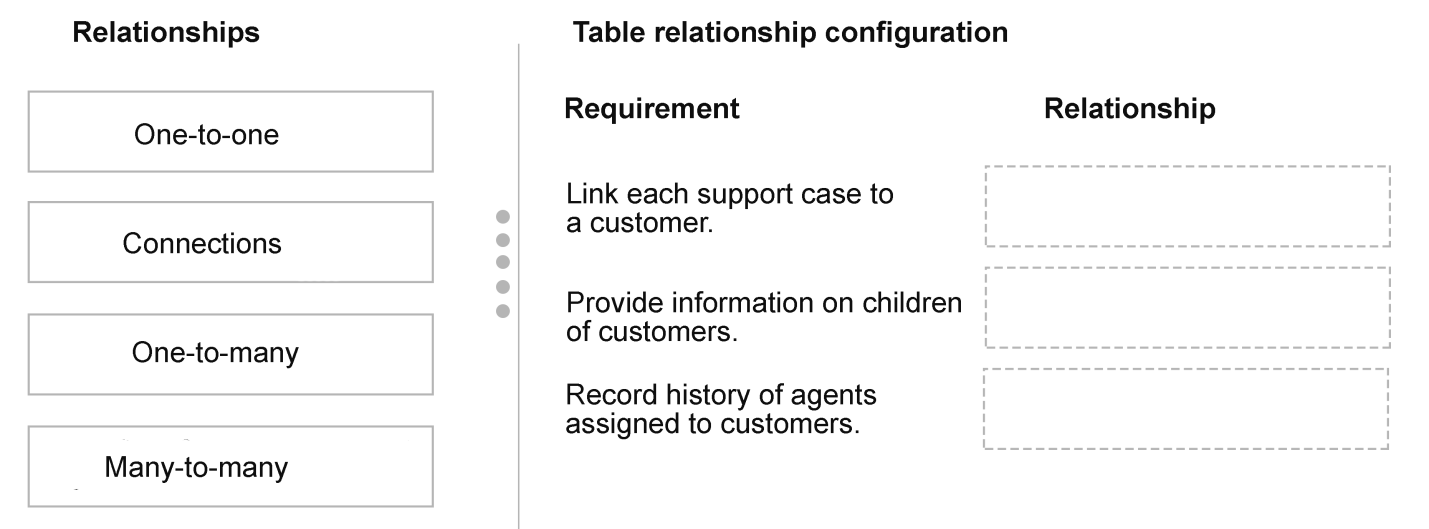
The data model includes the following requirements:
Link each support case to a customer.
Provide information on the children of customers.
Record history of agents assigned to customers.
You need to configure table relationships.
Which relationships should you use? To answer, move the appropriate relationship to the correct requirement. You may use each relationship once, more than once, or not at all. You may need to move the split bar between panes or scroll to view content.
NOTE: Each correct selection is worth one point.
Key Takeaways
The question tests whether you can map cardinality and metadata needs to Dataverse relationship mechanisms, especially spotting that “history” calls for Connections rather than a native many-to-many link.
This AB-410 scenario tests Dataverse relationship selection: customer-to-case is one-to-many, customer children use a self-referential one-to-many, and agent assignment history uses Connections.
Common mistake: The common mistake is choosing many-to-many for agent assignments because agents and customers have many-to-many cardinality; a native N:N relationship does not store assignment dates or role-based history, so it fails the “record history” requirement.
Expert Analysis
Case-to-customer: one-to-many The support case is the child record. Adding a Customer lookup on the Support Case table creates a one-to-many relationship from Customer to Support Case; the case form presents it as many-to-one. Each case stores exactly one customer ID, while one customer can have many support cases. This is the relationship that satisfies “link each support case to a customer.”
Customer children: self-referential one-to-many To provide information on a customer’s children, add a lookup on the Customer table that points back to Customer, such as Parent Customer. Dataverse creates a self-referential one-to-many relationship: each child customer has one parent, and a parent can have many children. Mark the relationship as hierarchical so hierarchy views and parent/child navigation work. A many-to-many relationship or a Connection role is not the right mechanism for a structural parent-child hierarchy.
Agent history: Connections, not a plain many-to-many It is tempting to choose many-to-many because a customer can have multiple agents assigned over time and an agent can be associated with multiple customers. That describes the cardinality correctly, but a native Dataverse many-to-many relationship only creates hidden intersect rows; it does not carry assignment dates, roles, or a historical record of each assignment. Connections are the Dataverse mechanism for role-based relationships between records with effective start and end dates and descriptive context. Create connections between Customer and Agent records with connection roles such as assigned agent, and add new connections as assignments change rather than overwriting the old association. The history requirement therefore maps to Connections.
Where the mechanism takes effect The request path is: the case lookup stores the customer relationship; the self-referential lookup on Customer stores the parent relationship; and a Connection record stores each agent-customer assignment as its own row. If the answer set does not offer Connections, a custom assignment/intersect table with start and end fields would be needed; a native many-to-many alone is still insufficient for history. The mapping is Customer→Support Case = one-to-many; Customer→Customer = self-referential one-to-many; Customer↔Agent history = Connections.
Official Reference
- https://learn.microsoft.com/en-us/power-apps/maker/data-platform/types-of-relationships
- https://learn.microsoft.com/en-us/power-apps/maker/data-platform/create-edit-relationships
- https://learn.microsoft.com/en-us/power-apps/maker/data-platform/connection-entities
These links open the official vendor documentation in a new tab.
Exam Strategy
Read each requirement for two things: cardinality and metadata. If it says each child links to one parent, use one-to-many or a self-referential one-to-many; if it says history, effective dates, or role-based relationships, choose Connections rather than native many-to-many. In drag-drop relationship questions, reuse one-to-many when two requirements describe separate parent-child lookups, and reserve many-to-many for pure associations with no extra relationship data.
Frequently Asked Questions
Why not use a many-to-many relationship to record agent assignment history?
How do you configure the customer children requirement in Dataverse?
Is the support case relationship one-to-many or many-to-one?
Discussion 2 contributions
Compiled from public community threads and reader submissions, lightly edited for clarity. Handles and vote tallies are shown as recorded, and comments reflect the views of individual contributors.
From public community threads 2
-
sanjaybhandekar 👍 4The third option is Many to Many, A customer can have multiple agents assigned over time, and an agent can be associated with multiple customers. This relationship can support tracking the assignment history.
-
exam_upskill 👍 11. One-to-Many 2. One-to-Many 3. Connections
Reader comments & corrections
No reader corrections yet — spotted an error or have a note? Share it below.