Copilot Studio Prompt Action: Input and Conversation Variables
Short answer
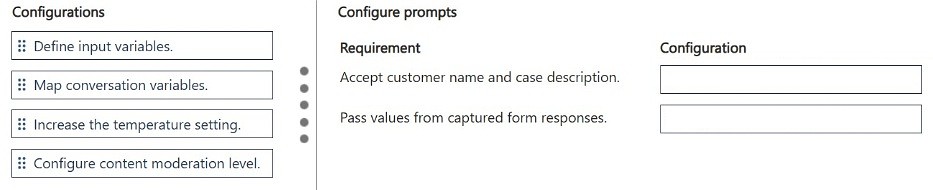
For the requirement that the prompt accept customer name and case description, use 'Define input variables.' For the requirement that the prompt receive values captured from responses, use 'Map conversation variables.'
Question
DRAG DROP
A company uses Microsoft Copilot Studio to generate responses for customer support scenarios.
The solution must meet the following requirements:
• The prompt must accept customer name and case description.
• The prompt must receive values captured from responses.
You need to configure the prompt action.
Which configurations should you use? To answer, move the appropriate configurations to the correct requirements. You may use each configuration once, more than once, or not at all. You may need to move the split bar between panes or scroll to view content.
NOTE: Each correct selection is worth one point.
Key Takeaways
The item tests how a Copilot Studio prompt action is wired to data: you must pair 'define input variables' with the requirement that the prompt accept the customer name and case description, and 'map conversation variables' with the requirement that the prompt receive values captured from responses — learners trap themselves by swapping the two mappings.
In Microsoft Copilot Studio, a prompt action is configured with input variables that supply the customer name and case description, and with conversation variables that carry values captured from earlier agent or bot responses. For this scenario, the 'accept customer name and case description' requirement maps to defining input variables, while the 'receive values captured from responses' requirement maps to mapping conversation variables.
Common mistake: The most common error is placing 'map conversation variables' against the requirement that the prompt accept customer name and case description. Conversation variables do not define what the prompt accepts; they transfer values already captured in the conversation, so they belong to the 'receive values captured from responses' requirement.
Expert Analysis
Why the Answer Is Correct
A Copilot Studio prompt action needs declared inputs, because a prompt cannot accept free-floating data — you create input variables on the action and reference them in the prompt text, which is exactly what satisfies the requirement that the prompt accept customer name and case description. Values captured from earlier bot or agent responses are carried by conversation variables, which are set by one node and read by another; mapping them into the prompt action satisfies the requirement that the prompt receive values captured from responses. The single community comment on this item gives the same pairing: define input variables first, then map conversation variables. Because each configuration can be used once, more than once, or not at all, the ordering logic follows the two requirements directly rather than any trick usage.
Why Other Candidate Answers Are Wrong
Swapping the two mappings fails both requirements conceptually: conversation variables are not how you make the prompt accept a customer name and case description, since those must be explicitly declared as inputs on the prompt action. Treating both requirements as input variables leaves no mechanism for data already captured elsewhere in the conversation to reach the prompt, so the second requirement goes unmet. Likewise, assuming that a prompt action can silently inherit values without any variable configuration ignores that Copilot Studio requires explicit variable definitions and mappings for data flow into and out of prompt actions.
Community Comment Notes
The lone comment on this question, from exam_upskill, states the configuration sequence as "Define input variables" followed by "Map conversation variables," which matches the requirement order in the scenario. No dissenting comments exist, so there is no counter-view to weigh; the pairing should be validated against Microsoft's prompt documentation rather than taken on community authority alone.
Official Reference
Exam Strategy
For Copilot Studio drag-and-drop items, read each requirement as a data-flow question and ask where the data originates: if it is new user-supplied data, it needs an input variable; if it already exists in the conversation, it needs a conversation variable. Match configurations to requirements by that origin, and remember each tile can be reused or left unused, so never force a tile into a slot it does not semantically fit.
Frequently Asked Questions
Why do customer name and case description need input variables in a Copilot Studio prompt action?
Input variables are the prompt action's declared parameters; referencing them in the prompt text lets user-supplied values flow into the model's instructions.
What are conversation variables used for in a Copilot Studio prompt action?
Conversation variables carry values captured earlier in the conversation (from agent or bot responses) so a prompt action can read them without asking the user again.
Discussion 1 contributions
Compiled from public community threads and reader submissions, lightly edited for clarity. Handles and vote tallies are shown as recorded.
From public community threads 1
-
exam_upskill 👍 11. Define input variables 2. Map conversation variables
Reader comments & corrections
No reader corrections yet — spotted an error or have a note? Share it below.