Configuring Security Roles for 5,000 Users with Minimal Effort
Short answer
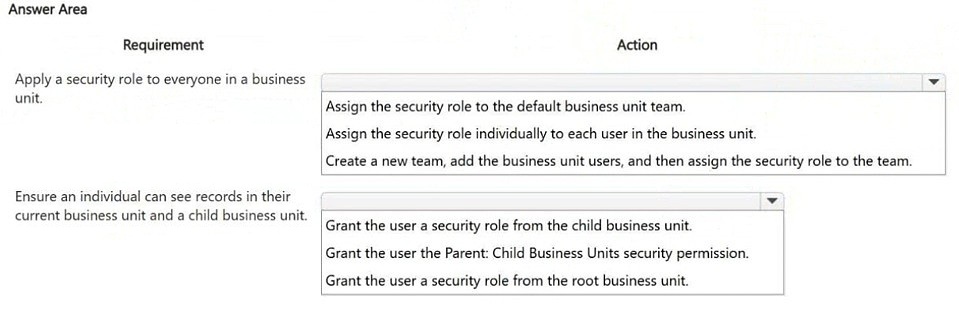
Assign the security role to the default business unit team, and grant the Parent: Child Business Units privilege so the role propagates to child business units.
Question
HOTSPOT
You are designing the organization structure for a company that has 5,000 users.
You need to configure security roles for the company while minimizing administrative effort.
What should you do? To answer, select the appropriate options in the answer area.
NOTE: Each correct selection is worth one point.
Key Takeaways
The hotspot tests whether you know that roles belong on teams and that the Parent: Child Business Units privilege extends a parent-BU role to users in subordinate business units — the trap is assigning roles directly to users or to each business unit separately.
In Microsoft Dataverse, security roles should be assigned to a business unit team (such as the default business unit owner team) rather than to individual users, and the Parent: Child Business Units privilege lets that role flow down to child business units. This combination scales to a 5,000-user organization while minimizing per-user administrative work.
Common mistake: Assigning the security role to each user individually (or creating a duplicate copy of the role per business unit), which multiplies administration across 5,000 accounts and breaks inheritance when the hierarchy changes.
Expert Analysis
Why the Answer Is Correct
Dataverse automatically creates one owner team per business unit (the default business unit team), so placing the security role on that team grants access to everyone mapped to the business unit without any per-user assignment work. Adding the Parent: Child Business Units privilege in the role means a role held at a parent business unit also covers users located in child business units, so the same role definition cascades down the org hierarchy. Together, these two selections let one role assignment serve thousands of users and remain correct as people move within the hierarchy.Why Other Candidate Answers Are Wrong
Assigning the role to individual users is the highest-effort path: each hire, transfer, and termination requires a separate role assignment, which is unmanageable at 5,000 users. Assigning a separate copy of the role to each business unit also fails the 'minimize administrative effort' requirement because every change must be replicated in every copy. Granting the user a privilege such as 'Organization' level read or a broad user-level privilege would over-provision access and defeats least privilege, while a role assigned only to a specific custom team would not automatically cover the whole business unit.Community Comment Notes
The single community post agrees with this verdict, stating: "Assign the security role to the default business unit team" and "Grant the user the Parent: Child Business units security permission." That matches Microsoft's documented owner-team model, so the comment supports — but does not replace — the official guidance.Official Reference
Exam Strategy
For hotspots about scaling security, look for the answer that moves access from users to teams and relies on business-unit inheritance. Any selection that mentions assigning to individual users, or duplicating roles per business unit, is almost always the low-effort trap in reverse.
Frequently Asked Questions
Why assign an AB-410 security role to a business unit team instead of users?
Owner teams exist per business unit by default, so team-based roles grant access automatically to all members and survive user changes without reassignment.
Discussion 1 contributions
Compiled from public community threads and reader submissions, lightly edited for clarity. Handles and vote tallies are shown as recorded.
From public community threads 1
-
exam_upskill 👍 11. Assign the security role to the default business unit team. 2. Grant the user the Parent: Child Business units security permission.
Reader comments & corrections
No reader corrections yet — spotted an error or have a note? Share it below.