Canvas app configurations for Fabrikam's field technician app
Short answer
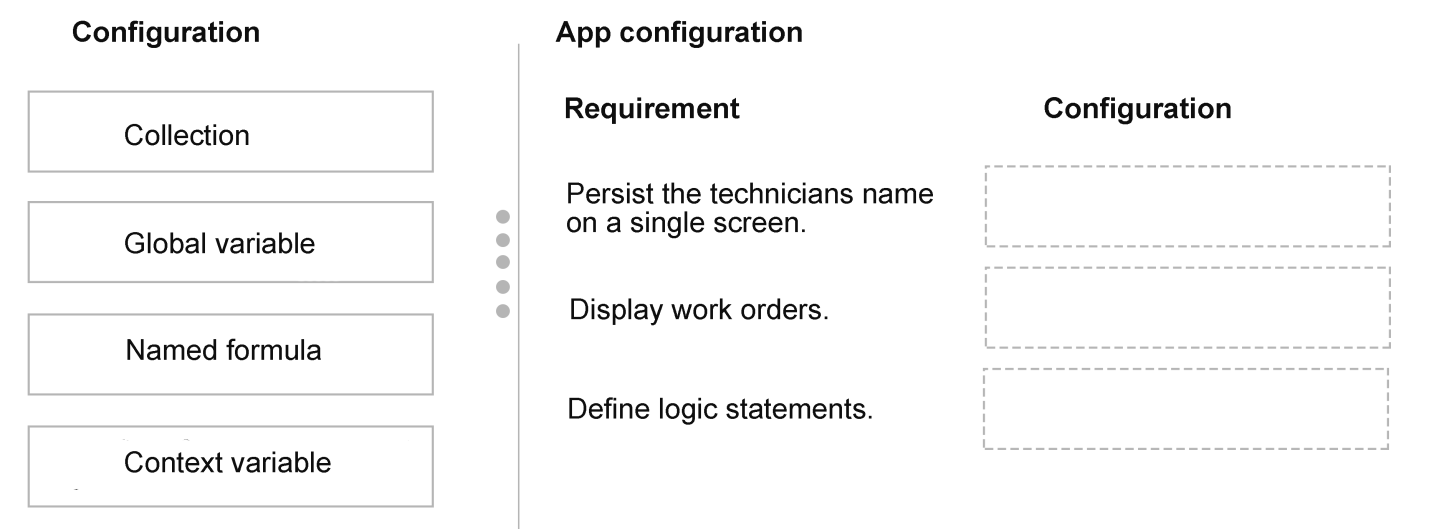
Use a context variable for the technician name that is persisted on the home screen only, a collection to hold the work order rows displayed in the gallery, and a named formula for the reusable calculation/logic configuration.
Question
This is a case study. Case studies are not timed separately from other exam sections. You can use as much exam time as you would like to complete each case study. However, there might be additional case studies or other exam sections. Manage your time to ensure that you can complete all the exam sections in the time provided. Pay attention to the Exam Progress at the top of the screen so you have sufficient time to complete any exam sections that follow this case study.
To answer the case study questions, you will need to reference information that is provided in the case. Case studies and associated questions might contain exhibits or other resources that provide more information about the scenario described in the case. Information provided in an individual question does not apply to the other questions in the case study.
A Review Screen will appear at the end of this case study. From the Review Screen, you can review and change your answers before you move to the next exam section. After you leave this case study, you will NOT be able to return to it.
To start the case study
To display the first question in this case study, select the “Next” button. To the left of the question, a menu provides links to information such as business requirements, the existing environment, and problem statements. Please read through all this information before answering any questions. When you are ready to answer a question, select the “Question” button to return to the question.
Background
Fabrikam Inc. is an energy provider that operates wind and solar farms across multiple countries and regions. The company uses Microsoft Power Platform to manage asset maintenance, technician workflows, and predictive analytics.
Field technicians use canvas apps on mobile devices to capture inspection and repair data. Operations managers use model-driven apps to monitor asset performance and maintenance history.
The company plans to enhance its platform by introducing AI-driven insights, improving reuse across applications, and establishing a formal application lifecycle management (ALM) strategy.
Current environment
Applications
Field technicians use an outdated mobile app to log maintenance activities and capture asset readings in SharePoint Online.
Operations managers use a model-driven app to review maintenance records and asset performance trends.
Development practices
Developers build and modify applications directly in the production environment.
There is NO structured ALM process.
Solutions are NOT consistently used to package or deploy application components.
Reusable components are inconsistently implemented across apps, leading to duplication.
AI integration
Fabrikam Inc. plans to actively explore generative AI usage as part of the next phase of work.
Business requirement
Application development
The outdated mobile app must be replaced with a new app that supports responsive design principles, provides full control over the UI, and allows technicians to take and upload photos directly from their mobile devices.
The new app for the field technicians requires the name of the technician to be persisted on the home screen only. In addition, work orders must be displayed within a gallery.
All new apps must connect to a scalable, cloud-based relational data store.
Apps must support efficient data entry for technicians in the field.
Reusable UI elements must be implemented to reduce duplication.
AI capabilities
The company requires a generative AI solution to manage customer complaint responses and create custom inspection reports that align to an existing template.
Customer complaint responses must be generated in applications and based on emails being sent to a mailbox.
Custom AI development must be minimized.
Generative AI reusability
Generative AI solutions must accept dynamic inputs to adapt to different scenarios.
Generative AI solutions must be reusable across different Power Platform services.
Extensibility
Custom UI form components must be reusable across applications.
Use of server-side custom code must be minimized where possible.
Technical requirements
Application lifecycle management (ALM)
Separate environments must be used for development, testing, and production.
Solutions must be used to package application components, segmented based on functional areas.
Managed solutions must be deployed to the production environment.
Validation must occur before deployment to production.
Data processing
Aggregated values across related rows must be displayed for reporting.
Calculations must update automatically as new data is entered. Calculation data must be limited to a maximum length of 10.
Issues
Duplicate logic exists across multiple canvas apps.
Developers frequently overwrite changes in production.
Generative AI solutions produce inconsistent outputs due to missing or inconsistent inputs.
Maintenance metrics are not consistently calculated across related rows.
You need to create the new app based on the requirements.
Which configurations should you use? To answer, move the appropriate configurations to the correct requirements. You may use each configuration once, more than once, or not at all. You may need to move the split bar between panes or scroll to view content.
NOTE: Each correct selection is worth one point.
Key Takeaways
It tests variable scope and data-shape selection in canvas apps, and the main trap is answering "persisted" with a global variable when the requirement says the value must live on one screen only.
This case study asks which Power Fx configurations satisfy the field technician canvas app requirements. The technician name scoped to the home screen uses a context variable, the work order gallery is fed by a collection, and reusable logic is defined as a named formula.
Common mistake: Using Set() to create a global variable for the technician name, because a global variable does persist and is visible everywhere — but "on the home screen only" requires a screen-scoped context variable.
Expert Analysis
The build this case demands
Fabrikam is replacing a SharePoint-backed mobile app. Responsive design, full control over the UI, and the ability to take and upload photos (the Camera / Add picture control) all point to a canvas app rather than a model-driven app, with a scalable cloud relational store behind it — Dataverse. The question is which Power Fx configuration satisfies each stated behaviour.
Why a global variable is the attractive wrong answer
For "the name of the technician must be persisted on the home screen only", the reflex is Set(TechnicianName,...). A global variable does persist for the whole session, it is reachable from every screen and control, and it survives navigation — so it sounds exactly like "persisted". The single point where it stops being correct is the word only: a global variable leaks the technician name to every other screen and nested component, which is broader scope than the requirement allows. The right configuration is a context variable (UpdateContext({TechnicianName:...})) created on the home screen; it lives on and is readable from that screen, matching "persisted on the home screen only".
Collections and named formulas
The work orders must be displayed within a gallery, and a gallery binds to a table of records. The configuration that materialises rows into an in-app table for the gallery is a collection (ClearCollect / Collect); a single-value variable cannot supply a gallery's row set.
The remaining slot is reusable logic — duplicate logic across canvas apps and maintenance metrics that are not calculated consistently. A named formula (Name = expression in App.Formulas) defines a reusable, read-only computation once and evaluates it wherever referenced, so it fits the reusable-logic configuration. For reusable visual elements the case would instead call for canvas components.
Resulting mapping
Technician name on the home screen only → context variable; work orders in a gallery → collection; reusable calculation logic → named formula.
Official Reference
- https://learn.microsoft.com/en-us/power-apps/maker/canvas-apps/working-with-variables
- https://learn.microsoft.com/en-us/power-apps/maker/canvas-apps/create-update-collection
- https://learn.microsoft.com/en-us/power-platform/power-fx/named-formulas
These links open the official vendor documentation in a new tab.
Exam Strategy
For drag-drop Power Platform cases, first classify each requirement by scope and shape: one value on one screen means a context variable, one value app-wide means a global variable, many rows shown in a gallery means a collection, computed read-only logic means a named formula, and reusable visuals mean a component. Read the qualifying words ("only", "all apps", "across rows") before picking, because they usually decide the configuration.
Frequently Asked Questions
Why use a context variable instead of a global variable for the technician name?
Can a named formula be used instead of a collection for the gallery?
Why is a canvas app the right choice for the replacement app?
Discussion 1 contributions
Compiled from public community threads and reader submissions, lightly edited for clarity. Handles and vote tallies are shown as recorded, and comments reflect the views of individual contributors.
From public community threads 1
-
exam_upskill 👍 11. Context Variable 2. Collections 3. Named Formula
Reader comments & corrections
No reader corrections yet — spotted an error or have a note? Share it below.