Adding Dog Weight to the Resident Form in a Model-Driven App
Short answer
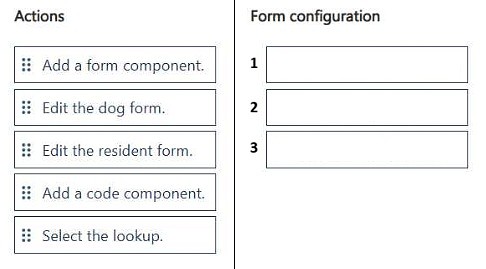
Edit the resident form, add a form component, then select the lookup to the Dog table so care staff can update the dog's weight from the resident record.
Question
DRAG DROP This is a case study. Case studies are not timed separately from other exam sections. You can use as much exam time as you would like to complete each case study. However, there might be additional case studies or other exam sections. Manage your time to ensure that you can complete all the exam sections in the time provided. Pay attention to the Exam Progress at the top of the screen so you have sufficient time to complete any exam sections that follow this case study. To answer the case study questions, you will need to reference information that is provided in the case. Case studies and associated questions might contain exhibits or other resources that provide more information about the scenario described in the case. Information provided in an individual question does not apply to the other questions in the case study. A Review Screen will appear at the end of this case study. From the Review Screen, you can review and change your answers before you move to the next exam section. After you leave this case study, you will NOT be able to return to it. To start the case study To display the first question in this case study, select the “Next” button. To the left of the question, a menu provides links to information such as business requirements, the existing environment, and problem statements. Please read through all this information before answering any questions. When you are ready to answer a question, select the “Question” button to return to the question. Background Contoso Suites is an animal shelter that specializes in finding homes for dogs that have been given up by their owners. The shelter can house up to 20 dogs. The shelter is implementing one model-driven Power Apps app to track the dogs and schedule meetings with potential adopters. No other apps will be created. The model-driven app uses Dataverse with out-of-the-box functionality when possible. Dataverse is set up with the following configuration: • The solution prefix “cs” is used for all new components. • Only the root business unit is used. • All tables are stored in Dataverse and do not require rapid scaling. • Exchange server-side sync is not configured. Adopters • Adopter information is stored in a Contact table. • Contacts are considered to be duplicates if they have the same email address and last name. • Adopters are often late to meetings, so a reminder email is sent to them two hours before their meeting. • The email reminders must not be tracked in the system. Dogs • Dog information is stored in a Dog table, which is organization owned. • Breed, size, and weight are fields in the table. Dog residency • A Resident table tracks the stay of each dog. • Each resident record has a lookup for the dog and its food. • The food type and amount are logged on each resident record. Auto-posting is not configured for changes to food type and amount. • A fee of $120 is in a currency column named Adoption Fee. This fee can be changed depending on the adoption circumstances. • A formula column named Deposit is automatically populated with 20% of the adoption fee. • A resident record is generated automatically when a dog record is created. This is the only way a resident record can be created. Exercise and feedings • Exercise for the dogs is tracked in an Exercise table. • Feedings are tracked in a Feeding table. • Exercise and feeding records appear in a resident record timeline. Care staff • The care staff must be able to view who changed the food type and the amount that was given, for up to three months ago. • The staff must be able to update the weight of a dog on the resident record. • The staff report that the buttons are too small on the touch screen they use to log exercise and feeding. • The staff must be able to view who the adopters are for upcoming meetings. The staff must not be able to update adopter information. Administrative staff • Administrative staff must receive a weekly list of duplicate contacts. Duplicate alerts must not appear when a staff member saves a new contact. • When an adopter wants to adopt a dog, the staff must perform a series of adoption duties in order. The following duty list must be displayed on the screen: o Commitment:
- Obtain adopter signature in a commitment document.
- Collect deposit.
- Document spay or neutering date.
- Perform spay or neutering.
- Document pickup date.
- Collect full payment.
- Verify dog is picked up.
Key Takeaways
The question tests embedding a related table's form on a model-driven form, and the trap is editing the Dog table form directly instead of surfacing it inside the Resident form.
In the Contoso Suites case study, care staff must update a dog's weight from the Resident record even though Weight lives on the Dog table. The page establishes the correct three-step sequence: edit the resident form, add a form component, and select the Dog table lookup.
Common mistake: Editing the Dog table form or the Weight field's own properties, which does not expose the weight on the resident record where staff actually work.
Expert Analysis
Why the Answer Is Correct
Because Weight is stored on the Dog table and the requirement is to update it from the resident record, the correct sequence is: edit the resident form, add a form component, then select the lookup to Dog. The form component ("Quick view form"-style embedding via the form component control) renders the Dog data inline on the Resident form, bound through the resident record's dog lookup. This keeps staff inside the resident timeline-driven workflow while writing to the Dog table, satisfying the requirement without creating a new app.Why Other Candidate Answers Are Wrong
Editing the Dog table form alone would place Weight only on dog records, not on the resident record, so care staff still could not update it where they log exercise and feedings. Adding a form component before editing the resident form is out of sequence — there is no target form to place the component on. Selecting a lookup other than Dog (for example Food or Resident) would surface the wrong related data and leave Weight inaccessible.Community Comment Notes
The single community submission lays out the same order: "1. Edit the resident form 2. Add a form component. 3. Select the lookup". That matches the exam's expected progression from the host form, to the component, to the related-table lookup, and it aligns with Microsoft's guidance on embedding related table forms using the form component control.Official Reference
Exam Strategy
On drag-drop sequence items, start from the record the user is actually on (the Resident form) and move outward to the related table. Always check which table owns the target field — Weight lives on Dog, so the lookup you select must be the dog lookup on the resident record.
Frequently Asked Questions
Why is Weight updated through the Resident form instead of the Dog form?
Weight is a field on the Dog table, but staff work from the resident record. A form component bound to the dog lookup surfaces that field inline so they can edit it in context.
Which lookup must be selected when adding the form component?
Select the lookup that relates the resident record to the dog — the Dog table lookup — so the embedded form shows the correct dog's data.
Discussion 1 contributions
Compiled from public community threads and reader submissions, lightly edited for clarity. Handles and vote tallies are shown as recorded.
From public community threads 1
-
exam_upskill 👍 21. Edit the resident form 2. Add a form component. 3. Select the lookup
Reader comments & corrections
No reader corrections yet — spotted an error or have a note? Share it below.