Creating an ACI Physical Domain and Attaching a VLAN Pool via the REST API
Short answer
AD Use the POST method with an attributes object in the REST API body.
Question
Key Takeaways
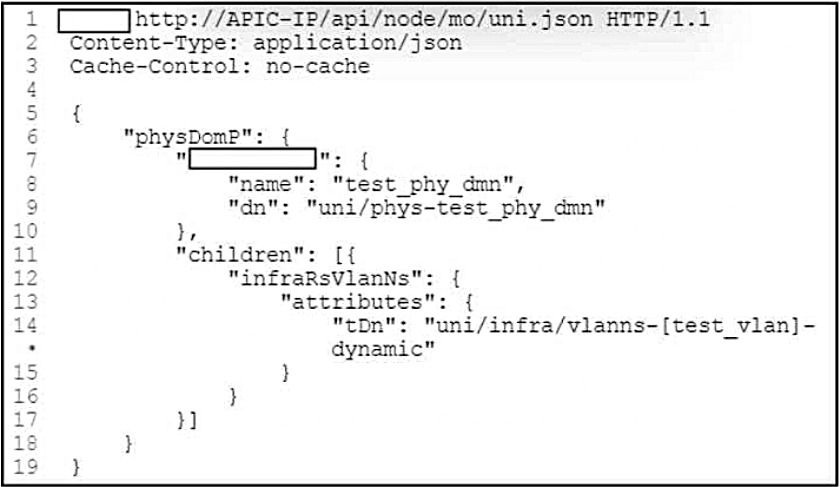
ACI configuration is model-driven: a POST to /api/node/mo/uni.json carrying a physDomP object with an attributes block (name, dn) plus a child infraRsVlanNs referencing the VLAN pool namespace (tDn) is the canonical way to configure a physical domain and bind a VLAN pool.
In the Cisco ACI REST API, you create a physical domain and attach a VLAN pool with a POST to the fabric policy managed object, supplying the configuration inside an attributes object (and the VLAN pool relation as a child infraRsVlanNs).
Common mistake: Choosing GET (read) or PATCH (not the ACI verb) or variables (not an ACI REST element). The two required pieces are the HTTP method POST and the attributes key in the JSON body.
Expert Analysis
Why the Answer Is Correct
The ACI REST API configures objects via POST (create/modify) with the object's properties in an attributes dictionary. To create a physical domain and attach a VLAN pool you POST a physDomP with attributes (name, dn) and a child infraRsVlanNs whose tDn points to the VLAN pool — hence POST and attributes.
Why the Other Options Are Wrong
GET is a read operation, not a configuration method. PATCH is not the ACI REST verb (ACI uses POST for create/modify). variables is not an ACI REST API element. These do not accomplish the configuration.
Community Comment Notes
Community: "Correct A and D — POST to create and attributes"; DevNet ACI getting-started shows exactly POST.../uni.json with { "physDomP": { "attributes": { "name":... }, "children": [ { "infraRsVlanNs": { "attributes": { "tDn":... } } } ] } }. Votes AD 100.
Official Reference
https://developer.cisco.com/docs/aci/getting-started
This link opens the official vendor documentation in a new tab.
Community Votes
100% of anonymous learners picked answer AD. Votes are pick records left by other test-takers — they are not the verified answer.
Discussion 6 contributions
Compiled from public community threads and reader submissions, lightly edited for clarity. Handles and vote tallies are shown as recorded, and comments reflect the views of individual contributors.
From public community threads 6
-
crooks_1988 👍 2Correct A and D- POST to create and "attributes"
-
GoForCCNP 👍 1It's A and D! https://developer.cisco.com/docs/aci/#!getting-started/physical-domain-configuration
-
udo2020 👍 1Should be A! POST http://..... attribute....
-
luisam 👍 3Answer A and D
-
0ed2da0 👍 2A & D POST and attributes
Show 1 more comment
-
wickkkkkkkkkkkkkkkkkk 👍 1AAAAAA and CCCCCC
Reader comments & corrections
No reader corrections yet — spotted an error or have a note? Share it below.