How to Restore OSPF Adjacency on Passive Interfaces?
Short answer
D router ospf 1
Question
Key Takeaways
The question tests whether you recognize that passive-interface default suppresses OSPF Hellos globally, requiring a targeted no passive-interface command to restore neighbor discovery on specific WAN links.
This question evaluates your understanding of OSPF passive interface behavior and how to selectively enable routing adjacencies. The community overwhelmingly agrees that applying the no passive-interface command to the router-facing link resolves the route-sharing failure.
Common mistake: Candidates frequently choose interface configuration mode or OSPF process restart commands, overlooking that the protocol is already running but intentionally silenced by a passive configuration. Some also misidentify the switch-connected port as the router peer, leading them to apply the command to the wrong interface.
Expert Analysis
Core Concept: OSPF Passive Interface Behavior
In Cisco IOS, the passive-interface command prevents an interface from sending or receiving OSPF Hello packets, effectively disabling neighbor adjacency formation while still advertising the connected subnet. When engineers use passive-interface default, this suppression applies to all current and future interfaces automatically. To establish OSPF adjacencies on specific links (such as those connecting to other routers), you must explicitly override the default behavior using the no passive-interface <interface-name> command.
Why Option D is Correct
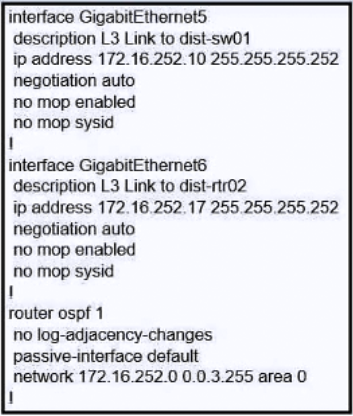
Based on the scenario and community consensus, the exhibit shows a configuration where passive-interface default is active, and one interface connects to a neighboring router while another terminates at a Layer 3 switch. Applying no passive-interface GigabitEthernet6 (the router-to-router link) re-enables OSPF Hello transmission on that specific interface, allowing neighbor discovery, adjacency establishment, and subsequent route exchange. Comment [9] correctly notes that this targeted negation is the standard best practice when using passive-interface default.
Why Other Options Fail
Options referencing router ospf 1 simply enter or verify the OSPF process, which does not change the passive state of any interface. Similarly, entering interface GigabitEthernet5 places you in interface configuration mode but does not modify OSPF behavior. As highlighted in comment [1], the switch-connected interface is a red herring; OSPF adjacencies are only required between routers, not switches. Comment [3] further clarifies that the goal is to restore route sharing across the entire topology, which requires activating the correct inter-router link rather than reloading the routing process or misconfiguring access ports.
Official Reference
- Cisco IOS IP Routing: OSPF Configuration Guide, "Configuring OSPF Passive Interfaces"
- RFC 2328, OSPF Version 2, Section 10.5 (Hello Packets)
- Cisco ENCOR 350-401 Official Cert Guide, Chapter 10: OSPF Implementation
These links open the official vendor documentation in a new tab.
Exam Strategy
When troubleshooting OSPF neighbor failures, always audit the router configuration for passive-interface commands before checking physical connectivity or authentication. Remember that passive-interface default silences all interfaces, so you must use no passive-interface followed by the specific WAN-facing interface name to restore adjacencies without compromising security on access networks.
Community Votes
100% of anonymous learners picked answer D. Votes are pick records left by other test-takers — they are not the verified answer.
Discussion 9 contributions
Compiled from public community threads and reader submissions, lightly edited for clarity. Handles and vote tallies are shown as recorded, and comments reflect the views of individual contributors.
From public community threads 9
-
ROBZY90 👍 4 Answered DIf we need all interfaces to be passive interfaces and leaving a single or a couple of interfaces non-passive, we can set passive interface as the default configuration by using the ‘passive-interface default’ command: Router#conf t Router(config)#router ospf 1 Router(config-router)#passive-interface default Router(config-router)#no passive-interface gi0/0/0
-
Dalik 👍 2 Answered AIt is recommended to configure passive-interface default under the OSPF routing process and specifically enable the interfaces where routing adjacencies are to be formed.
-
IgorLVG 👍 2 Answered Dno passive-interface default will "activaet" the hello in the other interfaces.
-
Marcinko 👍 1 Answered B"...R1 fails and then regains operational status, it must allow 100 seconds for the routing protocol to converge before preemption takes effect." So R1 is active than goes down and R2 takes the active role. Once R1 come up it has to wait for 100 sec till it takes over the active role Preemption delay hast to be set on R1 to "tell" the router to wait 100 sec... standby 300 preempt delay minimum 100 (one comment: standby [ group-number] preempt [ delay{ [ minimum seconds] [ reload seconds] [ sync seconds]}] ) --> standby 300 delay minimum 100 is missing the preempt command
-
Eduardo79 👍 1Isn't the link to the router on Gig6? No other answer removes the passive-interface from Gig6. This is how I understood the question. An engineer connected 2 routers, the one we're configuring and another one (probably the one connected to int GigE6), so we need an answer that will enable OSPF on that interface. However, even if the L3 switch on GigE5 is required, the only answer that includes both interfaces is D.
Show 4 more comments
-
Reavr 👍 1 Answered DBoth A and D work but for this question the answer is D. "A" works if you are only trying to share routes with one of the routers but the question says "but the routers are not sharing routes." Aka it is implying we want to share routes with both routers, not just one. Out of these options, D is the only one that lets you share routes with both routers.
-
SwitchKiller 👍 1 Answered DI read this as the Engineer has configured two routers but we're only seeing output from one of them. The Other router connects to the Interface G6 and the connection on G5 is to a switch so is a red herring. Answers A & B are then discounted as they reference the wrong interface, leaving D as the correct answer
-
Osama_anwar 👍 4 Answered DCorrect
-
yasmiine 👍 2 Answered DAnswer D
Reader comments & corrections
No reader corrections yet — spotted an error or have a note? Share it below.
Related Analysis
Practice All 350-401 Questions
Access 218 questions with complete answers and detailed explanations.
View Full 350-401 Practice Test →