How to Configure Static NAT Port Redirection for Internal Servers?
Short answer
C ip nat inside static tcp 10.1.1.100 8080 10.1.1.100 80
Question
Key Takeaways
The question tests the exact parameter order of Cisco's static NAT command and clarifies why the 'inside' keyword applies to inbound translation rules rather than just outbound traffic.
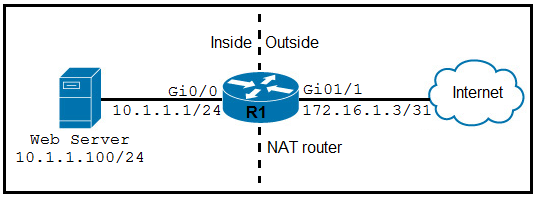
This question evaluates your ability to configure static NAT with port redirection to expose an internal web server on port 8080 to external users via standard HTTP port 80. The community consensus strongly supports option C as the correct mapping syntax.
Common mistake: Option D is the most frequent incorrect choice, as candidates mistakenly associate 'outside' with incoming internet traffic or reverse the port sequence, overlooking that Cisco IOS requires the local/internal IP and port to be listed before the global/external equivalents.
Expert Analysis
Core Concept: Static NAT Port Redirection
When an internal server listens on a non-standard port (like 8080) but needs to be accessible externally on a standard port (like 80), you must configure Static NAT with Port Redirection (often called port forwarding). This ensures that inbound packets destined for the public IP on port 80 are translated to the internal IP on port 8080 before reaching the server.
Command Syntax Breakdown
The underlying Cisco IOS command structure is ip nat inside source static tcp <local-ip> <local-port> <global-ip> <global-port>. Despite the slight simplification in the exam options (omitting the word source), the logical structure remains identical.
- Local (Inside):
10.1.1.100 8080(the actual server and its listening port) - Global (Outside):
10.1.1.100 80(the address/port exposed to the internet)
Option C correctly follows this sequence, placing the internal server details first and the external-facing details second.
Why the 'Inside' Keyword?
Candidates often confuse the inside and outside keywords based on traffic direction. In Cisco NAT terminology, ip nat inside source static defines how the router translates addresses relative to the inside network. Even though the traffic is incoming from the internet, the rule is applied under the inside context because it modifies the destination attributes for the inside host. As noted by community members, using outside static would require a completely different syntax structure that isn't valid here.
Analyzing the Distractors
- Option A & D: Incorrectly use
outside static, which does not align with standard Cisco IOS NAT command hierarchy for port forwarding. Additionally, D reverses the port mapping order, which would translate internal port 80 to external port 8080—the opposite of the requirement. - Option B: Reverses the port order, failing to match the specific local-to-global translation required.
Note on Syntax: Commenters have pointed out that real-world IOS strictly requires ip nat inside source static tcp.... While the exam simplifies this, recognizing the local-ip local-port global-ip global-port pattern is the critical skill being tested, as highlighted in user discussions regarding command validity.
Exam Strategy
Memorize the exact parameter order for Cisco NAT commands: always list the local (inside) IP and port first, followed by the global (outside) IP and port. When stuck, identify which IP/port belongs to the internal server versus the external client and place them accordingly in the command structure.
Community Votes
83% of anonymous learners picked answer C. Votes are pick records left by other test-takers — they are not the verified answer.
Discussion 14 contributions
Compiled from public community threads and reader submissions, lightly edited for clarity. Handles and vote tallies are shown as recorded, and comments reflect the views of individual contributors.
From public community threads 14
Show 9 more comments
-
Gene_nstudy 👍 3All options are wrong command syntax. ---------------------------- INET(config)#ip nat inside static tcp 10.1.1.100 8080 10.1.1.100 80 ^ % Invalid input detected at '^' marker. ---------------------------- The correct command syntax is as follows C. ip nat inside source static tcp 10.1.1.100 8080 172.16.1.3 80 Cisco exam question writers should review the questions they create.
-
KZM 👍 3 Answered CD. is incorrect, I think. There is no appropriate outside static NAT option in the given answers. For the outside static NAT, the command should that; "ip nat outside static tcp 172.16.1.3 80 10.1.1.100 8080", I think.
-
Mizuchan 👍 3 Answered CThis command effectively maps incoming TCP traffic on port 8080 to the web server's port 80, allowing external users to access the web server on the standard HTTP port 80.
-
TTOG 👍 2 Answered CIMHO, the only valid explanation of this mess is that while we are "outside" we still not in the "internet" which implies that internet SNAT/DNAT is happening in an other device not showing in the diagram and therefor we are using private space of 172.16... This reduce the question to tcp port redirection and, in that case answer will be C.
-
NazgulNr5 👍 2All answers are kinda wrong as Internet users won't be able to access the internal IP without that being NATted too. But C would also allow internal users to access the server on port 80.
-
[Removed] 👍 1 Answered CC is correct since we want to allow external users to access the internal web server on port 80 while the server listens on port 8080, the inside NAT rule is appropriate.
-
sharonmiller 👍 1 Answered Dnone of this makes sense... internet users are outside using port 80... they have to be translated from OUTSIDE to and then to use port 8080.. the answer is D
-
chiacche 👍 1 Answered Cip nat inside static tcp 10.1.1.100 8080 172.16.1.3 80
-
lazizz 👍 1The correct answer is "С", tested on eve-ng
Reader comments & corrections
No reader corrections yet — spotted an error or have a note? Share it below.
Related Analysis
Practice All 350-401 Questions
Access 218 questions with complete answers and detailed explanations.
View Full 350-401 Practice Test →
ip nat inside static tcp 10.1.1.100 8080 172.16.1.3 80Here's a breakdown of the command: -ip nat inside static tcp: This specifies a static NAT translation for TCP traffic on the inside interface. -10.1.1.100 8080: This is the local address of the web server and the port it's listening on (8080). -172.16.1.3 80: This is the public address (on the outside interface) and the port that will be used for incoming traffic (80). So, the command translates requests coming to172.16.1.3on port80to10.1.1.100on port8080, effectively allowing the web server to receive HTTP requests on port 80.