How to Configure Port Forwarding for an Internal Web Server?
Short answer
C interface G0/0
Question
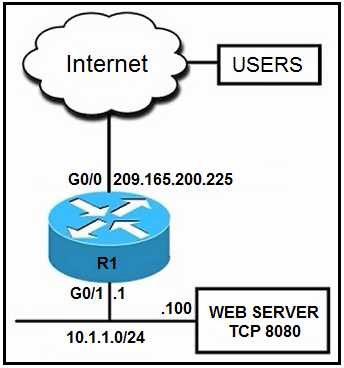
Key Takeaways
It tests precise mastery of the ip nat inside source static tcp command syntax and the inside/outside address hierarchy, where candidates often confuse parameter order or misidentify the target server IP.
This question tests the correct syntax and application of static NAT with port translation to expose an internal web server on a non-standard port to external users. The community consensus identifies option C as correct, acknowledging a known exam typo while validating its port-mapping logic.
Common mistake: Candidates frequently select options A or D by misinterpreting destination NAT syntax or choosing configurations that reference the router's own interface IP instead of the actual web server IP, resulting in failed packet translation.
Expert Analysis
Core Concept: Static NAT with Port Translation
The scenario requires exposing an internal web server listening on a non-standard port to external users accessing via standard HTTP. This is achieved through Static NAT with Port Translation (often called port forwarding or Destination NAT). The router must translate incoming packets destined for its Outside Global IP on port 80 into packets destined for the Inside Local IP on port 8080.
Command Syntax Breakdown
Cisco IOS enforces a strict syntax for static NAT mappings: ip nat inside source static tcp <inside_local_ip> <inside_local_port> <outside_global_ip> <outside_global_port> The command begins with inside source, indicating that traffic from the inside is translated when crossing outward, and vice versa for inbound traffic. Interfaces must be correctly designated with ip nat inside and ip nat outside.
Why Option C is Correct
Despite a widely noted typo in the exam dump where the inside IP is listed as the router's gateway instead of the actual server IP, Option C remains the intended answer because it correctly follows the parameter order and port mapping logic. As highlighted by community experts, the mapping aligns perfectly with the requirement: external users hit port 80, and the router forwards it to the server's port 8080. Community consensus confirms that this bidirectional NAT rule handles both inbound HTTP requests and outbound responses seamlessly.
Analyzing Incorrect Options
- Option A incorrectly places the Outside Global IP first in the NAT statement, violating Cisco IOS syntax requirements.
- Options B and D suffer from similar syntactical errors or incorrect IP/port combinations. Several candidates pointed out that multiple options erroneously use the router's interface IP instead of the web server's IP, which would cause NAT to drop traffic since the router itself isn't hosting the web service. Mislabeling interface directions further invalidates these configurations.
Official Reference
RFC 3022: Classical IP and ARP over Ethernet
This link opens the official vendor documentation in a new tab.
Exam Strategy
When tackling NAT configuration questions, immediately map the four translation components: Inside Local IP/Port and Outside Global IP/Port. Memorize the exact Cisco IOS syntax order to rapidly eliminate distractors that swap public/private parameters, and always verify that the translated IP matches the actual end-host rather than the router's gateway interface.
Community Votes
59% of anonymous learners picked answer C. Votes are pick records left by other test-takers — they are not the verified answer.
Discussion 15 contributions
Compiled from public community threads and reader submissions, lightly edited for clarity. Handles and vote tallies are shown as recorded, and comments reflect the views of individual contributors.
From public community threads 15
-
outnumber_gargle024 👍 11 Answered CC. interface G0/0 ip address 209.165.200.225 255.255.255.224 ip nat outside interface G0/1 ip address 10.1.1.1 255.255.255.0 ip nat inside ip nat inside source static tcp 10.1.1.1 8080 209.165.200.225 80 This translates traffic on http standard port (80) to port 8080. 8080 is not a default http port... doesn't make sense that anything outside of this private network would be trying to send http traffic to 8080
-
teems5uk 👍 7 Answered Ainterface G0/0 ip address 209.165.200.225 255.255.255.224 ip nat outside interface G0/1 ip address 10.1.1.1 255.255.255.0 ip nat inside ip nat inside source static tcp 209.165.200.225 8080 10.1.1.100 8080 The external interface (G0/0) is configured as an "outside" interface using ip nat outside. The internal interface (G0/1) is configured as an "inside" interface using ip nat inside. The static NAT translation is set up using ip nat inside source static tcp, which maps the external IP address and port to the internal IP address and port. This configuration ensures that traffic entering the router from the internet on port 8080 is translated to the internal web server (10.1.1.100) on port 8080. Options B, C, and D have incorrect configurations for achieving the specified goal.
-
apetrov 👍 4Did you notice that B C Dall have ip nat inside source static 10.1.1.1? 10.1.1.1 is the router IP address, while the task says that we should redirect to a WEB server address which is 10.1.1.100
-
EvillNL 👍 3 Answered CThe correct answer is C although there is a typo of the inside local IP - should be 10.1.1.100 interface G0/0 ip address 209.165.200.225 255.255.255.224 ip nat outside interface G0/1 ip address 10.1.1.1 255.255.255.0 ip nat inside ip nat inside source static tcp 10.1.1.100 8080 209.165.200.225 80 extendable The correct syntax of the ip nat command is: ip nat inside source static <protocol> <inside_local> <local_port> <inside_global> <global_port> local = private ip global = public ip
-
kldoyle97 👍 3Based on the wording of the question, the answer is either A or C since G0/1 is the inside address. I believe the translated address should be 10.1.1.100 not "10.1.1.1" since we want to translate the servers address in choice C. Choice A looks correct if we are trying to do Destination NAT, but it specifies "source". Not sure what to go with :/
Show 10 more comments
-
anonymous1966 👍 3 Answered CThe traffic coming from the web would probably use the TCP port 80 and the server is listening for the TCP port 8080. When you configure a NAT translation, it applies for both incoming and outgoing traffic.
-
ali_sh85 👍 3 Answered DI think D is correct, it should be a Destination NAT
-
artilling 👍 1 Answered DSorry for my English. Confused question. In options "B", "C" the source IP address is incorrect. In option “A” the public IP address is indicated first. And you will never have a NAT match in your life. While interface G0/0 "nat outside" In option "D" ip nat is incorrectly specified internally on interface G0/0. But if we do not have information that PAT is running on the router, or there is another Static NAT. Why don't we choose option "D"? After all, then the configuration will be correct and requests from the ISP on port 80 will be redirected to the WEB server on port 8080
-
zbeugene7 👍 1 Answered DCorrect answer is D. A and C are incorrect: NAT translation is done similar to the LB case with VIP as destination. This is similar however we have a single server so VIP is the outside interface ip , that is 209.165.200.225, hence the translation should be from 209.165.200.225 <80> to 10.1.1.1 <8080>. like it's in A except in A answer the port is incorrect.
-
chiacche 👍 1ip nat inside source static tcp 209.165.200.225 8080 10.1.1.100 8080 # Configure NAT mapping to map the external IP address and port (209.165.200.225:8080) to the internal web server (10.1.1.100:8080)
-
Outlaw_87 👍 1 Answered CFrom the picture Web Server IP is - 10.1.1.100 Last line should be like this: ip nat inside source static tcp 10.1.1.100 8080 209.165.200.225 80
-
XomXom 👍 1normally the incoming traffic (source) is holding a random port, destination is 8080. where we got this 80?
-
[Removed] 👍 1 Answered CC is correct look at the source port and the source ip
-
Rfvaz 👍 1 Answered AAnswer A, focus on the server!
-
Alfredomulemarchese 👍 1ChatGPT says "A"
Reader comments & corrections
No reader corrections yet — spotted an error or have a note? Share it below.
Related Analysis
Practice All 350-401 Questions
Access 218 questions with complete answers and detailed explanations.
View Full 350-401 Practice Test →