How to Fix HSRP Group Number Rejection?
Short answer
D standby version 2
Question
Key Takeaways
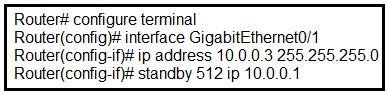
It tests your knowledge of default HSRP version constraints, where candidates often overlook that version 1 natively restricts groups to 255.
This question highlights the group number limitations between HSRP version 1 and version 2. The community unanimously confirms that switching to version 2 is required to accept group IDs beyond the 0–255 range.
Common mistake: Candidates frequently select priority or preempt options, mistakenly believing standard operational parameters are missing rather than recognizing the fundamental protocol version boundary.
Expert Analysis
HSRP Version Limitations
By default, Cisco IOS runs HSRP version 1, which strictly limits standby group numbers to the range of 0 through 255. When an engineer attempts to configure standby 512, the CLI rejects the command because 512 exceeds this hard-coded limit.
Why Option D Resolves the Issue
Executing standby version 2 upgrades the protocol instance on that interface to HSRP version 2, which expands the supported group range to 0 through 4095. As noted by multiple candidates in the community feedback, this single command directly addresses the root cause without requiring additional parameter adjustments.
Why Other Options Fail
- Option A (
standby redirects) is unrelated to group numbering and typically pertains to ICMP redirect behaviors in specific routing scenarios. - Options B and C (
priorityandpreempt) are valid HSRP tuning commands, but they cannot be applied until the group number itself is accepted by the running version. Configuring them first will still trigger a syntax rejection due to the invalid group ID.
Best Practices
Always verify the HSRP version before planning large-scale deployments. Version 2 also introduces changes to multicast addresses (224.0.0.102) and authentication methods, so ensure network-wide consistency when migrating.
Official Reference
https://www.rfc-editor.org/rfc/rfc5798.html
This link opens the official vendor documentation in a new tab.
Exam Strategy
When encountering configuration rejections on numeric identifiers, immediately verify the underlying protocol's version-specific limits before adding operational parameters. On the CCNP Enterprise exam, always consider default software behaviors first, as they frequently dictate whether a command will be accepted.
Community Votes
100% of anonymous learners picked answer D. Votes are pick records left by other test-takers — they are not the verified answer.
Discussion 4 contributions
Compiled from public community threads and reader submissions, lightly edited for clarity. Handles and vote tallies are shown as recorded, and comments reflect the views of individual contributors.
From public community threads 4
-
ciscoccie20 👍 14Correct! In HSRP version 1, group numbers are restricted to the range from 0 to 255. HSRP version 2 expands the group number range from 0 to 4095.
-
KZM 👍 5 Answered DBy default, HSRP operates using version 1 and supports standby group numbers ranging from 0 to 255. To utilize a group number such as 512, it's necessary to switch to version 2 using the command "standby version 2".
-
chiacche 👍 1 Answered Dstandby 512 -> HSRP v1 0~255 -> HSRP v2 0~4095
-
felix_simon 👍 1D
Reader comments & corrections
No reader corrections yet — spotted an error or have a note? Share it below.
Related Analysis
Practice All 350-401 Questions
Access 218 questions with complete answers and detailed explanations.
View Full 350-401 Practice Test →