Which Command Enables HSRP Preemption for Router Failover?
Short answer
A R2# standby 100 preempt
Question
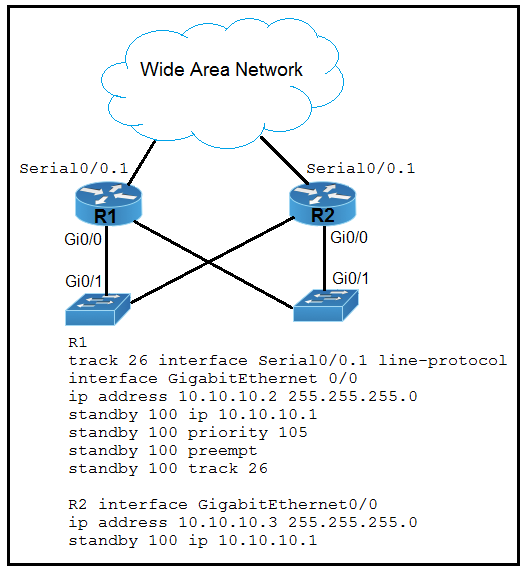
Key Takeaways
The question tests the critical distinction between HSRP priority tracking and preemption behavior, with the common trap being the assumption that tracking commands must be mirrored on the backup router or that priority drops automatically force a failover.
This question evaluates HSRP failover mechanics, specifically how interface tracking lowers priority and how preemption triggers role changes. The community consensus confirms that enabling standby preempt on the standby router is the sole missing configuration required for seamless takeover.
Common mistake: Candidates frequently select options C or D, incorrectly attempting to configure tracking on R2 for an interface that belongs to R1. They overlook that R1 already monitors the serial interface, and without explicitly enabling preemption on R2, it will remain in standby mode even if R1's priority drops below R2's.
Expert Analysis
HSRP Tracking vs. Preemption Mechanics
Hot Standby Router Protocol (HSRP) uses a priority-based election process where the router with the highest priority becomes the active router. By default, priorities start at 100. To enable dynamic failover, engineers use the standby track command to monitor an upstream interface. When that interface fails, the tracked router’s HSRP priority is decremented (default is 10), allowing the standby router to potentially assume the active role.
Why Option A is Correct
As highlighted by multiple community experts, R1 already has standby 100 track 26 configured. When Serial0/0.1 on R1 goes down, R1’s priority will automatically drop. However, HSRP does not allow a standby router to forcibly take over unless preemption is explicitly enabled. Configuring standby 100 preempt on R2 ensures that once R1’s priority falls below R2’s, R2 will immediately transition to the active state. The default decrement value of 10 means specifying decrement 10 (Option C) is redundant, and tracking R1’s interface on R2 (Options C and D) is architecturally incorrect since routers cannot directly track each other’s local interfaces in this manner.
Evaluating the Distractors
Options B, C, and D introduce unnecessary or misapplied configurations. Setting a static priority (Option B) doesn’t solve the dynamic failover requirement. Options C and D attempt to configure tracking on the wrong device or duplicate default behaviors. As noted in Cisco documentation, the standby track command modifies local priority based on local interface states, making cross-device tracking impossible via these CLI commands. Therefore, only preemption on the standby router bridges the gap between a priority change and an actual role transition.
Official Reference
https://www.cisco.com/c/en/us/support/docs/ip/hot-standby-router-protocol-hsrp/13780-6.html
This link opens the official vendor documentation in a new tab.
Exam Strategy
Always map out which router requires configuration changes before evaluating commands. Remember that HSRP tracking only adjusts priority locally; it never triggers a role change without the standby preempt command on the backup router, a frequent exam trap designed to test your understanding of protocol state transitions.
Community Votes
100% of anonymous learners picked answer A. Votes are pick records left by other test-takers — they are not the verified answer.
Discussion 9 contributions
Compiled from public community threads and reader submissions, lightly edited for clarity. Handles and vote tallies are shown as recorded, and comments reflect the views of individual contributors.
From public community threads 9
-
Mistwalker 👍 9 Answered AIt's A. Tracked objects will decrement priority by 10 as the default action, so that doesn't need to be explicitly configured. R2 will not become the active router without "standby preempt" unless R1 goes down completely, as f490efc mentioned, so that does need to be set. The scenario in this question, along with the above explanation, are mirrored here: https://www.cisco.com/c/en/us/support/docs/ip/hot-standby-router-protocol-hsrp/13780-6.html#toc-hId-1284746180
-
f490efc 👍 6 Answered AAgree with A. Decrement 10 is default value so you dont need to specify. However, R2 won't takeover unless R1 does not go down completely.
-
Aaron_0801 👍 5 Answered Ahttps://www.cisco.com/c/en/us/support/docs/ip/hot-standby-router-protocol-hsrp/13780-6.html#:~:text=The%20standby%20trackcommand%20allows%20you,the%20HSRP%20priority%20is%20reduced. The standby trackcommand allows you to specify another interface on the router for the HSRP process to monitor in order to alter the HSRP priority for a given group. If the line protocol of the specified interface goes down, the HSRP priority is reduced. This means that another HSRP router with higher priority can become the active router if that router has the standby preempt enabled. standby 1 track Serial0 !--- Indicates that HSRP tracks Serial0 interface. !--- The interface priority can also be configured, which indicates the !--- amount by which the router priority decreases when !--- the interface goes down. The default is 10.
-
Tadese 👍 2 Answered CR2# standby 100 track 26 decrement 10
-
Mizuchan 👍 2C would work if it was on R1...
Show 4 more comments
-
Abbribas 👍 1 Answered AIf R1's priority changes due to tracking (for example, it detects a failure on an interface and lowers its priority), R2 could temporarily become the active router if R1's priority becomes lower than R2's. If R1 recovers and its priority is restored to a higher value, R2 will not automatically revert to standby mode unless preempt is enabled on R2. Configuring preempt on R2 ensures that it will not continue acting as the active router if R1 comes back with a higher priority.
-
teems5uk 👍 1 Answered CI'm going with the option C considering the Track 26 command already applied on R1 "standby 100 track 26". The command instructs R2 to track the same interface (Serial0/0.1 with the number 26) as R1. When this tracked interface goes down on R1, both routers will adjust their HSRP priorities accordingly, facilitating a smooth failover to R2 if needed.
-
AbdullahMohammad251 👍 1 Answered AWithout preemption, R2 will become the active router only if interface Gi 0/0 of R2 goes down (the interface participating in HSRP.)
-
chiacche 👍 1 Answered Astandby 100 preempt: This command allows R2 to take over the role of the active router when its priority becomes higher than R1's
Reader comments & corrections
No reader corrections yet — spotted an error or have a note? Share it below.
Related Analysis
Practice All 350-401 Questions
Access 218 questions with complete answers and detailed explanations.
View Full 350-401 Practice Test →