EEM Applet Checks for a Learned MAC Address Every 600 Seconds
Short answer
D The watchdog timer runs the show ip arp check every 600 seconds, and the syslog action fires only when the specified MAC address is found.
Question
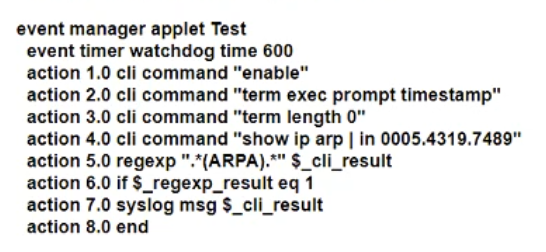
What does the applet accomplish?
Key Takeaways
The question tests whether you separate a timer-triggered check from a conditionally executed syslog action; the trap is assuming the 600-second timer guarantees a message every cycle.
This Cisco EEM watchdog applet polls the ARP output every 600 seconds and logs only when the specified MAC address is found; the correct answer is D.
Common mistake: A is the plausible wrong answer because it notices both the 600-second timer and the `syslog` action, but it ignores that the syslog action is inside the regexp match branch and sends nothing when the address is absent.
Expert Analysis
The timer is only the trigger
The event timer watchdog time 600 line means the applet wakes every 600 seconds. That fact makes A attractive: there is a 600-second timer and the script does contain syslog msg $_cli_result, so it sounds like a periodic status report. The critical detail is where that action sits. The timer causes a CLI command such as show ip arp | include <mac> to run, then regexp "ARPA" "$_cli_result" sets $_regexp_result. The syslog action is inside the if $_regexp_result eq 1 branch, so it executes only when the address appears in the command output. A commenter describes this precisely: the message is generated only "if the specific MAC address is found." If the address is absent, no syslog is sent; the applet merely checks again after another 600 seconds.
Why the other periodic and compare options fail
B and C both say the applet compares syslog output to a MAC table. It does not: it compares the result of the CLI command ($_cli_result) using a regular expression. B is also wrong on the condition—no event is generated on a miss. A fails at the same conditional boundary: it is not a status message every 600 seconds, but a match-triggered log. D is the intended answer: every 600 seconds the applet checks whether the specified address has been learned and acts only on a hit.
The ARP-versus-MAC wording caveat
The exhibit uses show ip arp, so the table being polled is the ARP table, not strictly the Layer 2 MAC address table. Several comments call this out and even argue that no option is perfectly worded. On a Cisco exam, D remains the best fit because it describes the conditional learned-address check rather than a guaranteed periodic syslog. The exam wants you to distinguish "checks every 600 seconds" from "logs every 600 seconds."
Official Reference
- https://www.cisco.com/c/en/us/support/docs/ios-nx-os-software/ios-xe-16/216091-best-practices-and-useful-scripts-for-ee.html
- https://www.cisco.com/c/en/us/td/docs/ios-xml/ios/eem/command/eem-cr-book/eem-cr-e2.html
These links open the official vendor documentation in a new tab.
Exam Strategy
When an EEM applet includes a timer plus a regexp/if block, map each action to its trigger: the timer only starts the check, while syslog, cli, or other actions inside the conditional occur only on a match. Eliminate options that claim an action every timer interval unless it is outside the if. Also verify whether the CLI polls ARP or MAC output; the wording may be loose, so choose the option that preserves the conditional learned-address logic.
Frequently Asked Questions
Does the EEM applet generate a syslog message every 600 seconds?
Why is D correct when the applet uses show ip arp instead of the MAC address table?
What does $_regexp_result eq 1 control in this applet?
Community Votes
53% of anonymous learners picked answer D. Votes are pick records left by other test-takers — they are not the verified answer.
Discussion 32 contributions
Compiled from public community threads and reader submissions, lightly edited for clarity. Handles and vote tallies are shown as recorded, and comments reflect the views of individual contributors.
From public community threads 30 of 32
-
TroyMcLure 👍 9 Answered DThis one is tricky. Please, pay attention to the wordings. With the command “show ip arp | in 0005.4278.9866”, the “ARPR” text is only found if this MAC address has been learned in the router. Answer A is not correct as the syslog message is only generated if the specific MAC address is found (not every 600 seconds).
-
Burik 👍 6 Answered DIt's D. The ARP table is checked every 600 seconds, but the syslog message is generated only if the specific MAC address is found, it's not generated every 600 seconds. If the MAC isn't found, no syslog message is generated. if $_regexp_result eq 1 <-- if the MAC is found... syslog msg $_cli_result <-- ...then generate a syslog entry, otherwise do nothing
-
mgiuseppe86 👍 4It's A Read Engish. It generates a syslog message. None of the other answers say that. and action 7 generates a syslog message. I tested this in my lab. D does NOT check a mac address table, it checks the arp table.
-
CKL_SG 👍 4 Answered DTested in GNS3 syslog message is generated only if the specific MAC address is found, it's not generated every 600 seconds. If the MAC isn't found, no syslog message is generated.
-
DavideDL 👍 3 Answered DI'm not an applet expert but for what I can understand the script generate a syslog message every 600s ONLY if the MAC Address: 0005.4319.7489 is in the ARP table. For this reason I would exclude A. B and C are wrong because It doesn't compare a syslog output. D It isn't completely correct but seems OK to me... It checks the *ARP table... My €0.02
Show 25 more comments
-
Burik 👍 3So it's D. The ARP table is checked every 600 seconds, but the syslog message is generated only if the specific MAC address is found (not every 600 seconds). If the MAC isn't found, no syslog message is generated.
-
JackDRipper 👍 3 Answered AB and C are obviously wrong. D seems correct at first glance, but the EEM is reading the ARP table, not the MAC address table A is the only valid answer.
-
danman32 👍 2Answer A seems plausible but it says a syslog message is generated every 600 seconds, reporting the status (exists or not) of the MAC address. But that's not what the script is doing. A syslog message is generated ONLY if the MAC address is found.' I agree with those pointing out that answers B-D are addressing the MAC table, which isn't quite right. It is the ARP table that is checked. But that's Cisco for you. Best fit if you overlook table terminology is answer D.
-
artemiwwe 👍 2Poorly described ansers :( None is correct. It does not generete every 600 seconds, it checks every 600 seconds if the MAC address is present in ARP table, and IF it is present, generates syslog. https://www.cisco.com/c/en/us/support/docs/ios-nx-os-software/ios-xe-16/216091-best-practices-and-useful-scripts-for-ee.html Useful EEM Scripts -> Track Specific MAC Address for MAC Address Learn
-
Asombrosso 👍 2 Answered DA. It DOESN'T generate a syslog message every 600 seconds - if only MAC exists B. it DOESN'T It compare syslog output- it compares cli output C. It DOESN'T compare syslog output - it compares cli output D. It DOESN'T check the MAC address table - it checks ARP
-
Burik 👍 2They are not. This question wants to check our knowledge of the use of the IF statement in EEM applets. Answer A is wrong because Action 7.0 will run only IF Action 6.0 returns 1. The answer is D.
-
Nickplayany 👍 2 Answered AIt´s A!! I have been checking that and the applet checks the status of the specified MAC in the ARP table every 600 seconds and generates a syslog message when the address is found
-
gorillaenhanced 👍 2(A) says it generates a syslog unconditionally which is not the case. the log is generated if the condition 7.0 is verified correct answer is D
-
Burik 👍 2So what? The show ip arp command shows MAC addresses as well. It's D.
-
AhcMez 👍 2 Answered Agood response is A there is a Syslog message
-
Splashisthegreatestmovie 👍 2Answers A and D are splitting hairs to me
-
Entivo 👍 2 Answered DBurik is correct, the answer is D.
-
Bluntedcase 👍 2I agree. For me D makes sense
-
Nickplayany 👍 1 Answered CIt could be C but if someone is more expert please check that. It is checking the ARP action 5.0 regexp "ARPA" "$_cli_result" -> That compares the results of the previous CLI command "$_cli_result" with the string ARPA if $_regexp_result eq 1 That means -> when it is successful syslog msg $_cli_result That means -> Sends the ARPA status message which got from the CLI command, to the syslog, or to the screen if you are consoled in
-
HungarianDish_111 👍 1 Answered AThe question is based on this: https://www.cisco.com/c/en/us/support/docs/ios-nx-os-software/ios-xe-16/216091-best-practices-and-useful-scripts-for-ee.html "Useful EEM Scripts Track Specific MAC Address for MAC Address Learn ... If the MAC is seen, the script takes these actions: outputs a syslog message" syslog msg $_cli_result => display syslog message if MAC is found, so answer A) as others concluded in earlier posts.
-
supershysherlock 👍 1 Answered AThe EEM applet checks the ARP table every 10 minutes for a specific MAC address. If an ARP entry is found for that MAC address, it logs the entire line containing that ARP entry to the syslog server. This could be used for monitoring when a specific device (identified by its MAC address) is active on the network and logging its IP address assignments over time.
-
Zendahr 👍 1 Answered AThe following example shows how to specify that an event is triggered every 5 hours: Router(config)# event manager applet timer-watch Router(config-applet)# event timer watchdog time 18000 https://www.cisco.com/c/en/us/td/docs/ios-xml/ios/eem/command/eem-cr-book/eem-cr-e2.html
-
Nickplayany 👍 1It´s A!! I have been checking that and the applet checks the status of the specified MAC in the ARP table every 600 seconds and generates a syslog message when the address is found As I can see C says event which is the mistake and the tricky part
-
danman32 👍 1Plus answers B and C assume the script is checking syslog messages. It doesn't CHECK syslog messages, it GENERATES a syslog message IF. And the IF check is done every 600 seconds.
-
Stef_2 👍 1 Answered DStrictly speaking, the command checks the ARP table, not the MAC address table (show mac address-table). But among the available answers, D is clearly the intended answer
-
Burik 👍 1No. The syslog message is generated only if the MAC address is found. There's an IF condition in Action 6.0. The following Action 7.0 won't run if Action 6.0 returns 0.
-
Dv123456 👍 1THe most probable answer is A: B and C-> Seems there si no such a syslog output to compare with. D - > The check is made in the arp table, not in the mac address-table
-
Chuckzero 👍 1The correct answers are A and D. This question should have a (choose two) options answer. They must have forgotten to say, "choose two". The EEM script does A and D.
-
Burik 👍 1No. Action 6.0 makes it so that action 7.0 runs only if the MAC is found, so the syslog entry is generated only if the MAC address is found. It's D.
-
AbdullahMohammad251 👍 1 Answered DThe Syslog msg will be generated only if we find a match for the MAC address (0005.4210.0049) in the ARP table.
Reader comments & corrections
No reader corrections yet — spotted an error or have a note? Share it below.
Related Analysis
Practice All 350-401 Questions
Access 218 questions with complete answers and detailed explanations.
View Full 350-401 Practice Test →