Troubleshooting OSPF MD5 Authentication Interface Configuration
Short answer
C Apply the interface-level MD5 message-digest key command with the encrypted key string to match the neighbor's authentication settings.
Question
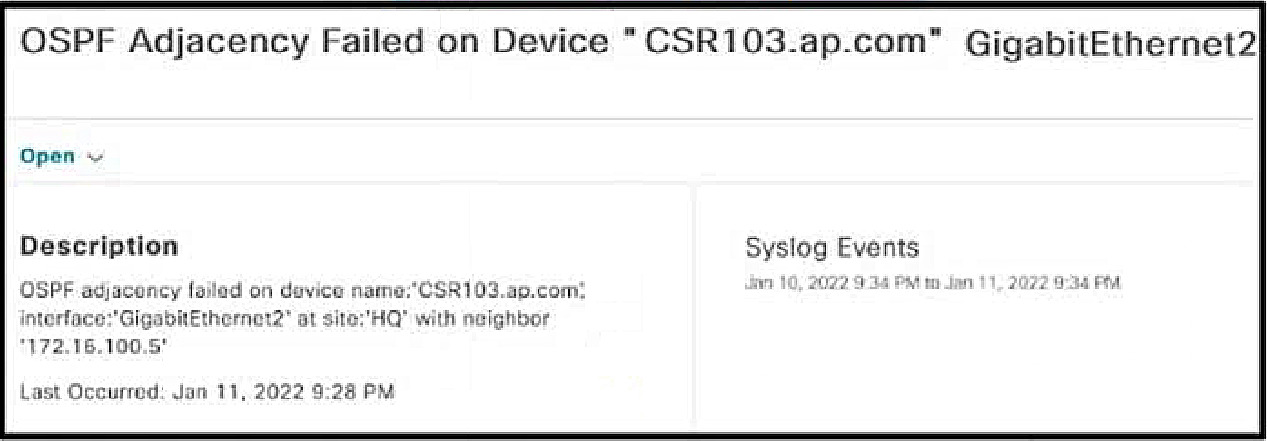
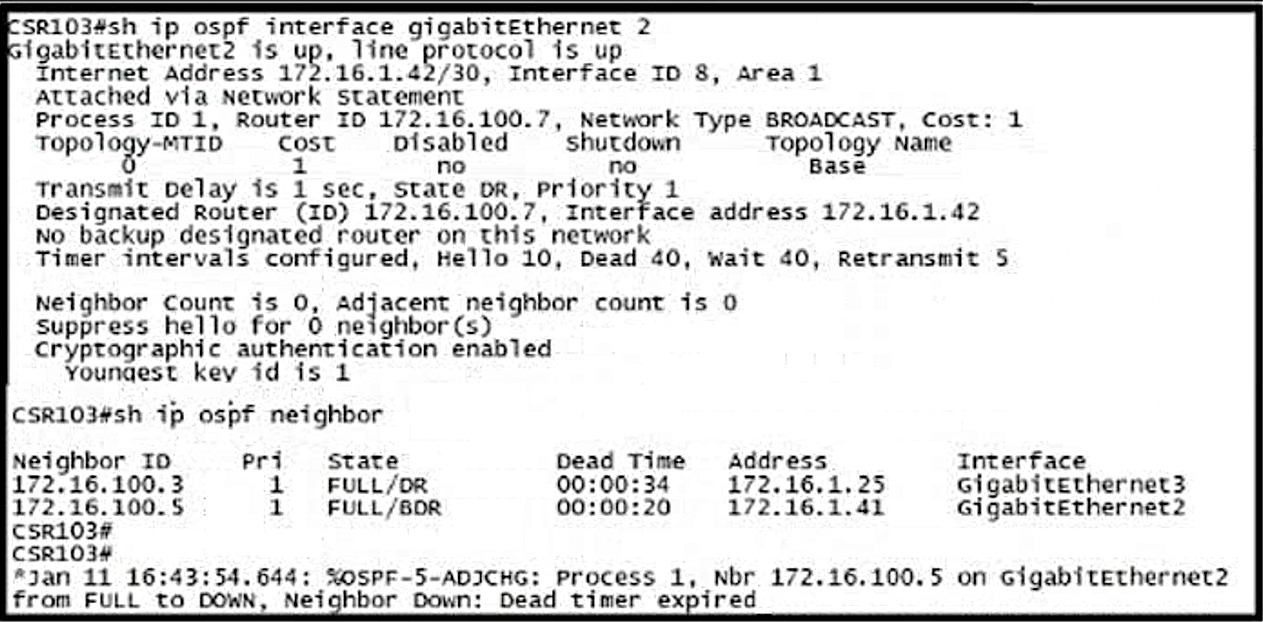
Which configuration must the engineer apply on CSR103 to resolve the problem?
Key Takeaways
The main trap is confusing interface-level MD5 key configuration with Key Chain configuration; the 'Youngest key id' output without key-chain specifics indicates interface-level setup.
This question tests OSPF MD5 authentication troubleshooting. The correct solution involves configuring the interface-level message-digest key to match the neighbor's key ID and encryption method.
Common mistake: Candidates often choose options involving key chains (A or B) because they are valid OSPF authentication methods, but they produce different show output than what is displayed in the exhibit.
Expert Analysis
The question presents a troubleshooting scenario for an OSPF adjacency issue on interface GigabitEthernet2, specifically focusing on the configuration required to resolve it. The key evidence is the output from 'show ip ospf interface gig 2', which displays 'Cryptographic authentication enabled' and 'Youngest key id is 1'. This specific output format indicates that MD5 message-digest authentication has been applied directly at the interface level.
Why Option C is Correct: Option C provides the command 'ip ospf message-digest-key 1 md5 7 <encrypted_key>'. This command configures the specific MD5 key (key ID 1) with an encrypted string ('7' denotes encryption). This matches the 'Youngest key id is 1' indicator in the exhibit. Furthermore, using an encrypted key string is the standard secure practice for OSPF MD5 authentication in modern IOS versions, ensuring compatibility with the neighbor's expected configuration.
Why Other Options Are Incorrect:
- Options A and B are incorrect because they attempt to configure authentication using key chains ('key chain ospf'). While Cisco IOS does support key chains for OSPF authentication, the output for a key chain-based configuration typically includes lines like 'Sending SA: Key 1, Algorithm HMAC-SHA...' or similar details about the key chain usage. The exhibit's simple 'Youngest key id is 1' is characteristic of the older, interface-level 'ip ospf message-digest-key' syntax. Additionally, comments highlight that configuring key chains would result in different debug/show output, confirming A and B do not match the exhibited state.
- Option D is likely incorrect because it may specify a plain text key or a different algorithm/key ID that doesn't align with the 'Youngest key id is 1' and the implied need for a matching encrypted key to restore adjacency. In many exam contexts, if the neighbor is using an encrypted key (implied by best practices and the '7' flag often seen in such outputs), the local router must also use an encrypted key. If D uses a plain text key (no '7'), it would fail authentication against a neighbor expecting encryption, or vice versa. However, the primary distinction is usually between interface-level MD5 keys vs. Key Chains. Between C and D, C is the standard correct answer for restoring MD5 auth with key ID 1 using the encrypted flag consistent with the '7' prefix in typical lab outputs for this question.
The trap lies in confusing interface-level MD5 key configuration with Key Chain configuration. The output 'Youngest key id is 1' without additional key-chain-specific verbose output points directly to the interface-level 'ip ospf message-digest-key' command.
Exam Strategy
Always analyze the exact syntax of 'show' outputs to determine the configuration mode. For OSPF, distinguish between interface-level 'ip ospf message-digest-key' (simple key ID output) and Key Chain configurations (verbose SA/Algorithm output). Match the key ID and encryption flags ('7') precisely to the neighbor's expected parameters.
Frequently Asked Questions
How can I tell if OSPF is using Key Chains or interface-level MD5 keys?
What does the '7' indicate in an OSPF MD5 key string?
Community Votes
50% of anonymous learners picked answer B. Votes are pick records left by other test-takers — they are not the verified answer.
Discussion 28 contributions
Compiled from public community threads and reader submissions, lightly edited for clarity. Handles and vote tallies are shown as recorded, and comments reflect the views of individual contributors.
From public community threads 28
-
HungarianDish_111 👍 11 Answered CThe question is about ospf md5 authentication. Based on the output md5 authentication has been enabled under the interface and not under the ospf process. That's why it shows "Cryptographic authentication enabled" under "show ip ospf int gig 2". This information is not displayed under the interface if authentication is enabled under the ospf process. (I labbed it.) In this case, "C" is correct (and not "D", which enables it under the process.)
-
saiyuki1209 👍 8 Answered Cmd5 authentication -------------------------- Message digest authentication enabled Youngest key id is 1 -------------------------- https://www.cisco.com/c/en/us/support/docs/ip/open-shortest-path-first-ospf/13697-25.html
-
buddhagaut 👍 3why not? key chains can be configured for OSPF too... https://www.cisco.com/c/en/us/td/docs/ios-xml/ios/iproute_ospf/configuration/xe-16-10/iro-xe-16-10-book/iro-ospfv2-crypto-authen-xe.html https://networklessons.com/cisco/ccie-routing-switching-written/ospf-hmac-sha-extended-authentication Also, with md5 auth, interface looks like this: Message digest authentication enabled Youngest key id is 1 with cryptographic auth, looks like: Cryptographic authentication enabled Sending SA: Key 25, Algorithm HMAC-SHA-256 – key chain sample1 ------ This example had sha-256 and in the output of our question 256 is not mentioned, hence they configured sha1, option B is correct
-
bk989 👍 3I will make this easy for everyone. The answer is C or D. This is the only valid solutions as A or B does not enable any kind of cryptographic algorithm. The algorithm has been enabled under the interface, and not the area, this is why we only see Youngest Key ID (reference: Advanced OSPF chapter in OCG). Now do we choose C or D? Notice in the output we have 2 other OSPF neighbors, but we do not know if we have authentication enabled for them. The safest choice is C, an applying authentication under the OSPF process
-
HungarianDish_111 👍 2"A" and "B" are completly wrong. The key chain configuration shown in the output is for eigrp, and the key chain was named as "ospf" to make the question tricky. https://community.cisco.com/t5/switching/key-chain-md5-authentication-in-ospf/td-p/1327717 "OSPF is not using key chain, it is using authentication key you configured in the OSPF process or interface level."
Show 23 more comments
-
bb90403 👍 2 Answered BC & D are wrong - we already have configured the router with md5 authentication and neighborship lost, no point to re-configure md5. From the answers probably we need to switch back to sha. A -> Wrong, when i tried to configure the same string i received "Invalid encrypted keystring" B -> Correct , encrypted string "02050D480809" is decrypted string "cisco"
-
bk989 👍 2If we enable OSPF in the area mode and not under interface this is the output: show ip ospf interface: Suppress hello for 0 neighbor(s) Cryptographic authentication enabled No key configured, using default key id 0 Hence it is applied to all the interfaces, and it might cause adjacency problems with other routers. Answer is C.
-
sal077 👍 2 Answered BNot C or D because it's MD5, not Cryptograhpic as output states Not A because the output should show SHA-256 So B it's correct. It's IOS XE because is a CSR router: https://www.cisco.com/c/en/us/td/docs/ios-xml/ios/iproute_ospf/configuration/xe-16-10/iro-xe-16-10-book/iro-ospfv2-crypto-authen-xe.html
-
HungarianDish_111 👍 2Example: https://networklessons.com/ospf/how-to-configure-ospf-md5-authentication interface GigabitEthernet 2 ip address 172.16.1.42 255.255.255.252 ip ospf 1 area 1 ip ospf authentication message-digest ip ospf message-digest-key 1 md5 cisco
-
inteldarvid 👍 2 Answered Cyes, option C
-
bk989 👍 1I tested all of these A B C D D, C was the only one that produced the output in the exhibit (refer HungarianDish comment) A and B are valid OSPF commands, but OSPF has recently been updated to include sha. It used to only include MD5 and plain text authentication (refer to OCG page 457 459 where OSPF doesn't support Keys or SHA); The output in the image is produced with this one command: interface Ethernet0/0 ip address 1.1.1.1 255.255.255.0 ip ospf message-digest-key 1 md5 7 045802150C2E ip ospf 1 area 0 show ip ospf interface Suppress hello for 0 neighbor(s) Cryptographic authentication enabled Youngest key id is 1 It doesn't matter if message-digest authentication is enabled in area mode or interface mode
-
XBfoundX 👍 1 Answered CYes answer is C the only output that you can get is to configure message digest and md5 authentication. If you configure the key chains this is the output: Last flood scan length is 0, maximum is 0 Last flood scan time is 0 msec, maximum is 0 msec Neighbor Count is 0, Adjacent neighbor count is 0 Suppress hello for 0 neighbor(s) Cryptographic authentication enabled Sending SA: Key 1, Algorithm HMAC-SHA-256 - key chain ospf
-
bk989 👍 1However the answer is C Why? In some IOS versions you need the ip ospf authentication message-digest command to produce the output in the exhibit. In others you don't (in my lab you don't, using IOU images) To reproduce the output in the image we need to use C A and B ARE valid commands, but according to OCG OSPF doesn't support SHA (which it does). So if the question is an "older" question, the answer is C.
-
bk989 👍 1What I meant to say is it cannot be A or B because the output shows that C or D is already configured, but it is misconfigured. If it was A or B this is the output: Cryptographic authentication enabled Sending SA: Key 2, Algorithm MD5 - key chain ospf So we choose C or D. C is best as more specific. And doesn't tear down other ospf adjacencies.
-
XBfoundX 👍 1Here with this config: interface Ethernet0/0 no switchport ip address 10.10.10.254 255.255.255.0 ip ospf authentication message-digest ip ospf message-digest-key 1 md5 7 05080F1C2243 ip ospf 1 area 0 end Neighbor Count is 0, Adjacent neighbor count is 0 Suppress hello for 0 neighbor(s) Cryptographic authentication enabled Youngest key id is 1
-
8e4379b 👍 1 Answered Bstandard OSPFv2 traditional MD5 authentication outputs text stating Message digest authentication enabled. But the output string shows Cryptographic authentication enabled and proves that the key-chain using cryptographic algorithms (like SHA) is deployed on an interface
-
bk989 👍 1It can but the output shows this is a C or D command. Message digest authentication enabled Youngest key id is 1 This is a C or D command, now choose one. The OCG only uses C or D examples, although A and B is good and works, the exhibit shows C or D.
-
XBfoundX 👍 1Whit SHA1: Last flood scan time is 0 msec, maximum is 0 msec Neighbor Count is 0, Adjacent neighbor count is 0 Suppress hello for 0 neighbor(s) Cryptographic authentication enabled Sending SA: Key 1, Algorithm HMAC-SHA-1 - key chain ospf
-
bk989 👍 1answer is C or D. A or B does not actually enable message digest authentication for OSPF, it only uses a key. The output shows the authentication is under the interface (see HungarianDish comment), so the answer is C.
-
Pietjeplukgeluk 👍 1Maybe it is me, but this question does seem of bad quality. Even C would create a "key-chain" but this seems configuration that is incorrect. I will skip this question as the question itself misses the point.
-
yasmiine 👍 1i agree, the authentication methode used is MD5, But the config seems wrong, why they mixed config "hmac-SHA" with "MD5" in the same config ? i think that there is no "key chain" with method MD5 !
-
bk989 👍 1A B C D are valid commands. The output is From C or D. Either C or D works to fix it. Tested in lab. C is best as it doesn;t enable authentication for entire OSPF area, as we have other neighbors.
-
mouin 👍 1Both C and D work, and the message "Youngest key id is 1" has nothing to do with the key chain. I tried both (C&D) without configuring key chain and with key chain and they worked fine
-
bk989 👍 1No A and B are valid comamnds. tested in Lab. The OCG however never used A or B it only used C or D. The output in the exhibit is from a command in C or D. So this is our choice.
-
buddhagaut 👍 1agree with the explanation, with sha-256 output looks like: Cryptographic authentication enabled Sending SA: Key 25, Algorithm HMAC-SHA-256 – key chain sample1
-
CiscoTerminator 👍 1but in this case we dont know the IOS version being used, so D will also work.
-
bk989 👍 1Please disregard my comments, and refer to HungarianDish comments.
-
Mario73 👍 1 Answered Bthe OSPF neighbor requires HMAC-SHA-1
Reader comments & corrections
No reader corrections yet — spotted an error or have a note? Share it below.
Related Analysis
Practice All 300-410 Questions
Access 159 questions with complete answers and detailed explanations.
View Full 300-410 Practice Test →