Troubleshooting Access Lists for Secure Server Access
Short answer
C Permit tcp port 443 to allow secure HTTPS access to the server as implied by the requirement.
Question
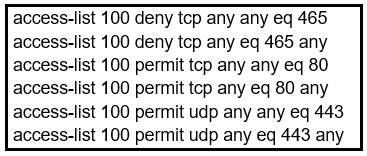
Refer to the Exhibit. The access-lists are configured on the network device. There is a server behind the network device. User are trying to access the server securely however they are not able to access it. What changes would you recommend to the above configuration?
Key Takeaways
The main trap is misidentifying the protocol associated with 'secure access'; HTTPS (443) is the standard, not RDP or SMTPS.
This question tests knowledge of standard secure network ports. The correct solution involves permitting TCP port 443 for HTTPS access.
Common mistake: Candidates often choose 'any any' (D) thinking it's the easiest fix, ignoring the principle of least privilege, or select RDP (B) assuming remote management.
Expert Analysis
The scenario describes users attempting to access a server 'securely' but failing due to an access-list configuration. In Cisco certification contexts, the term 'securely' when referring to general user-to-server access almost invariably implies HTTPS (Hypertext Transfer Protocol Secure). The standard port for HTTPS is TCP 443. Therefore, the access list must explicitly permit traffic destined for this port.
Option C suggests permitting TCP port 443. Although the option text in some dumps may be syntactically abbreviated (e.g., 'Permit tcp port 443'), it represents the correct logical action: allowing inbound HTTPS traffic. Option A (port 465) is for SMTPS, which is not the standard secure web access method. Option B (port 3389) is for RDP, which is typically considered remote desktop management rather than general 'secure access' in this context unless specified otherwise. Option D ('any any') is overly permissive and violates the principle of least privilege; while it would technically allow access, it is rarely the recommended configuration change in a troubleshooting exam question that asks for a specific fix to a security policy.
Key Insight: The trap here is interpreting 'securely' broadly. Candidates might think of SSH (22) or RDP (3389), but without further specification, HTTPS (443) is the default assumption for secure client-server communication. Getting this wrong leads to opening unnecessary ports or blocking the actual required service.
Operational Consequence: Failing to permit port 443 results in continued connectivity failure for web-based secure applications. Conversely, permitting 'any any' creates a significant security vulnerability by exposing all TCP services on the server.
Exam Strategy
Always map descriptive terms like 'secure', 'encrypted', or 'private' to their most common standard protocols first. For web access, assume HTTPS (443). For email, consider SMTPS (465/587). Avoid 'any' statements unless the scenario explicitly demands broad access or no other specific port fits.
Frequently Asked Questions
Why is port 443 preferred over 3389 for 'secure access'?
Is 'Permit tcp port 443' valid IOS syntax?
Community Votes
50% of anonymous learners picked answer C. Votes are pick records left by other test-takers — they are not the verified answer.
Discussion 4 contributions
Compiled from public community threads and reader submissions, lightly edited for clarity. Handles and vote tallies are shown as recorded, and comments reflect the views of individual contributors.
From public community threads 4
-
ellen_AA 👍 4Permit tcp port 443 doesn't exist!! should be: permit tcp ip any any eq 443
-
forccnp 👍 4given answer is correct. same question #125
-
Rebeen.Ra 👍 1 Answered CSecure Access Requirement: Secure web traffic (HTTPS) relies on TCP port 443, not UDP secure TCP-based traffic to the server is blocked. Adding a permit statement for TCP port 443 will resolve the issue.
-
ciscotopics 👍 1 Answered DWe have not been told that we are dealing with a web server. It could be a server offering any type of service. The most logical option is to permit all tcp traffic.
Reader comments & corrections
No reader corrections yet — spotted an error or have a note? Share it below.
Related Analysis
Practice All 300-410 Questions
Access 159 questions with complete answers and detailed explanations.
View Full 300-410 Practice Test →