Microsoft Purview Retention Label Regulatory Record
HOTSPOT
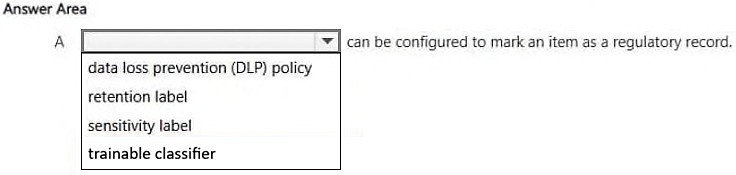
Select the answer that correctly completes the sentence.
Community Insight
The question tests whether you know that retention labels in Microsoft Purview can be configured to mark an item as a regulatory record, distinguishing this from other label types like sensitivity labels.
This SC-900 hotspot question tests the capability of Microsoft Purview retention labels to classify items as regulatory records. The correct configuration ensures compliance with legal and regulatory requirements by marking specific data.
Learners often confuse retention labels with sensitivity labels or DLP policies. Sensitivity labels focus on encryption and access rights, while retention labels manage lifecycle and legal holds, such as marking data as a regulatory record.
Community Discussion (2 comments)
Comments & Corrections
No comments yet — spotted an error or have a note? Share it below.
Expert Analysis
Why the Answer Is Correct
Retention labels in Microsoft Purview are designed to manage how long content is kept and what happens when it expires. One specific configuration option within a retention label is the ability to mark an item as a 'regulatory record.' This designation is crucial for organizations that need to adhere to strict regulatory frameworks, ensuring that the data is treated with the appropriate legal standing.Why Other Candidate Answers Are Wrong
Other potential configurations might include setting a retention period, applying a hold policy, or using sensitivity labels. However, sensitivity labels do not have the specific function of marking an item as a regulatory record; they focus on classification and protection (encryption). DLP policies detect sensitive information but do not inherently apply the 'regulatory record' status via a label in the same manner. Confusing these distinct Purview components leads to incorrect answers.Community Comment Notes
Community feedback confirms that retention labels are the correct tool. As noted by user blh_, "A retention label in Microsoft Purview can be configured to mark an item as a regulatory record." Another comment reiterates this: "You can use retention labels configured in Microsoft Purview to mark an item as a regulatory record." These comments align with the official functionality of Purview retention labels.Exam Strategy
When studying Microsoft Purview, clearly distinguish between the purposes of Retention Labels (lifecycle, holds, regulatory records) and Sensitivity Labels (classification, encryption, access control). Memorize the specific capabilities of each to avoid confusion in scenario-based questions.
Frequently Asked Questions
Can sensitivity labels mark items as regulatory records?
No, sensitivity labels focus on classifying and protecting data through encryption and access restrictions. They do not have the capability to mark an item as a regulatory record.
What is the primary purpose of a retention label in Purview?
Retention labels are used to manage the lifecycle of content by specifying how long it should be retained and what actions to take after retention expires, including marking it as a regulatory record.
Related Analysis
Practice All SC-900 Questions
Access 141 questions with complete answers and detailed explanations.
View Full SC-900 Practice Test →