Security Copilot Partner Agent Approval and Identity
Short answer
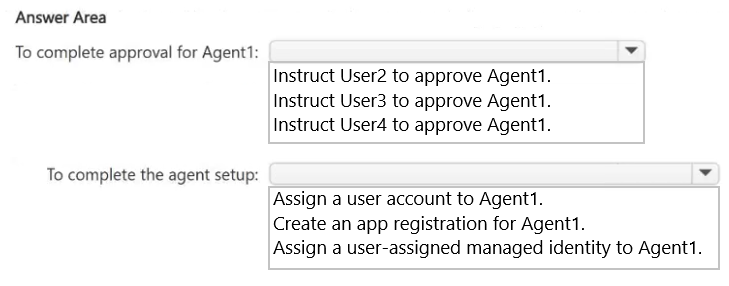
Have User2, the Security Copilot Owner, approve Agent1 in Microsoft Security Store, then assign a least-privileged user account to Agent1 for its runtime identity.
Question
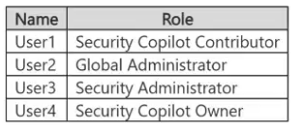
You have a Microsoft Entra tenant that contains the users shown in the following table.
You use Microsoft Security Copilot.
From Microsoft Security Store, User1 attempts to deploy a partner-built agent named Agent1 and reports that the Get agent option is unavailable.
You need to identify whether Agent1 can run in Security Copilot successfully. The solution must follow the principle of least privilege.
How should you complete the deployment? To answer, select the appropriate options in the answer area.
NOTE: Each correct selection is worth one point.
Key Takeaways
This tests least-privilege approval of a Microsoft Security Store agent and the user-account identity the agent needs before it can run.
Deploying a partner-built Security Copilot agent requires an existing Security Copilot Owner to approve it, followed by assigning a least-privileged user account to the agent.
Common mistake: Elevating User1 or using a Global Administrator to approve Agent1; that is over-privileged and unnecessary because the Security Copilot Owner role is purpose-built for the approval.
Expert Analysis
Least privilege is the deciding rule Partner-built agents from Microsoft Security Store are not deployed by every Security Copilot user. The deployment action requires approval by the Security Copilot Owner role. User1 can browse the store but cannot complete Get agent because User1 does not hold that role. The correct fix is not to elevate User1 or hand out Global Administrator; it is to have the existing least-privileged role holder perform or approve the deployment. In the table, User2 is the Security Copilot Owner, so instruct User2 to approve Agent1.
Why the admin-looking users are traps Security Administrator and Global Administrator are deliberately tempting because they sound more powerful. They can satisfy many tenant tasks, but they are broader than necessary for a Security Copilot partner-agent approval. Using them would violate the least-privilege constraint and does not establish that the agent can run. Discussion around this item points at the Global Administrator because it can also approve, but that is exactly the over-privileged path; another learner correctly couples User2 approval with assigning a user account to the agent.
Agent runtime identity Approval alone does not make Agent1 run. The agent must be bound to a runtime identity. For this scenario, assign a user account to Agent1. The account should be dedicated and least-privileged for the data and actions the partner agent needs; do not use a privileged administrator account as the agent's identity. That completes deployment: Owner approval plus a constrained user account.
Official Reference
https://learn.microsoft.com/en-us/copilot/security/agents-manage
This link opens the official vendor documentation in a new tab.
Exam Strategy
For Security Copilot agent questions, separate the approval role from the agent runtime identity. Find the narrowest role that can perform the named action, then check whether the agent needs a user account or another identity. Avoid Global Administrator unless the scenario explicitly removes all purpose-built roles.
Frequently Asked Questions
Why can't User1 use Get agent in Microsoft Security Store?
Why assign a user account to Agent1 instead of using a Global Administrator?
Does a Global Administrator need to approve Agent1?
Discussion 2 contributions
Compiled from public community threads and reader submissions, lightly edited for clarity. Handles and vote tallies are shown as recorded, and comments reflect the views of individual contributors.
From public community threads 2
-
M15tin 👍 1Para completar la aprobación de Agente1: ✅ Indicar a Usuario4 que apruebe Agente1. Usuario4 tiene el rol Security Copilot Owner, que puede aprobar la implementación de agentes de socios. Esto mantiene el principio de mínimo privilegio, evitando utilizar Global Administrator o Security Administrator cuando no son necesarios. Para completar la configuración del agente: ✅ Asignar una identidad administrada asignada por el usuario a Agente1. Una user-assigned managed identity permite que el agente se autentique y acceda únicamente a los recursos autorizados sin almacenar credenciales en el agente.
-
Eltooth 👍 1To complete approval for Agent1: Instruct User2 to approve Agent1. To complete the agent setup: Assign a user account to Agent1. https://learn.microsoft.com/en-us/copilot/security/agents-manage
Reader comments & corrections
No reader corrections yet — spotted an error or have a note? Share it below.
Related Analysis
Practice All SC-500 Questions
Access 100 questions with complete answers and detailed explanations.
View Full SC-500 Practice Test →