Microsoft Entra Conditional Access CA1 and CA2 Outcomes
Short answer
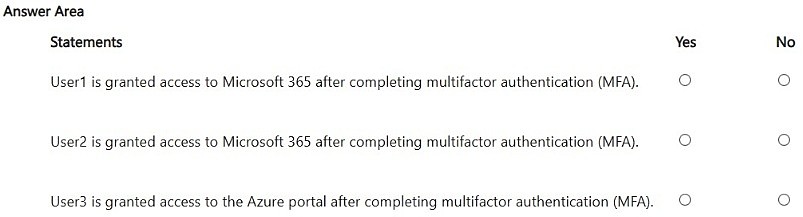
The hotspot selections are No for User1, Yes for User2, and Yes for User3: CA1 blocks User1 on a noncompliant device, CA2 accepts MFA alone for User2, and neither policy blocks User3's Azure portal sign-in.
Question
You have a Microsoft Entra tenant that contains the users shown in the following table.
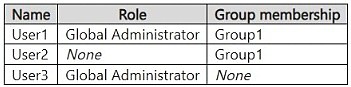
The tenant contains a Conditional Access policy named CA1 that has the following settings:
• Assignments:
o Users or agents:
- Include: Directory roles: Global Administrator
o Resources (formerly cloud apps):
- Include: All resources
o Locations:
- Configure: Yes
- Include: Any network or location
o Grant:
- Require multifactor authentication
- Require device to be marked as compliant
- Require all the selected controls
• Assignments:
o Users or agents:
- Include: Users and groups: Group1
o Resources (formerly cloud apps)
- Include: Select resources: Office 365
o Locations:
- Configure: Yes
- Include: Any network or location
o Grant:
- Require multifactor authentication
- Require app protection policy
- Require one of the selected controls
• User1 signs in to Microsoft 365 from a home network by using Microsoft Outlook on a noncompliant device.
• User2 signs in to Microsoft 365 without an app protection policy by using a noncompliant device.
• User3 signs in to the Azure portal from a home network by using a compliant device.
For each of the following statements, select Yes if the statement is true. Otherwise, select No.
NOTE: Each correct selection is worth one point.
Key Takeaways
It tests cumulative Conditional Access evaluation: CA1's AND controls block the noncompliant Global Administrator, while CA2's OR grant lets MFA alone satisfy User2.
This SC-500 hotspot evaluates Microsoft Entra Conditional Access policies CA1 and CA2 across three users. The correct selections are No for User1, Yes for User2, and Yes for User3.
Common mistake: Treating a noncompliant device as an automatic block for every user, or assuming CA2 requires both MFA and app protection; CA2 requires only one selected control.
Expert Analysis
Policy scope comes first. CA1 is scoped to the Global Administrator directory role and all resources, so it follows User1 wherever User1 signs in. CA2 is scoped to Group1 and the Office 365 cloud app, so it governs User2's Outlook/Microsoft 365 sign-in but not an Azure portal sign-in. The table's role and group assignments decide which policies are evaluated before any grant control is considered; a policy that does not include the user or the target app cannot grant or block that sign-in.
CA1 is an AND gate. For User1, CA1 requires MFA and a compliant device, and 'Require all the selected controls' means both must be satisfied. The home network is irrelevant because the location condition includes any network. Outlook on a noncompliant device fails the compliance control, so User1 is blocked. If User1 were also in Group1, CA2 would not rescue the sign-in: Conditional Access policies are cumulative and the user must satisfy every applicable policy. This is the trap: CA2's OR grant does not weaken CA1's AND grant.
CA2 is an OR gate. User2 is in Group1 and signs in to Microsoft 365/Outlook, which is within the Office 365 cloud app target. CA2 requires MFA or app protection policy, with 'Require one of the selected controls'. The user has no app protection policy, but MFA alone satisfies the OR; a compliant device is not required by CA2. Comments on this item debate whether User2 should be Yes because CA2 requires MFA or app protection; the correct reading is that MFA alone satisfies the OR. A comment also objects that CA2 targets Office 365 while the task says Microsoft 365, but Office 365 is the umbrella resource for Exchange Online/Outlook and related Microsoft 365 workloads. The correct outcome is Yes for User2.
User3 shows the target-resource check. CA2 includes Group1 but targets only Office 365, so it cannot govern an Azure portal sign-in. CA1 governs all resources but only for Global Administrators. On the table's assignments, neither policy blocks User3, so the answer is Yes; the compliant device is a distractor. If User3 were made a Global Administrator, CA1 would then apply and the sign-in would need both MFA and compliance, making the role assignment the change that flips the reasoning. Misreading AND versus OR, or treating noncompliance as an automatic block, produces the common wrong sequence Yes/No/No and can lead to over-blocking or incorrect policy design.
Official Reference
- https://learn.microsoft.com/en-us/entra/identity/conditional-access/concept-conditional-access-grant
- https://learn.microsoft.com/en-us/entra/identity/conditional-access/concept-conditional-access-policies
- https://learn.microsoft.com/en-us/entra/identity/conditional-access/concept-conditional-access-cloud-apps
These links open the official vendor documentation in a new tab.
Exam Strategy
For Conditional Access hotspot items, build a small matrix before answering: user scope, target resource, conditions, and grant controls. Then evaluate each policy independently and combine with the rule that all applicable policies must be satisfied. Watch the multiple-controls setting—'Require all' is AND, 'Require one' is OR—and do not let a noncompliant device or a cloud-app label decide the result until you have checked whether that policy actually includes the user and app.
Frequently Asked Questions
Why does CA1 block User1 even though CA2 allows MFA as an alternative?
Does User2 need a compliant device to access Microsoft 365 under CA2?
Is a Microsoft 365 sign-in in scope of CA2 when CA2 targets Office 365?
Discussion 4 contributions
Compiled from public community threads and reader submissions, lightly edited for clarity. Handles and vote tallies are shown as recorded, and comments reflect the views of individual contributors.
From public community threads 4
-
alashi 👍 6No Yes Yes User 2 is subject to CA policy 2, it requires MFA OR App protection policy, so since MFA is complete, they satisfy the requirement. There is no requirement for a compliant device in CA policy 2.
-
kungfumaster 👍 3correct user2 is also yes , as MFA or app protecion policy , one of the selected control required.
-
LukeAR78 👍 2User2 is Yes. CA2 says MFA or app protection policy. They sign in with MFA.
-
aneupa 👍 1User2 is granted access to office365 after passing mfa not microsoft 365. The policy scope is office 365, the question states M365
Reader comments & corrections
No reader corrections yet — spotted an error or have a note? Share it below.
Related Analysis
Practice All SC-500 Questions
Access 100 questions with complete answers and detailed explanations.
View Full SC-500 Practice Test →