Azure Storage SAS and RBAC Access Control
HOTSPOT
You have an Azure subscription that contains two users named User1 and User2 and the blob containers shown in the following table.
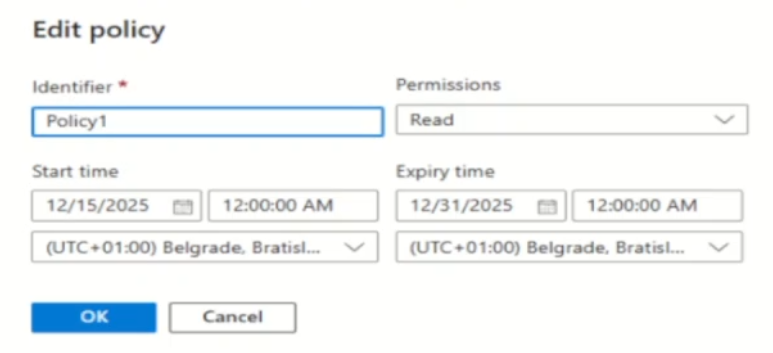
 Policy1 is configured as shown in the following exhibit.
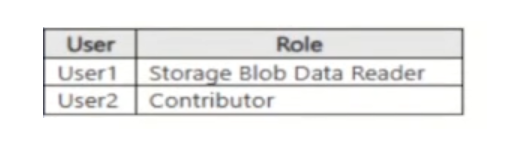
 You assign the roles for storagte1 as shown in the following table.
 The storage1 account has the following shared access signature (SAS) named SAS1:
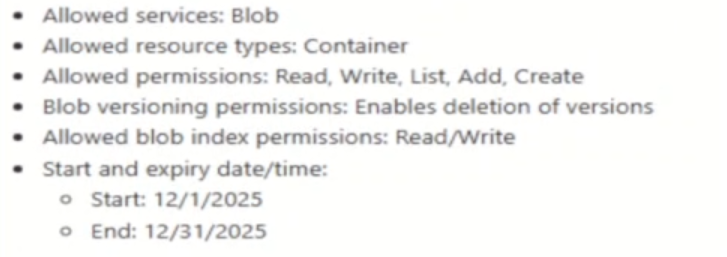 Dates are in MM/DD/YYYY format.
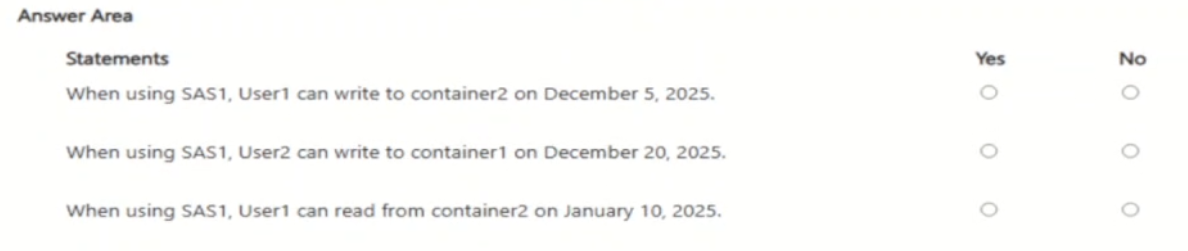
For each of the following statements, select Yes if the statement is true. Otherwise, select No.
NOTE: Each correct selection is worth one point.
Dates are in MM/DD/YYYY format.
For each of the following statements, select Yes if the statement is true. Otherwise, select No.
NOTE: Each correct selection is worth one point.
Community Insight
The core trap is confusing container-level SAS permissions with object-level operations; a Container SAS allows listing or managing the container but does not grant Write access to blobs inside it unless explicitly configured otherwise.
This scenario tests the intersection of Azure RBAC roles, storage account policies, and Shared Access Signature (SAS) constraints. It establishes that SAS permissions are additive to but do not override RBAC denials, and that resource-level SAS tokens restrict operations to specific entity types.
Learners often assume that because a user has a role allowing write access, any valid SAS token will also allow writing. They fail to recognize that a Container-scoped SAS token inherently lacks the 'Write' permission for individual blob objects.
Community Discussion (1 comments)
Comments & Corrections
No comments yet — spotted an error or have a note? Share it below.
Expert Analysis
Why the Answer Is Correct
To determine access, you must evaluate both the assigned RBAC role and the SAS token constraints simultaneously. For User1 on Container2: The RBAC role 'Storage Blob Data Contributor' allows writing blobs. However, the SAS token is scoped to the 'Container' level. By definition, a Container SAS grants permissions to list blobs or manage the container itself, but it does NOT grant permission to write, add, or create individual blob objects within that container. Therefore, User1 cannot write to a blob in Container2 using this specific SAS.Why Other Candidate Answers Are Wrong
Many candidates incorrectly select 'Yes' for User1's write capability, assuming the high-level contributor role overrides the granular SAS limitation. Others might misinterpret the expiration date, thinking December 5th is outside the window when it is clearly within the start/end dates. For User2, if they lack the necessary RBAC role (e.g., if assigned only Reader), even a perfect Object SAS would fail due to RBAC denial. The key is understanding that SAS provides authorization based on the token, while RBAC provides authorization based on identity; both must permit the action.Community Comment Notes
As mcdesilva74 noted, "Container-level access covers operations such as listing blobs... Writing a blob is an object-level operation." This highlights the critical distinction between managing the container metadata and manipulating the data within it. Another common confusion involves the date format; ensure MM/DD/YYYY is read correctly to avoid false negatives on time-based restrictions.Official Reference
Exam Strategy
Always check the Scope of the SAS first. If it is 'Container', remember that Write/Add/Create permissions apply to the container structure, not the blobs inside. If the question asks about writing a blob, look for an 'Object' scope or explicit blob permissions in a container SAS, which are rare and specific.
Frequently Asked Questions
Can a Container SAS allow writing to blobs?
No. A Container SAS allows listing blobs or managing the container. To write a blob, you need an Object SAS or a Container SAS with explicit permissions that somehow cover blobs, but standard practice distinguishes these scopes.
Does RBAC override SAS?
Yes. If RBAC denies access (e.g., no role assigned), the user cannot perform the action even if they have a valid SAS token. Both must allow the operation.
Related Analysis
Practice All SC-500 Questions
Access 100 questions with complete answers and detailed explanations.
View Full SC-500 Practice Test →