How Do You Restrict ACI Container Group Port 5000 Exposure?
Short answer
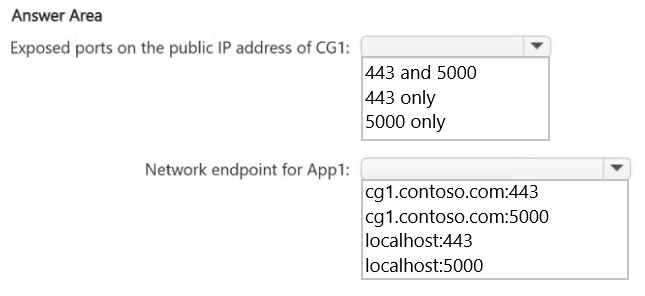
On CG1's public IP, expose only TCP 443 and remove or unpublish TCP 5000. Container1 can still reach the port-5000 container over localhost.
Question
You have an Azure Container Instances container group named CGI that has a DNS name of cg1.contoso.com. CG1 has the following configurations:
A Linux container named container1 that serves HTTPS over TCP port 443 and hosts an application named App1
A Linux container named contained that listens on TCP port 5000 and is accessed only by App1
A public IP address
A security review finds that external clients can reach TCP port 5000 by using the public IP address of CG1.
You need to meet the following requirements:
Ensure that the external clients can access container1 only by using TCP port 443.
Ensure that container1 can continue to access contained.
What should you configure? To answer, select the appropriate options in the answer area.
NOTE: Each correct selection is worth one point.
Key Takeaways
The exam tests the split between ACI public port publishing and shared localhost networking; the trap is trying to block port 5000 internally when only its public exposure must be removed.
Azure Container Instances publishes only ports declared on the container group's public IP, while containers in the same group can still communicate over localhost. This page establishes that CG1 should expose TCP 443 only and leave TCP 5000 unpublished.
Common mistake: A common mistake is adding a deny rule or disabling container2's port-5000 listener, which either is unnecessary or breaks App1's dependency, instead of removing 5000 from CG1's declared public ports.
Expert Analysis
Why the Answer Is Correct
ACI container groups share a network namespace, so container1 can reach the port-5000 container via localhost regardless of whether 5000 is published on the group's public IP. External reachability comes from the container group's declared ports, so configuring CG1's public IP to expose only TCP 443 closes the external path to 5000. The requirement to keep App1 working is satisfied because internal loopback traffic is not filtered by the public port list.
Why Other Candidate Answers Are Wrong
Selecting TCP 5000 alongside 443 leaves the exact exposure the review found, even if the application is otherwise secured. Changing the DNS name, IP address type, or container restart policy does not change which ports are published. Adding an NSG deny rule is unnecessary for this public-IP scenario, and disabling the port-5000 listener would break App1's dependency rather than merely hide it from external clients. The correct control is at the container group port declaration.
Community Comment Notes
Craigg noted that containers in the same group "share the localhost network interface" and can reach each other on any port via localhost or 127.0.0.1 even when that port is not exposed externally. That comment directly supports leaving TCP 5000 out of CG1's public ports while preserving container1-to-container2 traffic. No other comment disputes the port-publishing model.
Official Reference
https://learn.microsoft.com/en-us/azure/container-instances/container-instances-container-groups
This link opens the official vendor documentation in a new tab.
Exam Strategy
Treat the word external as the key: ACI publishes only ports declared on the container group IP, not every port a container listens on. For hotspot items, deselect or omit TCP 5000 and keep only TCP 443, then confirm the internal dependency uses localhost.
Frequently Asked Questions
Why can container1 still reach port 5000 after TCP 5000 is removed from CG1's public IP?
Does ACI need an NSG to hide port 5000 on CG1's public IP?
Discussion 1 contributions
Compiled from public community threads and reader submissions, lightly edited for clarity. Handles and vote tallies are shown as recorded, and comments reflect the views of individual contributors.
From public community threads 1
-
Craigg 👍 1Internal Communication: Containers in the same group share the localhost network interface. They can talk to each other on any port via localhost (or 127.0.0.1), regardless of whether that port is exposed externally. Therefore, container1 can still reach contained on port 5000 internally
Reader comments & corrections
No reader corrections yet — spotted an error or have a note? Share it below.
Related Analysis
Practice All SC-500 Questions
Access 100 questions with complete answers and detailed explanations.
View Full SC-500 Practice Test →