Delegated vs Application Permissions for Entra Agent ID
Short answer
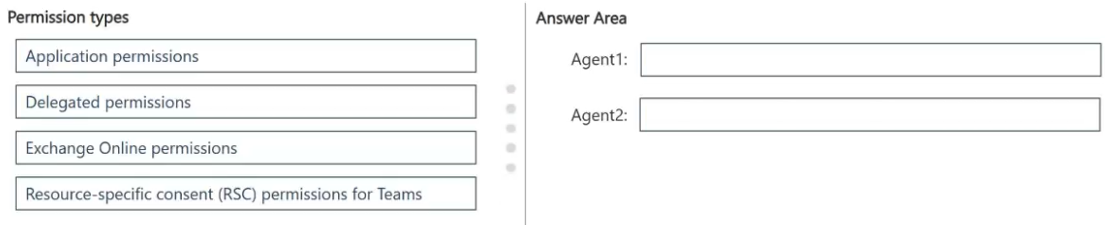
Assign delegated permissions to Agent1 and application permissions to Agent2, because Agent1 acts in a signed-in user's context while Agent2 runs unattended as the application.
Question
You have a Microsoft 365 subscription. All users have Microsoft Exchange Online mailboxes.
You use Microsoft Entra Agent ID to register and manage AI agents.
The developers at your company create the following two agents:
Agent1: An interactive agent that helps users summarize their own Exchange Online email
Agent2: An autonomous agent that sends nightly updates to a Microsoft Teams channel
You need to grant each agent access to Microsoft Graph. The solution must minimize the access scope, while meeting each agent’s operating model.
Which type of permission should you assign to each agent? To answer, drag the appropriate permission types to the correct agents. Each permission type may be used once, more than once, or not at all. You may need to drag the split bar between panes or scroll to view content.
NOTE: Each correct selection is worth one point.
Key Takeaways
The exam tests whether an agent acts with a signed-in user's context (delegated) or autonomously as the app (application); the trap is choosing application permissions for every agent or mistaking Teams RSC for a Graph permission type.
This SC-500 scenario tests Microsoft Entra Agent ID authorization: Agent1 gets delegated permissions, while Agent2 gets application permissions for Microsoft Graph.
Common mistake: A common error is giving both agents application permissions because agents feel like apps, or picking Teams RSC for the nightly poster; that over-scopes Agent1 and misreads the permission-type requirement.
Expert Analysis
The boundary: user context versus app context
The deciding question is not whether the workload is called an agent, but whether a signed-in user's identity is present when the Microsoft Graph call is made. Delegated permissions let the agent act as the signed-in user and are limited to that user's own data. Application permissions let the agent authenticate as itself with no user present and are consented tenant-wide, so they must be scoped carefully.
Agent1 falls on the delegated side
Agent1 is interactive and helps users summarize their own Exchange Online email. Each request runs in a user's context and should only touch that user's mailbox. Assigning delegated permissions satisfies this and keeps the scope tied to the signed-in user. Application permissions such as Mail.Read would grant access across mailboxes and exceed the requirement.
Agent2 falls on the application side
Agent2 is autonomous and posts nightly updates to a Teams channel. No user signs in at night, so there is no delegated context to act under. The agent must authenticate as an application and use application permissions to create the channel messages. A comment suggested Teams resource-specific consent (RSC) for Agent2 because it can narrow access to a specific team, and that is a legitimate Teams consent scoping option. However, the question asks which type of Microsoft Graph permission to assign; RSC is a Teams consent framework, not the delegated/application permission type requested. The least-privilege check happens within the chosen permission type, not by replacing it.
Result
Assign delegated permissions to Agent1 and application permissions to Agent2: the boundary is the presence of a signed-in user.
Official Reference
This link opens the official vendor documentation in a new tab.
Exam Strategy
Before choosing a permission type, ask whether a user is signed in when the Graph call runs. If yes, delegated permissions act as that user; if the agent runs on a schedule or trigger with no user, application permissions are required. Then check least privilege inside that type, and do not let Teams RSC or other resource-specific consent models masquerade as a Graph permission type. This two-step check transfers to any agent, app registration, or automation question.
Frequently Asked Questions
Why does Agent2 need application permissions rather than delegated permissions?
Does Teams resource-specific consent (RSC) replace application permissions for Agent2?
Why would application permissions be wrong for Agent1?
Discussion 2 contributions
Compiled from public community threads and reader submissions, lightly edited for clarity. Handles and vote tallies are shown as recorded, and comments reflect the views of individual contributors.
From public community threads 2
-
Eltooth 👍 4Agent1: Delegated permissions Agent2: Application permissions https://learn.microsoft.com/en-us/entra/agent-id/grant-agent-access-microsoft-365#how-to-manually-grant-authorization-delegated-or-application Delegated Permissions for Agent1: Because Agent1 is an interactive agent that helps users summarize their own emails, a user will be signed in. By using delegated permissions, the agent acts on behalf of the logged-in user and can only access the data that the specific user has permission to see. Application Permissions for Agent2: Because Agent2 is an autonomous agent running background jobs at night without a user present, it cannot use a signed-in user's context. It must authenticate using its own identity via application permissions to post messages directly to the Microsoft Teams channel.
-
rkrau 👍 1No I go with Agent1: Delegated permissions Agent2: RSC, while Teams Resource-Specific Consent (RSC) … allows you to grant permissions to an app or agent on a per-team basis, rather than at the tenant level.and „minimize the access scope, while meeting each agent’s operating model“.
Reader comments & corrections
No reader corrections yet — spotted an error or have a note? Share it below.
Related Analysis
Practice All SC-500 Questions
Access 100 questions with complete answers and detailed explanations.
View Full SC-500 Practice Test →