Configuring Real-Time Protection for Copilot Studio Agents
Short answer
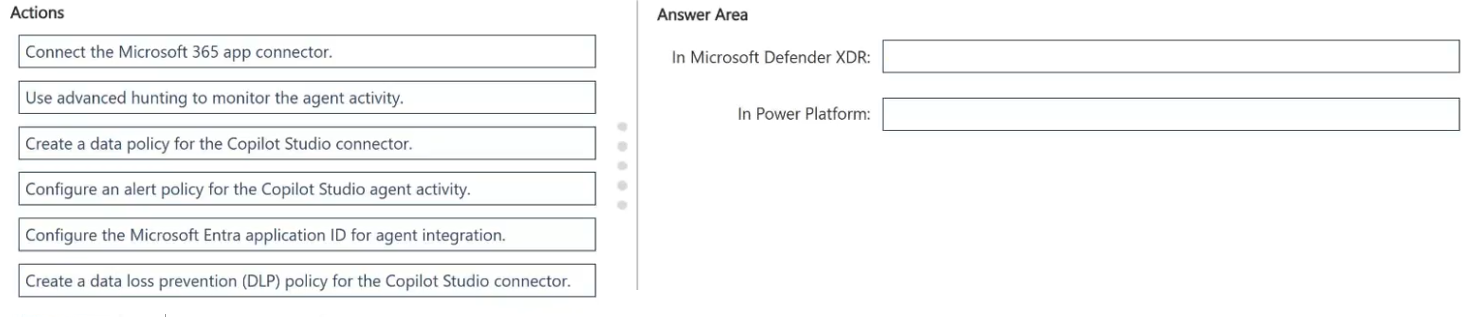
In Microsoft Defender XDR: Configure the Microsoft Entra application ID for agent integration. In Power Platform: Configure the Microsoft Entra application ID for agent integration.
Question
You have a Microsoft Defender XDR environment.
You have a Microsoft Power Platform environment where makers publish custom Microsoft Copilot Studio agents.
You need to enable real-time protection so that suspicious tool invocations are blocked before an agent runs actions, and related alerts appear in the Microsoft Defender portal.
What should you do? To answer, drag the appropriate actions to the correct services. Each action may be used once, more than once, or not at all. You may need to drag the split bar between panes or scroll to view content.
NOTE: Each correct selection is worth one point.
Key Takeaways
Tests the precise configuration steps for identity-based agent integration, specifically the need to register the same Entra application ID in both the security platform and the agent environment.
Learn how to enable real-time protection for Microsoft Copilot Studio agents by configuring the Microsoft Entra application ID in both Microsoft Defender XDR and the Power Platform.
Common mistake: Learners often try to use general Microsoft 365 connectors or misidentify the service requiring the Entra ID configuration, failing to recognize that both Defender and Power Platform must share the same application identity for real-time blocking.
Expert Analysis
The scenario involves integrating Microsoft Copilot Studio agents with Microsoft Defender XDR to enforce real-time protection. The core concept is the boundary between the agent runtime (Power Platform) and the security enforcement engine (Defender). To enable this, two distinct configuration points must be addressed.
First, in the Microsoft Power Platform, you must configure the Microsoft Entra application ID for agent integration. This step registers the specific identity associated with your Copilot Studio agent, allowing it to communicate securely with external security services. Without this identity mapping, the agent cannot invoke security controls.
Second, in Microsoft Defender XDR, you must configure the corresponding Microsoft Entra application ID. This allows Defender's AI safety framework to trace, intercept, and map real-time signals from that specific identity. It establishes the trust relationship where Defender can evaluate tool invocations before they are executed.
A common mistake is attempting to use generic connectors like the "Microsoft 365 app connector" in Defender, which does not provide the granular, identity-based real-time blocking required for Copilot Studio agents. The correct approach relies on the shared Entra ID registration across both platforms to create a secure pipeline for signal interception.
Official Reference
https://learn.microsoft.com/en-us/defender-xdr/configure-copilot-studio-integration
This link opens the official vendor documentation in a new tab.
Exam Strategy
When dealing with agent security integrations, always look for identity-based configurations first. If the question mentions 'real-time protection' or 'blocking actions,' verify if the solution requires sharing an application identity (Entra ID) between the security tool and the agent runtime. Avoid generic connectors unless explicitly stated as the primary mechanism for identity resolution.
Frequently Asked Questions
Why do I need to configure the Entra Application ID in both places?
Can I use the Microsoft 365 app connector instead?
Discussion 2 contributions
Compiled from public community threads and reader submissions, lightly edited for clarity. Handles and vote tallies are shown as recorded, and comments reflect the views of individual contributors.
From public community threads 2
-
Eltooth 👍 1In Microsoft Defender XDR: Configure the Microsoft Entra application ID for agent integration. In Power Platform: Configure the Microsoft Entra application ID for agent integration. XDR: The Application (client) ID is registered under the security platform settings to allow Defender's AI safety framework to trace, intercept, and map real-time signals from the specific identity associated with your custom agents. Power Platform: The same Application (client) ID is linked within your Power Platform / Copilot Studio administration settings. This allows the Copilot environment to forward tool invocations out to Defender for runtime analysis before executing actions.
-
musiman 👍 1In Microsoft Defender XDR: Connect the Microsoft 365 app connector. In Power Platform: Configure the Microsoft Entra application ID for agent integration.
Reader comments & corrections
No reader corrections yet — spotted an error or have a note? Share it below.
Related Analysis
Practice All SC-500 Questions
Access 100 questions with complete answers and detailed explanations.
View Full SC-500 Practice Test →