Configure MUA on RSVault1 and a Resource Guard in Sub2
Short answer
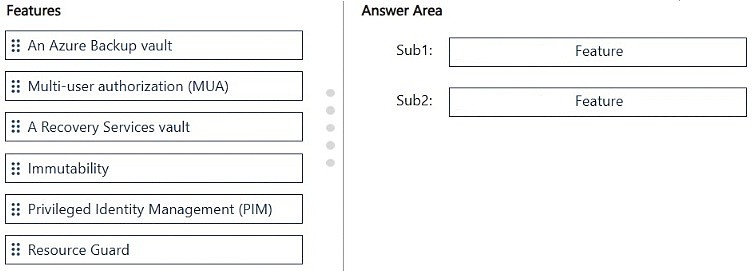
In Sub1, enable Multi-User Authorization (MUA) on RSVault1; in Sub2, create the Resource Guard that Group2 controls as approver, and link RSVault1's MUA to it.
Question
You have two Azure subscriptions named Sub1 and Sub2.
You have two groups named Group1 and Group2. Group1 only has access to Sub1 and Group2 only has access to Sub2.
Sub1 contains a Recovery Services vault named RSVault1 that stores virtual machine backups. RSVault1 is managed by using Group1.
You need to ensure that modifying the backup settings of RSVault1 requires approval from an approver in Group2.
What should you configure for each subscription? To answer, drag the appropriate features to the correct subscriptions. Each feature may be used once, more than once, or not at all. You may need to drag the split bar between panes or scroll to view content.
NOTE: Each correct selection is worth one point.
Key Takeaways
The key test is separating the protected vault in Sub1 from the approving Resource Guard in Sub2 so Group2, not the vault-managing Group1, must approve critical backup changes.
Multi-User Authorization for Azure Backup protects critical Recovery Services vault operations by requiring approval from a Resource Guard in an independent subscription. For RSVault1, enable MUA in Sub1 and place the Resource Guard in Sub2 where Group2 can approve changes.
Common mistake: The common wrong approach is to enable MUA on RSVault1 but place the Resource Guard in Sub1 or give Group1 approval rights; that lets the vault-managing group satisfy its own approval and breaks the independence the question requires.
Expert Analysis
Protected vault versus approval authority
The wording separates the vault being managed from the approver's access. RSVault1 is in Sub1 and Group1 manages it, but Group1 must not be able to approve its own critical change. The decisive qualifier is that Group2 only has access to Sub2, so the approval control cannot be placed in Sub1; it must be a separate object reachable by Group2 in Sub2. That rules out any configuration that enables approval only on RSVault1 or puts the approval guard in Sub1.
Why Multi-User Authorization belongs in Sub1
"Modifying backup settings" is a protected operation. Azure Backup's Multi-User Authorization (MUA) is the feature enabled on a Recovery Services vault to require approval from a Resource Guard before such critical operations proceed. Therefore Sub1 gets MUA on RSVault1. The phrase "requires approval" eliminates ordinary role-based access control, because RBAC controls who can make a change, not an independent approval workflow.
Why the Resource Guard belongs in Sub2
The Resource Guard is the separate approval resource that holds the protected operations and authorizes approvers. Group2's only subscription access is Sub2, so creating the Resource Guard there gives the approvers the required access while keeping Group1, which only has Sub1, from controlling the guard. The supplied reasoning matches this split: enable MUA on the vault in Sub1 and place the Resource Guard in Sub2.
Final mapping
Sub1 -> Multi-User Authorization on RSVault1; Sub2 -> Resource Guard. Then link RSVault1's MUA to the Sub2 guard. Approval from Group2 is required when someone changes backup settings on RSVault1, and Group1 cannot self-authorize. No other feature satisfies both the approval requirement and the subscription-boundary constraint.
Official Reference
- https://learn.microsoft.com/en-us/azure/backup/multi-user-authorization
- https://learn.microsoft.com/en-us/azure/backup/multi-user-authorization-concept
These links open the official vendor documentation in a new tab.
Exam Strategy
When an approval must come from a team that cannot administer the protected resource, map the resource's subscription to the control enabled on the resource (MUA on the vault) and map the approver's subscription to the independent guard object. Use access scope as the decisive clue: the approver group must reach the guard, not the vault. Do not treat RBAC as approval; RBAC assigns permissions, whereas MUA adds a separate approval step.
Frequently Asked Questions
Why must the Resource Guard be in Sub2 instead of Sub1?
What exactly is enabled on RSVault1 in Sub1?
Does assigning Group1 a backup operator role satisfy the approval requirement?
Discussion 1 contributions
Compiled from public community threads and reader submissions, lightly edited for clarity. Handles and vote tallies are shown as recorded, and comments reflect the views of individual contributors.
From public community threads 1
-
rkrau 👍 1Sub1 → Multi-User Authorization (MUA): MUA is enabled on the vault—specifically, on RSVault1 in Sub1—and linked to a Resource Guard. Sub2 → Resource Guard: The Resource Guard is located in a space accessible only to the independent team (which includes Group2). Consequently, Group1 cannot grant itself authorization.
Reader comments & corrections
No reader corrections yet — spotted an error or have a note? Share it below.
Related Analysis
Practice All SC-500 Questions
Access 100 questions with complete answers and detailed explanations.
View Full SC-500 Practice Test →