Azure SQL Entra Admin Nested Group Access Rules
Short answer
User1 can manage sqlsvr2: Yes. User2 can manage sqlsvr2: No. User3 can manage sqlsvr1: No.
Question
You have an Azure subscription that is linked to a Microsoft Entra tenant. The tenant contains the groups shown in the following table.
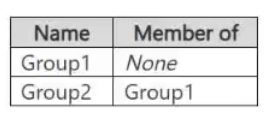
The tenant contains the users shown in the following table.
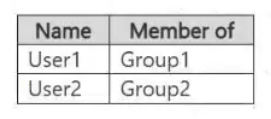
The subscription contains the Azure SQL servers shown in the following table.
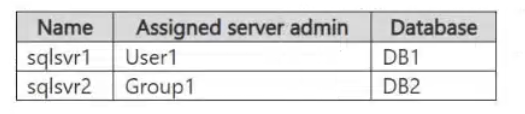
The servers are configured for Microsoft Entra-only authentication.
For each of the following statements, select Yes if the statement is true. Otherwise, select No.
NOTE: Each correct selection is worth one point.

Key Takeaways
Tests the specific limitation that Azure SQL Server Entra Admin roles do not inherit permissions through nested groups; only direct group members are granted administrative access.
Determines access rights for Azure SQL servers configured with Microsoft Entra Admin groups, highlighting that nested group membership does not grant admin privileges.
Common mistake: Assuming that because User2 is in a subgroup of the Admin group, they inherit the Admin privileges. This fails because Entra Admin assignments for Azure SQL require direct membership in the assigned group.
Expert Analysis
The core of this question tests the distinction between Microsoft Entra ID Group Membership (for RBAC and resource access) and Microsoft Entra Admin assignments for Azure SQL servers. Understanding how these two mechanisms interact—and where they do not—is critical.
First, consider the statement: "User1 can manage sqlsvr2." sqlsvr2 is configured with Group1 as its Microsoft Entra Admin. User1 is a direct member of Group1. In Azure SQL, assigning an Entra Group as the Entra Admin grants that group full control over the server (including the ability to create databases, manage users, and essentially act as the server administrator). Therefore, User1, being a direct member of the admin group, has management capabilities. This statement is Yes.
Second, consider: "User2 can manage sqlsvr2." User2 is a member of Group2, which is a nested member of Group1. While Entra Groups support nesting for many RBAC roles and application access scenarios, Microsoft Entra Admin assignments for Azure SQL Server do not resolve nested group memberships. The Entra Admin role assignment applies only to the direct members of the specified group. Since User2 is not a direct member of Group1, they are not recognized as an Entra Admin for sqlsvr2. Without any other explicit permissions, User2 cannot manage the server. This statement is No.
Third, consider: "User3 can manage sqlsvr1." sqlsvr1 is configured with Group1 as its Microsoft Entra Admin. User3 is not a member of Group1 (they are in Group3, which is unrelated). Therefore, User3 has no Entra Admin privileges on sqlsvr1. Unless there is an additional RBAC role assigned (which is not stated), User3 cannot manage the server. This statement is No.
The common trap here is assuming that because Group2 is inside Group1, all permissions flowing to Group1 automatically apply to Group2. For Entra Admin server-level roles, this inheritance does not happen; it requires direct membership.
Official Reference
- https://learn.microsoft.com/en-us/azure/azure-sql/database/aad-authentication-configure?view=azuresql-mi&tabs=azure-powershell
- https://learn.microsoft.com/en-us/azure/role-based-access-control/role-assignments-nested-groups
These links open the official vendor documentation in a new tab.
Exam Strategy
When encountering 'Entra Admin' or 'Server-Level Role' questions for Azure SQL, always check if the user is a direct member of the assigned group. Do not assume nested group inheritance applies to these specific server-level security principals. If the user is only indirectly connected via a subgroup, the answer for management access is typically 'No'.
Frequently Asked Questions
Do nested groups work for Azure SQL Entra Admin?
What if User2 was added directly to Group1?
Discussion 1 contributions
Compiled from public community threads and reader submissions, lightly edited for clarity. Handles and vote tallies are shown as recorded, and comments reflect the views of individual contributors.
From public community threads 1
-
oztech 👍 2I would say its Y,Y,N. User2 is a member of Group2, and Group2 is a member of Group1 (Nested Group). sqlsvr2 has Group1 configured as the Microsoft Entra Admin. According to official Microsoft Entra documentation, nested group memberships do not grant access to shared resources assigned to the parent group. Only direct members of the assigned parent group (Group1, such as User1) receive access. Therefore, User2 does not inherit the admin permissions on sqlsvr2 and cannot alter the schema of DB2. Reference: https://learn.microsoft.com/en-us/entra/fundamentals/concept-learn-about-groups
Reader comments & corrections
No reader corrections yet — spotted an error or have a note? Share it below.
Related Analysis
Practice All SC-500 Questions
Access 100 questions with complete answers and detailed explanations.
View Full SC-500 Practice Test →