Azure SQL Database auditing action groups for Defender for SQL
Short answer
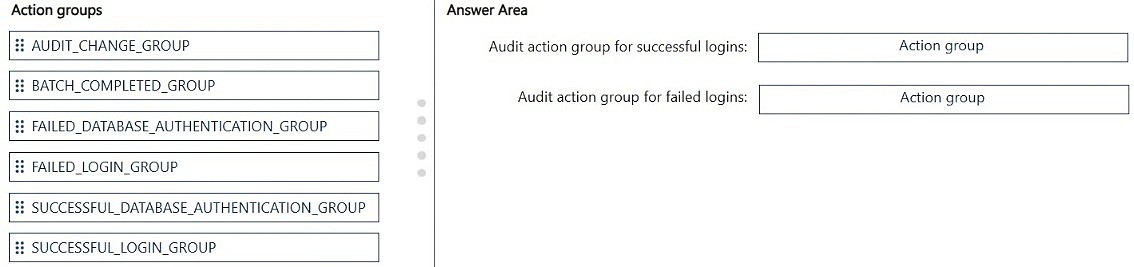
Configure database auditing for DB1 on Server1 with BATCH_COMPLETED_GROUP, SUCCESSFUL_DATABASE_AUTHENTICATION_GROUP, and FAILED_DATABASE_AUTHENTICATION_GROUP; these are the recommended Azure SQL Database audit groups for Defender for SQL investigations.
Question
You have an Azure subscription named Sub1 that contains an Azure SQL Database logical server named Server1.
Server1 contains a database named DB1.
Microsoft Defender for Cloud security alerts are being generated for Sub1.
You plan to improve investigation capabilities when Microsoft Defender for SQL raises Advanced Threat Protection alerts.
You need to ensure that the Advanced Threat Protection investigations have the audit records of DB1. The solution must include the recommended audit action groups.
How should you configure database auditing for Server1? To answer, drag the appropriate action groups to the correct requirements. Each action group may be used once, more than once, or not at all. You may need to drag the split bar between panes or scroll to view content.
NOTE: Each correct selection is worth one point.
Key Takeaways
The question tests the recommended Azure SQL Database audit action groups and the trap of substituting SQL Server login/logout groups for database-authentication groups.
Azure SQL Database auditing for Defender for SQL investigations requires the recommended action groups BATCH_COMPLETED_GROUP, SUCCESSFUL_DATABASE_AUTHENTICATION_GROUP, and FAILED_DATABASE_AUTHENTICATION_GROUP. This page maps each group to the audit requirement for DB1 on Server1.
Common mistake: Choosing only BATCH_COMPLETED_GROUP, or adding SUCCESSFUL_LOGIN_GROUP and FAILED_LOGIN_GROUP instead of the database-authentication groups, fails because investigations need both successful and failed database authentication evidence.
Expert Analysis
Recommended audit set
For DB1 on Server1, enable Azure SQL auditing with exactly three action groups: BATCH_COMPLETED_GROUP, SUCCESSFUL_DATABASE_AUTHENTICATION_GROUP, and FAILED_DATABASE_AUTHENTICATION_GROUP. This is the recommended Azure SQL Database audit policy and it gives Defender for SQL Advanced Threat Protection investigations both query/batch activity and both authentication outcomes.
The most attractive wrong approach
The strongest distractor is to keep BATCH_COMPLETED_GROUP for the database work, then add SUCCESSFUL_LOGIN_GROUP and FAILED_LOGIN_GROUP because those names sound like the correct way to capture who connected. That approach is familiar from SQL Server server-level auditing and satisfies the audit-records and authentication wording on the surface. It fails on scope: Azure SQL Database verifies authentication at the database level, so the matching groups are SUCCESSFUL_DATABASE_AUTHENTICATION_GROUP and FAILED_DATABASE_AUTHENTICATION_GROUP, not the login groups. A second near-miss is selecting only BATCH_COMPLETED_GROUP; it records database activity but leaves investigations without successful and failed authentication evidence.
Mapping to the requirements
Use BATCH_COMPLETED_GROUP for completed batches, SUCCESSFUL_DATABASE_AUTHENTICATION_GROUP for successful database authentications, and FAILED_DATABASE_AUTHENTICATION_GROUP for failed database authentications. Learner discussion notes that the recommended default policy consists of exactly these three groups; that matches the requirement to include the recommended audit action groups. Do not add DATABASE_LOGOUT_GROUP or generic SQL Server login/logout groups unless the scenario explicitly asks for them; extra groups do not repair the missing database-authentication coverage.
Official Reference
- https://learn.microsoft.com/en-us/azure/azure-sql/database/auditing-overview
- https://learn.microsoft.com/en-us/sql/relational-databases/security/auditing/sql-server-audit-action-groups-and-actions?view=sql-server-ver16
These links open the official vendor documentation in a new tab.
Exam Strategy
When a drag-drop asks for Azure SQL audit action groups, map each requirement to the group's exact scope: BATCH_COMPLETED_GROUP for executed batches, SUCCESSFUL_DATABASE_AUTHENTICATION_GROUP for successful database logins, and FAILED_DATABASE_AUTHENTICATION_GROUP for failed database logins. Prefer database-authentication groups over SQL Server login or logout groups because Azure SQL Database authenticates at database scope. Count the requirement slots and ensure each gets one matching group rather than adding extra coverage.
Frequently Asked Questions
Which audit action groups are recommended for Azure SQL Database auditing?
Why use DATABASE_AUTHENTICATION groups instead of LOGIN groups in Azure SQL Database?
Does BATCH_COMPLETED_GROUP alone provide enough audit records for Advanced Threat Protection?
Discussion 1 contributions
Compiled from public community threads and reader submissions, lightly edited for clarity. Handles and vote tallies are shown as recorded, and comments reflect the views of individual contributors.
From public community threads 1
-
rkrau 👍 1According to Microsoft Learn, the recommended default audit policy for Azure SQL Database consists of exactly three groups: BATCH_COMPLETED_GROUP, SUCCESSFUL_DATABASE_AUTHENTICATION_GROUP, and FAILED_DATABASE_AUTHENTICATION_GROUP. In Azure SQL Database, authentication is verified at the database level; therefore, the DATABASE_AUTHENTICATION groups are the correct choice. Other options include SUCCESSFUL_LOGIN_GROUP and FAILED_LOGIN_GROUP. These server-level login groups are familiar from SQL Server and Managed Instance, but they are not the recommended choice for Azure SQL Database.
Reader comments & corrections
No reader corrections yet — spotted an error or have a note? Share it below.
Related Analysis
Practice All SC-500 Questions
Access 100 questions with complete answers and detailed explanations.
View Full SC-500 Practice Test →