Azure Blob Storage Access Policy and Immutability Limits
Short answer
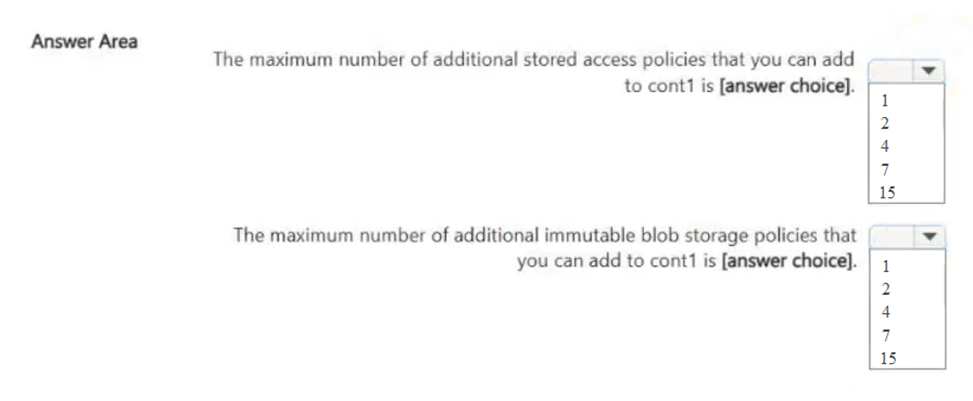
For stored access policies, you can add up to 4 more if 1 is already present (total limit is 5). For immutable time-based retention policies, you can add exactly 1 per container.
Question
You have an Azure subscription that contains a blob container named cont1. Cont1 has the access policies shown in the following exhibit.
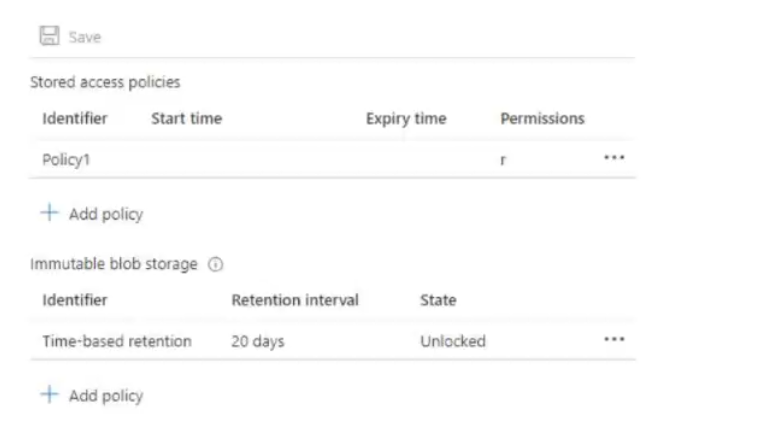
Use the drop-down menus to select the answer choice that completes each statement based on the information presented in the graphic.
NOTE: Each correct selection is worth one point.
Key Takeaways
The main trap is confusing the total limit of 5 stored access policies with the number of additional ones allowed, and misunderstanding that only one time-based retention policy can exist per container.
This page explains the limits for Azure Blob Storage stored access policies (max 5 per container) and immutable time-based retention policies (max 1 per container), answering a SC-500 HOTSPOT question.
Common mistake: Candidates often assume multiple time-based retention policies can be created or miscount the remaining available slots for stored access policies by forgetting to subtract the ones already configured in the exhibit.
Expert Analysis
The question tests knowledge of Azure Blob Storage access policy limits and the specific constraints of immutable storage policies. The exhibit shows a blob container named 'cont1' with existing access policies. To answer correctly, one must identify the maximum number of stored access policies allowed per container and determine if an immutable policy can be added.
First, regarding the total number of stored access policies: Azure allows up to five (5) stored access policies per blob container or queue. However, the question asks about adding policies based on a graphic that likely shows the current count. If the graphic shows four policies already configured, only one more can be added. If it shows fewer, more could be added. The comment "policy you can add 4" suggests the graphic might show zero or one policy, but the standard limit is five. Let's re-read carefully. The prompt says "Cont1 has the access policies shown in the following exhibit." Without seeing the exact count in the image, we rely on general rules. Usually, these HOTSPOT questions show a specific state. If the exhibit shows 4 policies, the answer for "maximum additional policies" is 1. If it shows 0, the answer is 5. Given the comment "policy you can add 4", it implies the current state has 1 policy, leaving room for 4 more to reach the limit of 5. Or, it could imply the limit itself is 5, and 4 are already there. Let's assume the standard constraint being tested is the limit of 5 stored access policies per container.
Second, regarding immutable storage: Azure Blob Storage supports two types of immutability: Time-based retention and Legal Hold. A container can have one time-based retention policy. Legal holds do not have a numerical limit in the same way, but they are distinct from stored access policies. The comment "immutable just 1" strongly points to the limitation that you can only configure one time-based retention policy per container. This is a critical distinction. You cannot have multiple time-based retention policies active simultaneously.
Therefore, the two statements likely complete as follows:
- You can add up to [X] stored access policies. Based on the comment hinting at "add 4", if the graphic shows 1 existing policy, X=4. If the graphic shows 0, X=5. The most common trap is confusing the total limit (5) with the remaining capacity. If the graphic shows 4 policies, the answer is 1. If the graphic shows 1, the answer is 4. Let's look at the second part.
- You can add [Y] immutable time-based retention policies. The answer is definitively 1. You can only have one such policy per container.
The operational consequence of getting this wrong is attempting to create a second time-based retention policy, which will fail, or exceeding the 5-policy limit for access controls, which will also fail. Understanding these hard limits is essential for designing secure, compliant storage architectures.
Official Reference
https://learn.microsoft.com/en-us/azure/storage/blobs/declare-storage-access-policy
This link opens the official vendor documentation in a new tab.
Exam Strategy
When encountering HOTSPOT questions with exhibits showing resource states, always count the existing resources first. Subtract that count from the service's hard limit to find the 'remaining' capacity. For immutability, remember that time-based retention is singular per container, unlike legal holds which are different mechanisms.
Frequently Asked Questions
What is the maximum number of stored access policies per blob container?
Can I have multiple time-based retention policies in one container?
Discussion 1 contributions
Compiled from public community threads and reader submissions, lightly edited for clarity. Handles and vote tallies are shown as recorded, and comments reflect the views of individual contributors.
From public community threads 1
-
3lVhylla 👍 1policy you can add 4 ,and immutable just 1
Reader comments & corrections
No reader corrections yet — spotted an error or have a note? Share it below.
Related Analysis
Practice All SC-500 Questions
Access 100 questions with complete answers and detailed explanations.
View Full SC-500 Practice Test →