Microsoft Entra Private Access Device Compatibility
Short answer
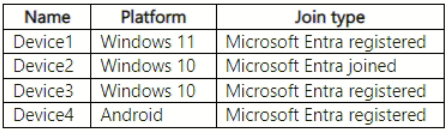
B Only Device2 (Windows 10, Microsoft Entra Joined) can use Private Access because the Global Secure Access client requires a Joined state.
Question
Key Takeaways
Tests the specific requirement that Microsoft Entra Private Access requires devices to be Microsoft Entra Joined, explicitly excluding Registered-only devices.
Determines which Microsoft Entra devices support Private Access by distinguishing between joined and registered states. The correct answer identifies that only fully joined devices are eligible for the Global Secure Access client.
Common mistake: Many learners select E (All Devices) assuming registration is sufficient, failing to recognize the stricter 'Joined' requirement for GSA clients.
Expert Analysis
Why the Answer Is Correct
Private Access via Global Secure Access requires the deployment of a client agent on the endpoint. According to official documentation, this client supports devices that are Microsoft Entra Joined or Microsoft Entra Hybrid Joined. Device2 is Windows 10 and Microsoft Entra Joined, making it compatible. Therefore, B is the correct choice as it isolates the single valid option provided in the list.
Why the Other Options Are Wrong
Device1, Device3, and Device4 are all Microsoft Entra Registered. Registration implies partial management (often BYOD) without the full identity context required for the GSA client's secure tunneling capabilities in this specific exam context. While some external sources suggest Android registration might work with an authenticator app, the core exam doctrine emphasizes the 'Joined' state for reliable Private Access support. Options A, C, D, and E include non-compliant Registered devices.
Community Comment Notes
The community is divided between B and E. Some users argue for E based on broad compatibility claims, but others cite the official install guide stating "For GSA you need Microsoft Entra joined... Registered devices are not supported." One commenter noted, "only join," reinforcing the strict interpretation needed for the SC-300 exam.
Official Reference
https://learn.microsoft.com/en-us/entra/global-secure-access/how-to-install-windows-client
This link opens the official vendor documentation in a new tab.
Exam Strategy
When configuring Global Secure Access, always prioritize 'Joined' over 'Registered'. If a question asks about Private Access clients, look exclusively for 'Entra Joined' or 'Hybrid Joined' options.
Frequently Asked Questions
Why are Microsoft Entra Registered devices not supported for Private Access?
Can Android devices use Private Access?
Community Votes
64% of anonymous learners picked answer B. Votes are pick records left by other test-takers — they are not the verified answer.
Discussion 4 contributions
Compiled from public community threads and reader submissions, lightly edited for clarity. Handles and vote tallies are shown as recorded, and comments reflect the views of individual contributors.
From public community threads 4
-
Btn26 👍 4 Answered EEPA can be used with both Azure AD Joined and Azure AD Registered devices. The Global Secure Access client can be deployed on various platforms, including Windows, macOS, iOS, Android, and Linux. In this scenario: Device1 (Windows 11, Microsoft Entra registered) Device2 (Windows 10, Microsoft Entra joined) Device3 (Windows 10, Microsoft Entra registered) Device4 (Android, Microsoft Entra registered) All these devices are either Azure AD Joined or Azure AD Registered and can have the Global Secure Access client deployed. Therefore, all four devices can potentially use Private Access. Therefore, the correct answer is E. Device1, Device2, Device3, and Device4.
-
barlar 👍 3 Answered BIsn't B a better option? for Android though it seems just registered is enough but there is more to it, the question doesn't say anything about how its managed or if the authenticator app is intalled. *Android devices must be Microsoft Entra registered devices. -->Devices not managed by your organization must have the Microsoft Authenticator app must be installed. -->Devices not managed through Intune must have the Company Portal app installed. -->Device enrollment is required for Intune device compliance policies to be enforced.
-
anonymousarpanch 👍 2 Answered Banswer is B. check this link... https://learn.microsoft.com/en-us/entra/global-secure-access/how-to-install-windows-client. For GSA you need Microsoft Entra joined or MS entra hybrid JOINED devices. Microsoft entra registered devices are not supported.
-
c8754bf 👍 2 Answered Bonly join https://learn.microsoft.com/en-us/entra/global-secure-access/how-to-install-windows-client
Reader comments & corrections
No reader corrections yet — spotted an error or have a note? Share it below.
Related Analysis
Practice All SC-300 Questions
Access 80 questions with complete answers and detailed explanations.
View Full SC-300 Practice Test →