Which Roles Can Manage Microsoft Entra Internet Access?
You have a Microsoft 365 E5 subscription that contains the users shown in the following table. You configure Microsoft Entra Internet Access. Which users can manage Microsoft Entra Internet Access? - 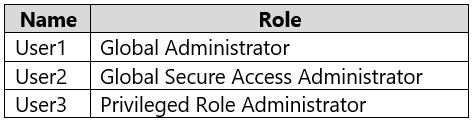
Community Votes
77% of anonymous learners picked answer D. Votes are pick records left by other test-takers — they are not the verified answer.
Community Insight
It tests which directory roles carry permission to configure Entra Internet Access in Global Secure Access, and the trap is assuming the dedicated Global Secure Access Administrator role is the ONLY one that can, while forgetting the Global Administrator's full tenant-wide rights.
Microsoft Entra Internet Access can be administered by both the Global Administrator and the Global Secure Access Administrator roles, so only User1 and User2 qualify. This page confirms why answer D is correct and why the narrower 'Global Secure Access Administrator only' pick fails on exam day.
Choosing B (User2 only) by treating the Global Secure Access Administrator role as the exclusive owner of Entra Internet Access; in reality the Global Administrator role also has full permissions over Global Secure Access configuration.
Community Discussion (4 comments)
Comments & Corrections
No comments yet — spotted an error or have a note? Share it below.
Expert Analysis
Why the Answer Is Correct
Microsoft documents that the Global Secure Access Administrator role can "create and manage all aspects of Microsoft Entra Internet Access and Microsoft Entra Private Access," which covers User2. The Global Administrator role is the highest-privilege directory role and holds full access to every Microsoft Entra workload, including Global Secure Access, so User1 also qualifies. Because the question asks which users CAN manage Internet Access and both User1 and User2 can, option D is the only defensible pick. As TRN80 reasoned, User1's Global Administrator role "has full access to manage all aspects of Microsoft Entra," while User2's role is purpose-built for this workload. User3's Privileged Role Administrator role is scoped to role assignments and does not grant configuration rights over the Internet Access service, so a three-user answer cannot be right.Why the Other Options Are Wrong
A (User1 only) ignores that the Global Secure Access Administrator role exists specifically to operate Internet Access and Private Access. B (User2 only) is the most popular distractor because it treats the feature-specific role as exclusive, but it wrongly excludes the tenant-wide Global Administrator. C (User3 only) confuses role-assignment governance with service configuration: Privileged Role Administrator can grant roles to others but cannot itself edit Internet Access settings. E (all three) over-extends the Privileged Role Administrator role and would only be true if that admin had also been assigned Global Administrator or Global Secure Access Administrator.Community Comment Notes
The community split reflects exactly this confusion, with the majority siding with D and a sizable minority holding B. TRN80 laid out the role-by-role logic, noting that User3's role "is focused on managing role assignments and does not include permissions to manage" Internet Access. Sunth65 argued for B by quoting the role description, "Create and manage all aspects of Microsoft Entra Internet Access," but that text describes what the Global Secure Access Administrator can do — it never states the role is exclusive of Global Administrator. nicolaslindt pointed to Microsoft's role-based permissions reference for Global Secure Access, which is the authoritative source for resolving this question.Official Reference
Exam Strategy
When a question lists several directory roles and asks who CAN perform an action, first check whether a built-in role is feature-specific and then whether Global Administrator is present — Global Administrator almost always satisfies any 'who can manage' criterion. Eliminate roles scoped purely to governance, such as Privileged Role Administrator, unless the task is about assigning roles or managing PIM.
Frequently Asked Questions
Why can't the Privileged Role Administrator (User3) manage Entra Internet Access?
Privileged Role Administrator only manages role assignments and PIM; it has no permissions to configure Global Secure Access traffic forwarding or Internet Access policies.
Does Global Administrator really have full access to Global Secure Access?
Yes. Global Administrator holds complete permissions across Microsoft Entra, which includes managing Entra Internet Access alongside the dedicated Global Secure Access Administrator role.
Related Analysis
Practice All SC-300 Questions
Access 80 questions with complete answers and detailed explanations.
View Full SC-300 Practice Test →