Which Nmap Command Generates a List of Active Hosts from a Discovery Scan?
Short answer
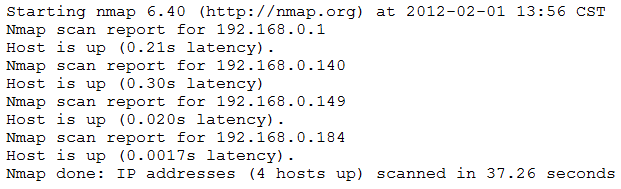
B nmap –sn 192.168.0.1-254 | grep “Nmap scan” | awk ‘{print $5}’
Question
Key Takeaways
The exam tests your understanding of Nmap flags and output parsing; the trap is confusing host discovery (-sn) with port scanning options like --open or -O.
Discover the correct Nmap command to turn discovery scan output into a list of active hosts. The community agrees that using -sn, grep, and awk (option B) is the reliable method.
Common mistake: A common mistake is choosing option C, which uses --open and sed, but this scans for open ports and does not produce the discovery output shown; the correct approach requires -sn for a ping scan.
Expert Analysis
Why the Answer Is Correct
Option B is correct because nmap -sn performs a ping scan (host discovery without port scanning), which produces "Nmap scan report for" lines. The pipeline grep "Nmap scan" filters for those lines, and awk '{print $5}' extracts the IP address from the fifth field. This directly transforms the scan output into a clean list of active hosts. Community comments [1] and [3] both confirm this exact reasoning.
Why the Other Options Are Wrong
Option A uses -oG for grepable output and pipes to sort, but it does not filter or extract IPs into a list. Option C uses --open (which is not a valid Nmap flag for host discovery) and an odd sed expression. Option D uses -O for OS detection and cut -f is incomplete for extracting IPs. Only B combines the correct Nmap flag with text processing to achieve the goal.
Community Comment Notes
Comment [1] provides a clear breakdown of how the command works, emphasizing that -sn disables port scanning. Comment [4] correctly identifies the output as ping scans with latency times. Comment [5] argues for C, but the use of --open is not appropriate for discovery scans, and the community overwhelmingly supports B with 89 votes.
Official Reference
- https://nmap.org/book/man-host-discovery.html
- https://nmap.org/man/
- https://nmap.org/book/man-output.html
These links open the official vendor documentation in a new tab.
Exam Strategy
Memorize the purpose of -sn: it performs host discovery only. When parsing Nmap output, remember that 'Nmap scan report for' lines put the IP as field 5, so grep and awk are your friends for creating active host lists.
Community Votes
100% of anonymous learners picked answer B. Votes are pick records left by other test-takers — they are not the verified answer.
Discussion 5 contributions
Compiled from public community threads and reader submissions, lightly edited for clarity. Handles and vote tallies are shown as recorded, and comments reflect the views of individual contributors.
From public community threads 5
-
PhillyCheese 👍 4 Answered BExplanation: -sn disables port scanning and performs host discovery only. grep "Nmap scan" filters the output to lines containing the phrase “Nmap scan.” awk '{print $5}' extracts the fifth field (IP addresses) from the filtered lines1. This provides a list of active hosts.
-
aee9303 👍 3nmap –sn 192.168.0.1-254 | grep “Nmap scan” | awk ‘{print $5}’ The output are ping scans, identifiable because they have latency times. Ping: -sn The piping is taking the one thing and adding the next. awk is outputting to a table, in this case it means to output by printing the five scans (to the screen).
-
DustyRex1 👍 2 Answered BThis command performs a ping scan (-sn) to identify which hosts are up in the given range (192.168.0.1-254), filters the lines containing "Nmap scan" using grep, and then extracts the fifth field (the IP address) using awk.
-
ER1 👍 2 Answered BThe output are ping scans, identifiable because they have latency times.
-
Big_Dre 👍 1 Answered CThe given command uses nmap, uniq, and sed to perform a scan on a range of IP addresses, filter the output, and save the results to a file. Here's a breakdown of each part of the command: nmap ––open 192.168.0.1-254: This command uses nmap to perform a scan (-–open) on the IP range from 192.168.0.1 to 192.168.0.254. The --open option tells nmap to show only the hosts with at least one open port. | uniq: The uniq command filters the output to remove duplicate lines. This can be useful if there are repeated entries in the nmap output. | sed ‘s/Nmap//2’: The sed command is used to perform a substitution (s) operation on the output. Specifically, it removes the second occurrence of the word "Nmap" from each line. > file.txt: This part of the command redirects the processed output to a file named file.txt. In summary, the command scans the specified IP range to identify hosts with open ports, removes duplicate lines from the output, removes the second occurrence of the word "Nmap" from each line, and then saves the processed output to a file named file.txt.
Reader comments & corrections
No reader corrections yet — spotted an error or have a note? Share it below.