Mapping Power Platform Services to Business Requirements in Teams
Short answer
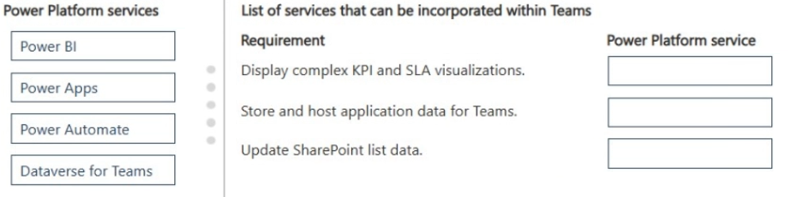
Requirement 1 (Visualizations): Power BI. Requirement 2 (Own Data Store): Microsoft Dataverse. Requirement 3 (Update SharePoint Interface): Power Apps.
Question
A company is evaluating Power Platform services.
Users in the company have Teams as their core application. The users have the following requirements:
• Managers must frequently review complex key performance indicator (KPI) and service-level agreement (SLA) visualizations for customers. Managers do not have any Power Platform licenses assigned.
• Users require the ability to create and host apps with their own data store.
• Because the company uses numerous SharePoint lists to store business data, it requires an extensible interface to update the data.
You need to explain how each Power Platform service can be used within Teams.
Which services should you use for each requirement? To answer, move the appropriate services to the correct requirements. You may use each service once, more than once, or not at all. You may need to move the split bar between panes or scroll to view content.
NOTE: Each correct selection is worth one point.
Key Takeaways
The main trap is confusing data storage (Dataverse) with data presentation (Power BI) and misidentifying the need for a user interface (Power Apps) versus backend automation (Power Automate).
Learn how to assign Power BI, Dataverse, and Power Apps to specific business needs like visualization, data hosting, and SharePoint integration within Microsoft Teams.
Common mistake: Learners often select Power Automate for updating SharePoint lists, missing that the requirement asks for a user-facing 'interface' rather than automated background processes. Others may choose SharePoint for data hosting instead of Dataverse, ignoring the 'own data store' nuance.
Expert Analysis
The scenario requires mapping three distinct business requirements to specific Microsoft Power Platform services that integrate with Teams. The correct solution relies on identifying the primary function of each service: visualization, data storage, and automation.
Requirement 1: KPI/SLA Visualizations for Managers without Licenses The key constraint here is that managers have "no Power Platform licenses." This immediately eliminates custom app building or complex flow creation for them as a primary interface. Power BI is the correct choice because it offers embedded reporting within Teams via tabs and chat apps. Crucially, Power BI allows viewing content through read-only access or free viewer roles (depending on licensing tiers, but often accessible via Teams integration for basic consumption) without requiring full Power Apps or Automate licenses for every viewer. It is specifically designed for "complex visualizations" of data.
Requirement 2: Create and Host Apps with Own Data Store The phrase "own data store" is the critical differentiator. While SharePoint and SQL Server are common connectors, they are external data sources. Microsoft Dataverse is the native, secure, and scalable data platform for Power Platform. When an organization needs to "host" apps with their own dedicated, relational data structure managed by the platform, Dataverse is the standard answer. It provides the underlying data layer for Power Apps.
Requirement 3: Extensible Interface to Update SharePoint Lists The requirement specifies using existing "SharePoint lists" and needing an "extensible interface to update the data." Since the data source is already SharePoint, the goal is not to move the data to Dataverse, but to provide a user-friendly way to interact with it. Power Apps is the tool used to build these custom interfaces (canvas or model-driven apps) that sit on top of SharePoint lists, allowing users to create, read, update, and delete items more effectively than the native SharePoint list view.
Why the Wrong Approach Fails: A common trap is to assume that because the company uses SharePoint, all solutions must involve SharePoint. However, Requirement 1 asks for visualization, which is not the strength of SharePoint or Power Apps alone; it is the core strength of Power BI. Another trap is assigning Power Automate to Requirement 3. While Power Automate can update SharePoint, the question asks for an "interface" for users to update data, implying a UI for human interaction, which is Power Apps. Power Automate is for backend logic, not front-end user interfaces.
Official Reference
- https://learn.microsoft.com/en-us/power-platform/
- https://learn.microsoft.com/en-us/power-bi/fundamentals/service-embedded-in-microsoft-teams
- https://learn.microsoft.com/en-us/power-apps/maker/canvas-apps/sharepoint-list
These links open the official vendor documentation in a new tab.
Exam Strategy
When analyzing Power Platform requirements, isolate the verb: if it involves charts/reports, think Power BI. If it involves storing data natively for the platform, think Dataverse. If it involves building a UI for an existing source like SharePoint, think Power Apps. Always check license constraints; viewers often only need Power BI access.
Frequently Asked Questions
Can managers view Power BI reports without a license?
Why use Dataverse instead of SharePoint for Requirement 2?
What is the difference between Power Apps and Power Automate for SharePoint?
Discussion 1 contributions
Compiled from public community threads and reader submissions, lightly edited for clarity. Handles and vote tallies are shown as recorded, and comments reflect the views of individual contributors.
From public community threads 1
-
abeltenera 👍 1Power BI - Obvious Dataverse for teams - Also obvious Power Automate: you update a Sharepoint list from a trigger in Teams...
Reader comments & corrections
No reader corrections yet — spotted an error or have a note? Share it below.
Related Analysis
Practice All PL-900 Questions
Access 130 questions with complete answers and detailed explanations.
View Full PL-900 Practice Test →