Power Automate Flow Types for Weekly Status Report App?
Short answer
Use an automated cloud flow for the escalation SMS when a status report is submitted, and a scheduled cloud flow for the 8 PM Sunday reminder to users who have not submitted.
Question
A company is creating a canvas app to manage weekly status reports from users about projects.
Status reports must be created weekly. Users can enter project tasks with descriptions. Users can also add escalation requests for tasks that are late or at risk. When a status report is submitted with an escalation request, the app must automatically send a text message to the submitter's manager. A reminder must be sent at 8 PM on Sunday to everyone who has not yet submitted a status report for the previous week.
You need to identify the appropriate components to use in the solution.
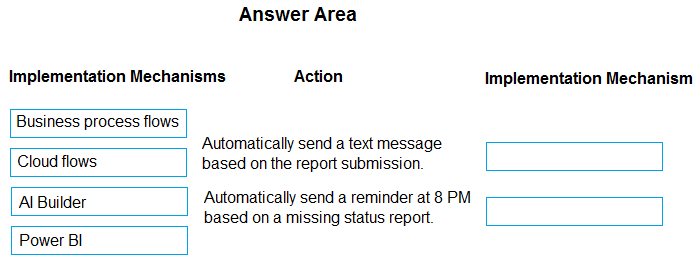
What should you use? To answer, drag the appropriate implementation mechanisms to the correct requirements. Each implementation mechanism may be used once, more than once, or not at all. You may need to drag the split bar between panes or scroll to view content.
NOTE: Each correct selection is worth one point.
Key Takeaways
Tests whether you can distinguish event-driven automated flows from time-based scheduled flows; the trap is treating both requirements as generic cloud flows or choosing a business process flow.
This PL-900 drag-drop scenario asks you to match weekly status report automation needs to Power Automate flow types. The correct mapping is an automated cloud flow for the escalation SMS and a scheduled cloud flow for the Sunday 8 PM reminder.
Common mistake: Many learners pick 'Cloud flow' for both slots without specifying automated versus scheduled, or choose a business process flow because the scenario describes a weekly process; business process flows only guide user stages and cannot send SMS or run on a timer.
Expert Analysis
Why the Answer Is Correct
The first requirement fires immediately when a status report with an escalation request is submitted, so it needs an event-driven automated cloud flow with a trigger such as 'When an item is created' or 'When a record is updated' plus an SMS connector like Twilio. The second requirement runs on a calendar schedule every Sunday at 8 PM, so it needs a scheduled cloud flow that looks up users who have not submitted and sends their reminders. Both are cloud flows, but Power Automate distinguishes automated flows (event-triggered) from scheduled flows (time-triggered). That exact distinction is what PL-900 tests here. As Cooljoy7777 explained, sending an SMS when a report is submitted is handled by "an automated Cloud flow using triggers," and the 8 PM reminder is a scheduled cloud flow.
Why Other Candidate Answers Are Wrong
Business process flow is a model-driven app component that guides users through stages; it cannot send text messages or execute unattended on a timer, so it fails both requirements. Instant cloud flow requires a user to manually trigger it, which contradicts the automatic SMS and the unattended Sunday reminder. A generic 'cloud flow' label without the automated or scheduled qualifier is too vague for this exam because the two requirements demand different trigger categories. Using a scheduled flow for the escalation SMS would delay the message until the next schedule, while using an automated flow for the reminder would require an event that does not naturally occur for missing submissions.
Community Comment Notes
FreddyKruger1 posted "Cloud Flows Cloud Flows," confirming that both requirements are solved with cloud flows rather than business process flows. Cooljoy7777 elaborated that the escalation SMS uses an automated Cloud flow with an event trigger and messaging connector, while the 8 PM reminder uses a scheduled cloud flow for time-based notification. That community consensus aligns with the vendor-documented flow type definitions. No commenter proposed a business process flow or instant flow, reinforcing that the intended exam distinction is automated versus scheduled.
Official Reference
https://learn.microsoft.com/en-us/power-automate/flow-types
This link opens the official vendor documentation in a new tab.
Exam Strategy
When you see 'automatically' paired with a record event such as submit, create, or update, choose Automated cloud flow; when you see a specific time or weekly schedule, choose Scheduled cloud flow. Business process flow is a distractor whenever the requirement involves messaging or a timer.
Frequently Asked Questions
Why isn't a business process flow used for the weekly status report escalation?
What is the difference between an automated cloud flow and a scheduled cloud flow in PL-900?
Discussion 2 contributions
Compiled from public community threads and reader submissions, lightly edited for clarity. Handles and vote tallies are shown as recorded, and comments reflect the views of individual contributors.
From public community threads 2
-
FreddyKruger1 👍 6Cloud Flows Cloud Flows
-
Cooljoy7777 👍 1(Cloud flows): Automatically executing an event-driven task (sending an SMS or notification when a record/report is submitted) is handled by an automated Cloud flow using triggers (e.g., When a new item is created) and messaging connectors (like Twilio or SMS services). (Cloud flows): Sending a time-based notification or reminder (checking for missing reports at a specific time like 8 PM) is handled by a scheduled Cloud flow configured with a Recurrence trigger.
Reader comments & corrections
No reader corrections yet — spotted an error or have a note? Share it below.
Related Analysis
Practice All PL-900 Questions
Access 130 questions with complete answers and detailed explanations.
View Full PL-900 Practice Test →